Compare commits
13 Commits
| Author | SHA1 | Date | |
|---|---|---|---|

|
d1c6e0cb1c | ||
|
|
fc34b24029 | ||
|
|
7e2269a040 | ||
|
|
55d4d9f7e5 | ||
|
|
06a45c9cf2 | ||
|
|
16dd34ef58 | ||
|
|
aed2436ec5 | ||
|
|
df0ec5b3f7 | ||
|
|
9c2b37ec29 | ||
|
|
47fdcad370 | ||
|
|
76295ba1e3 | ||
|
|
4c1f0ca2c0 | ||
|
|
48a53bc248 |
19
README.md
@@ -1,4 +1,4 @@
|
|||||||
<div align="center"><img src="https://bjuimg.obs.cn-north-4.myhuaweicloud.com/images/2024/2/27/8c687ef1-5711-4a93-9db0-79c010af7902.png" alt="logo" width="32" /></div>
|
<div align="center"><img src="https://bjuimg.obs.cn-north-4.myhuaweicloud.com/images/2024/5/29/cec03bbd-0eab-464d-9caf-d0b5a7ffc5a6.png" alt="logo" width="32" /></div>
|
||||||
<p style="margin-top: 12px" align="center"><b>一款高颜值、现代化的智能运维&轻量堡垒机平台。</b></p>
|
<p style="margin-top: 12px" align="center"><b>一款高颜值、现代化的智能运维&轻量堡垒机平台。</b></p>
|
||||||
<p align="center">
|
<p align="center">
|
||||||
<a target="_blank"
|
<a target="_blank"
|
||||||
@@ -43,7 +43,8 @@
|
|||||||
**`orion-visor`** 提供一站式服务器运维解决方案。
|
**`orion-visor`** 提供一站式服务器运维解决方案。
|
||||||
|
|
||||||
* **资产管理**:支持对资产进行分组,实现对主机、密钥和身份的统一管理和授权。
|
* **资产管理**:支持对资产进行分组,实现对主机、密钥和身份的统一管理和授权。
|
||||||
* **在线终端**:提供在线 Terminal 服务,支持快捷命令、大文件上传、在线编辑等操作。
|
* **在线终端**:提供在线终端 SSH 服务,支持快捷命令、自定义快捷键和主题风格。
|
||||||
|
* **文件管理**:支持远程主机 SFTP 大文件的批量上传、下载和在线编辑等操作。
|
||||||
* **批量操作**:支持批量执行主机命令、多主机文件分发等功能。
|
* **批量操作**:支持批量执行主机命令、多主机文件分发等功能。
|
||||||
* **计划任务**:支持配置 cron 表达式,定时执行主机命令。
|
* **计划任务**:支持配置 cron 表达式,定时执行主机命令。
|
||||||
* **安全可靠**:动态配置权限,记录用户操作日志,提供简单的审计功能。
|
* **安全可靠**:动态配置权限,记录用户操作日志,提供简单的审计功能。
|
||||||
@@ -88,22 +89,22 @@ docker compose up -d
|
|||||||
|
|
||||||
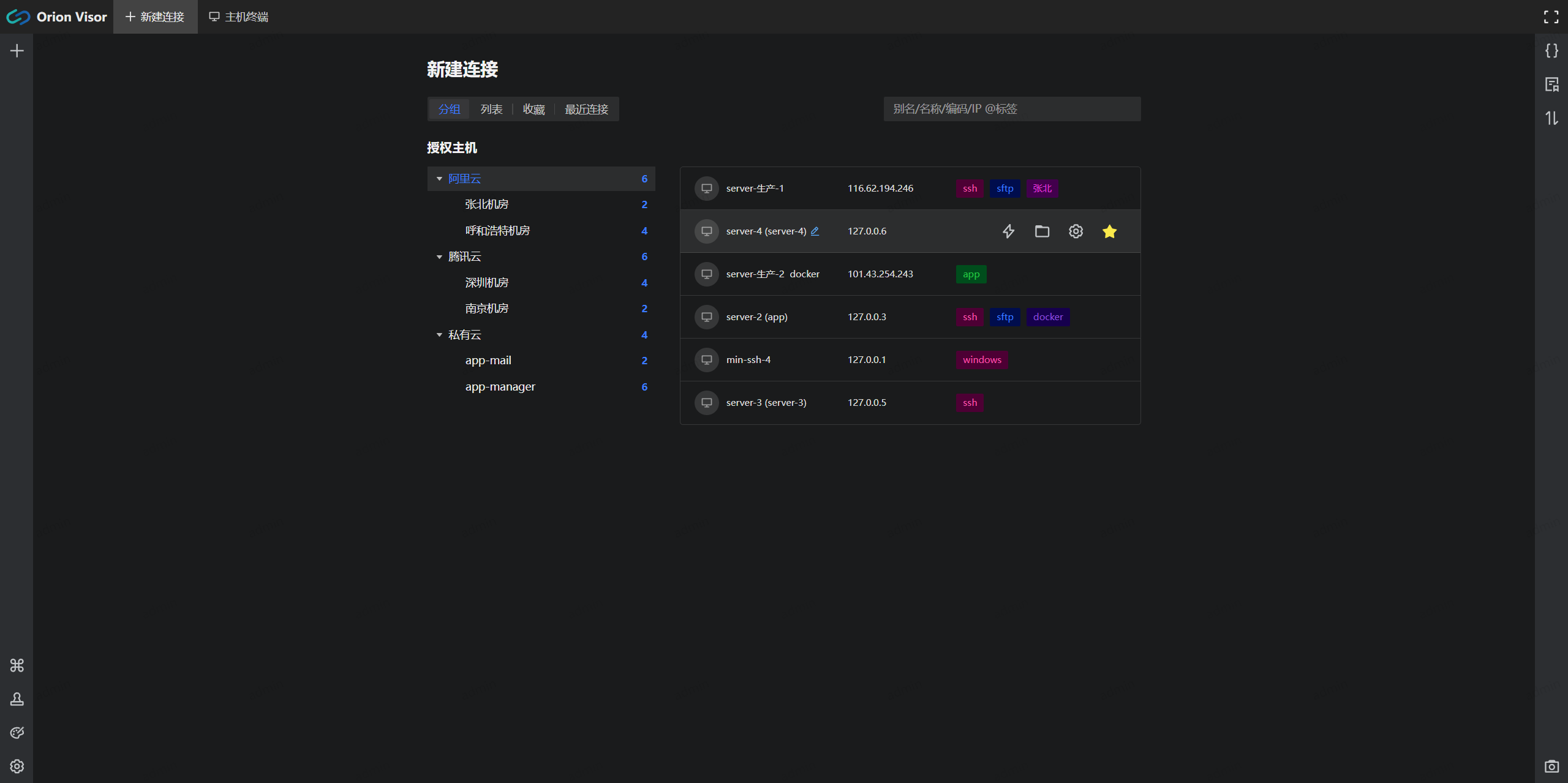
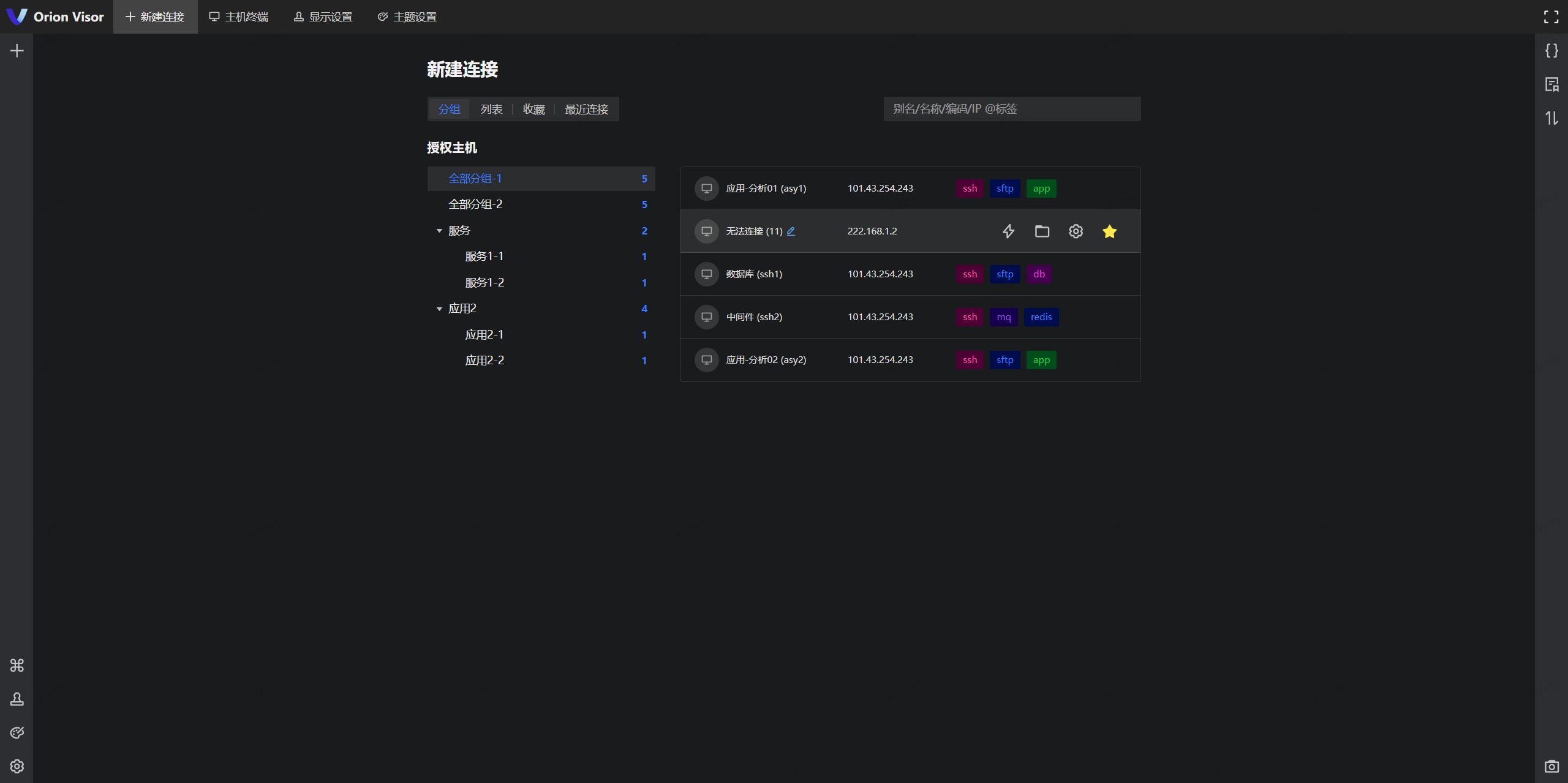
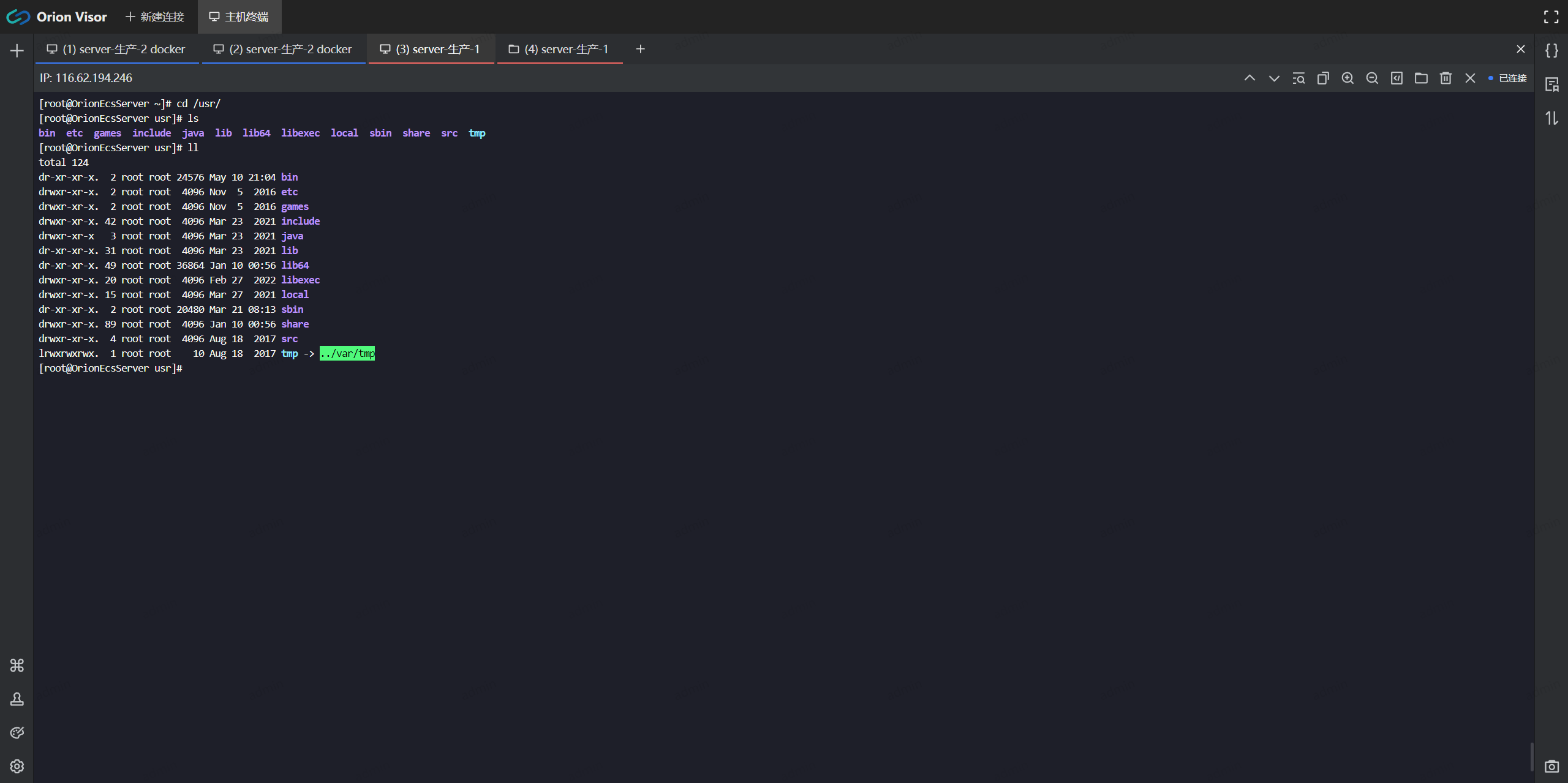
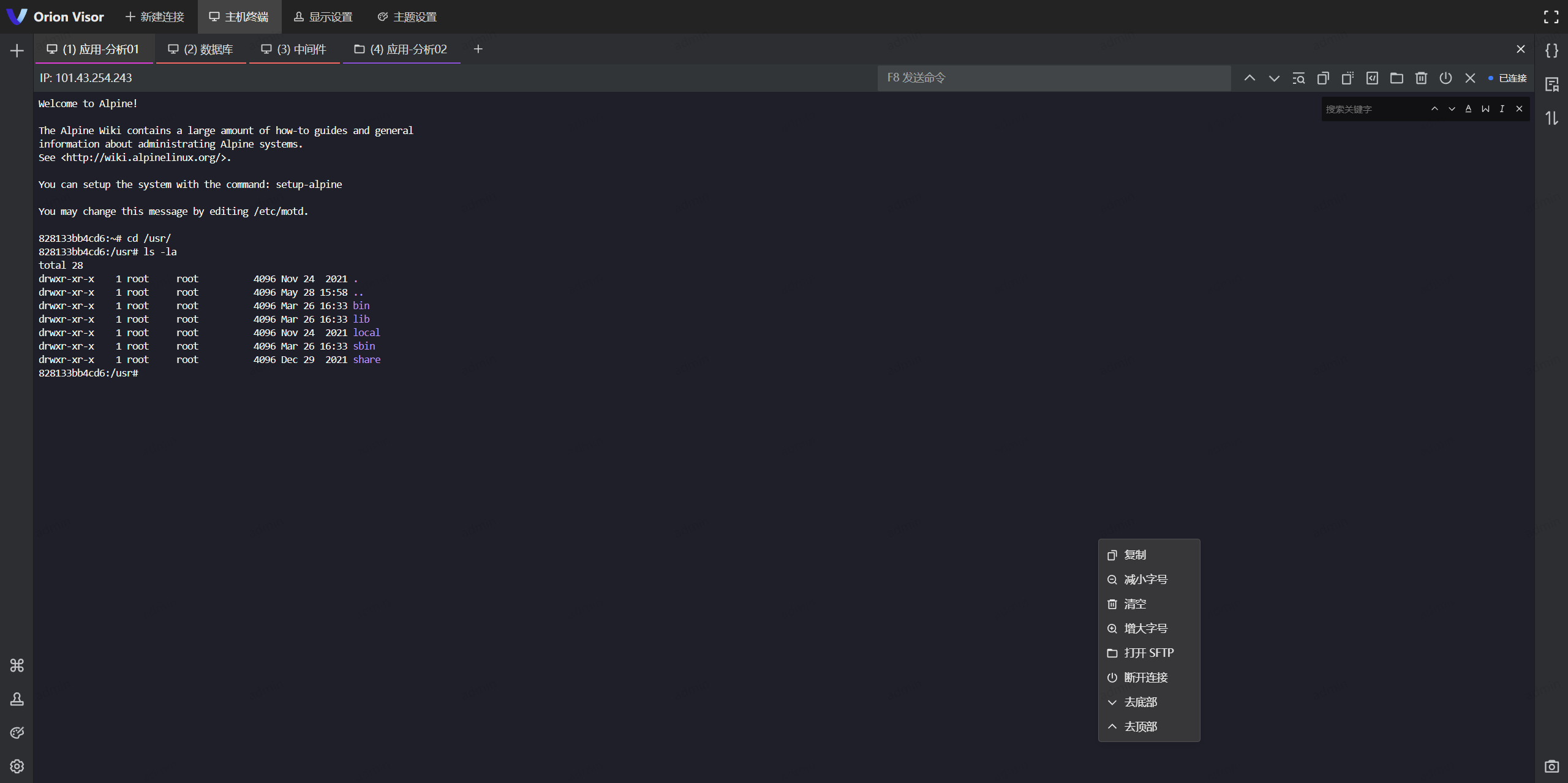
#### 主机终端
|
#### 主机终端
|
||||||
|
|
||||||
|
|
||||||
|
|
||||||
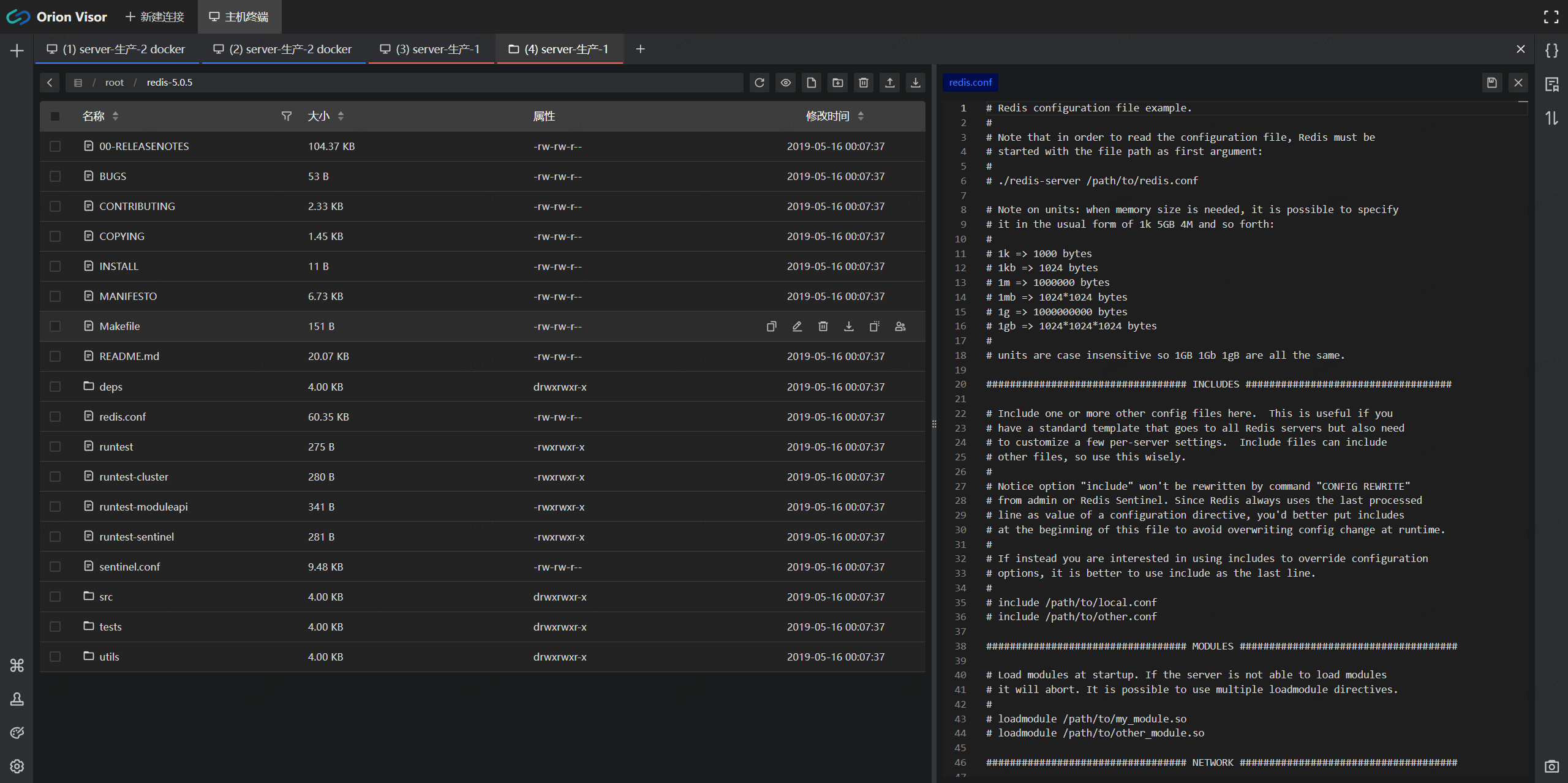
|
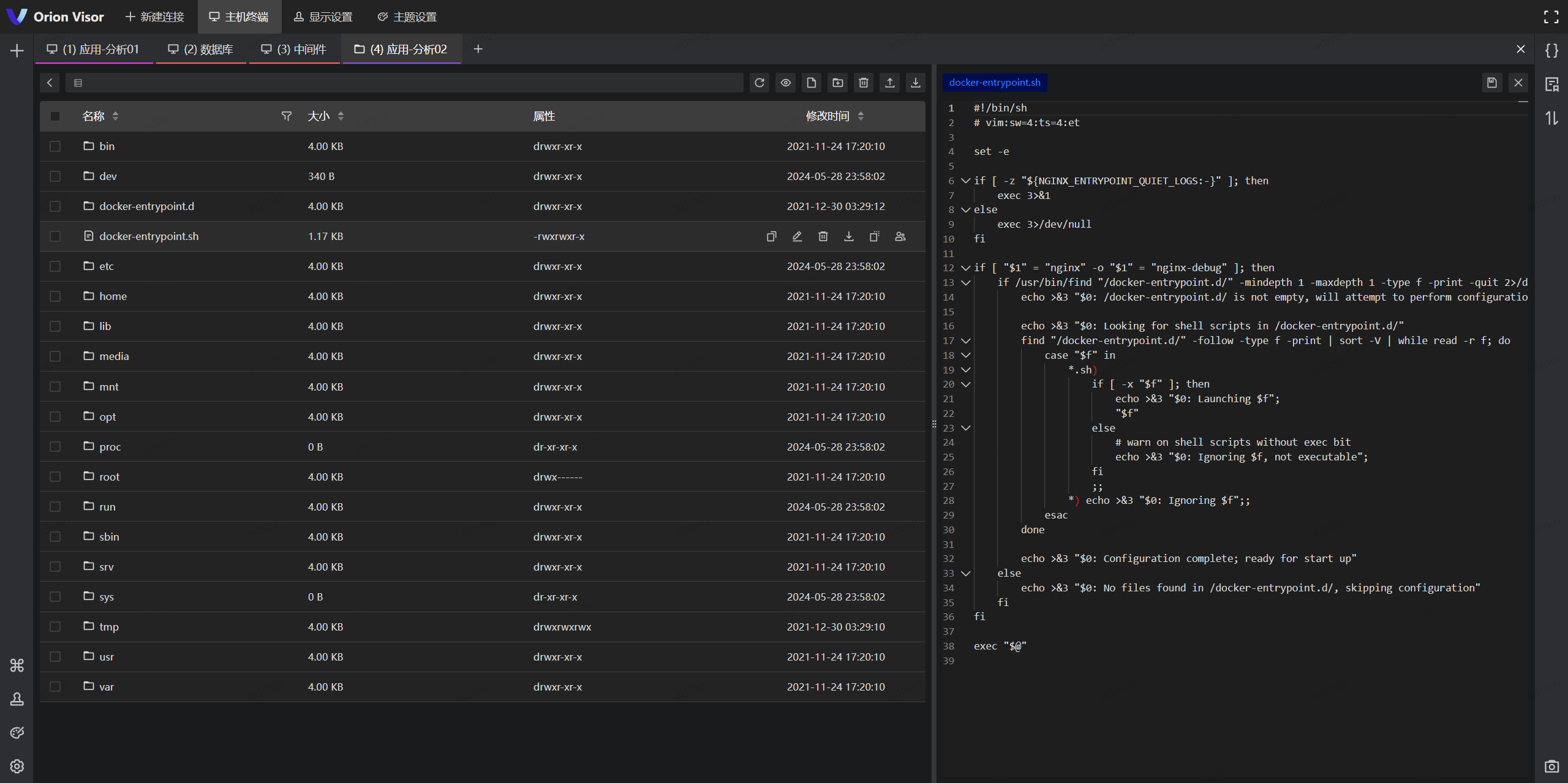
|
||||||
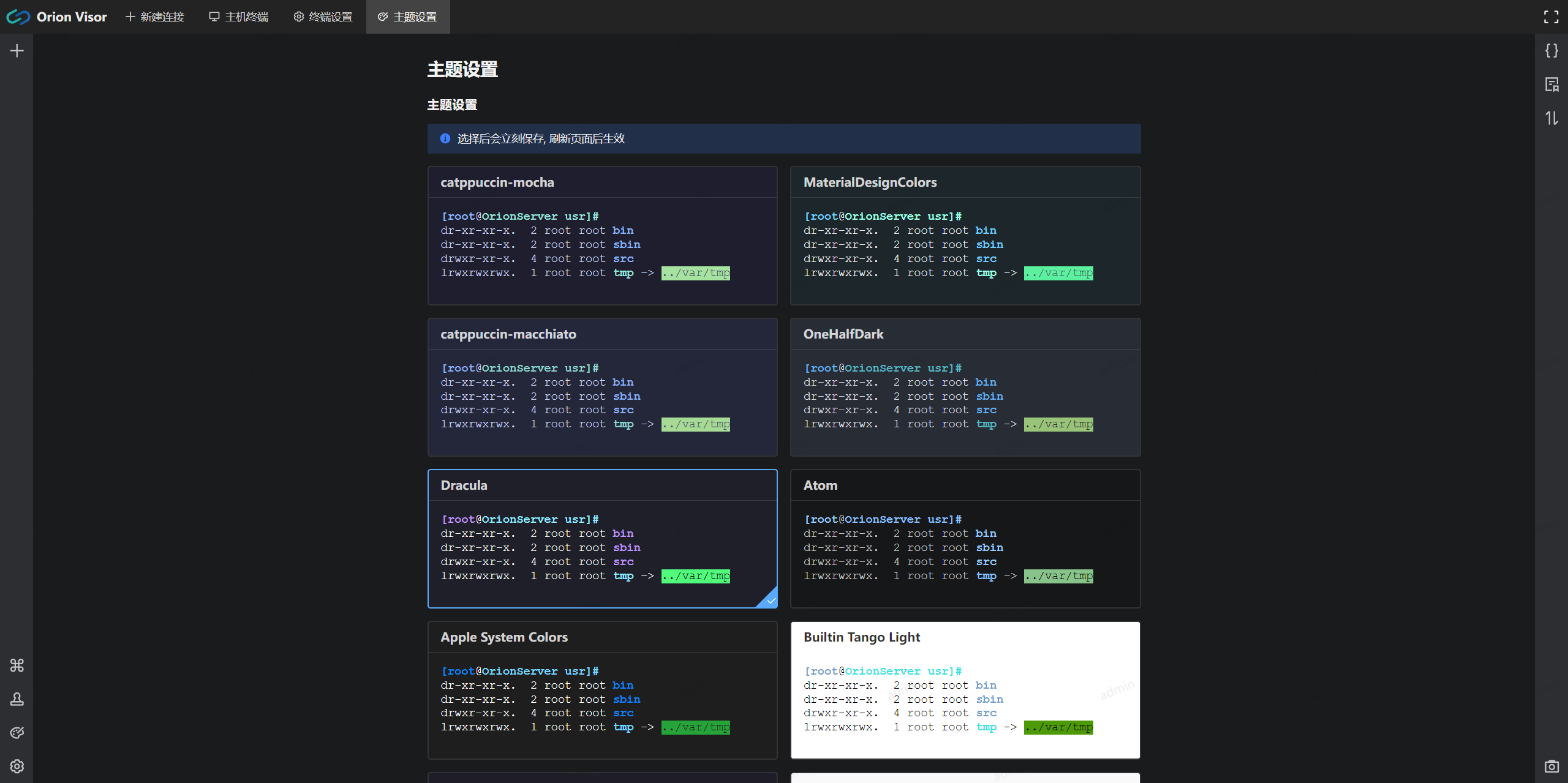
|
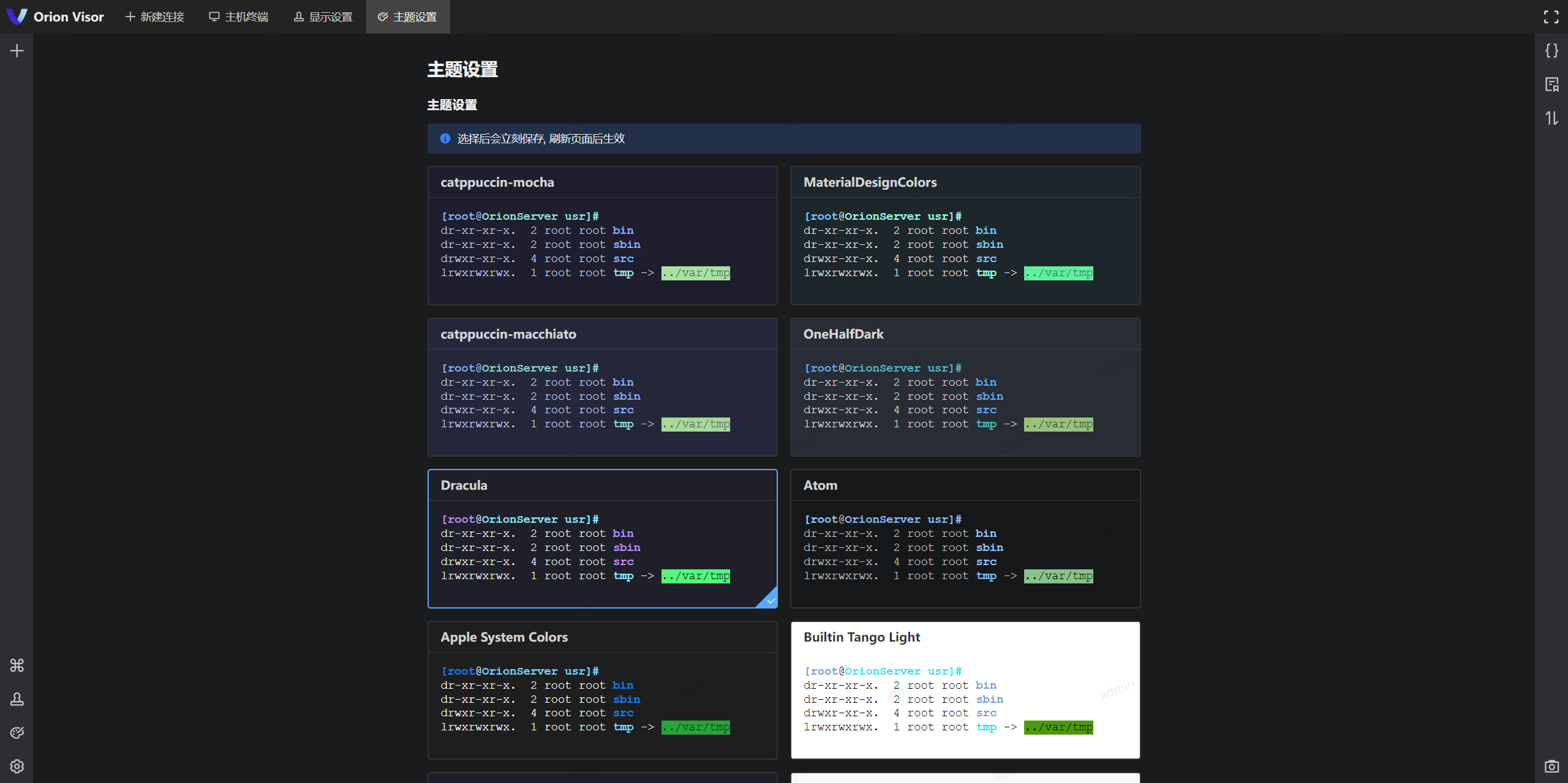
|
||||||
|
|
||||||
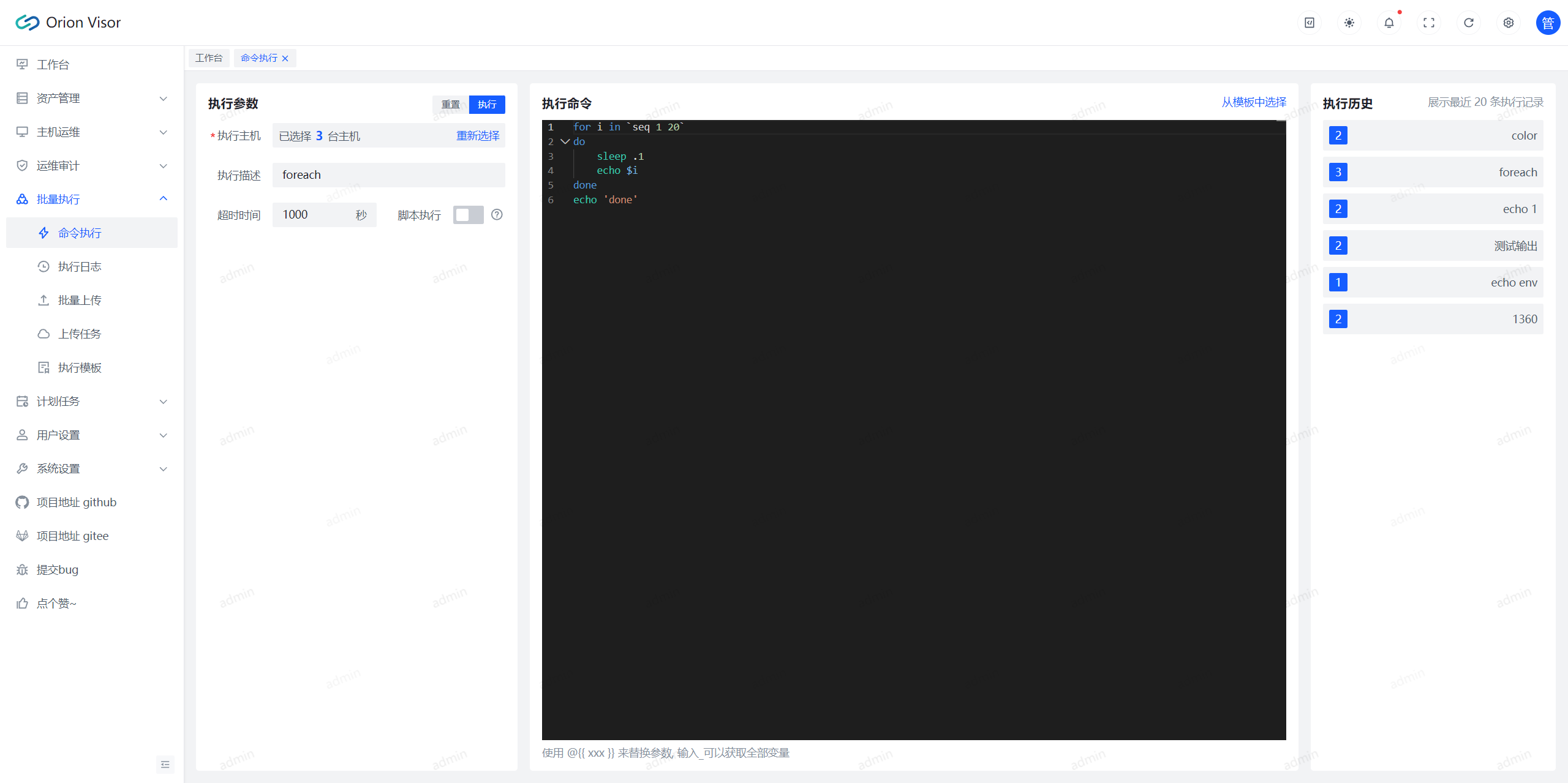
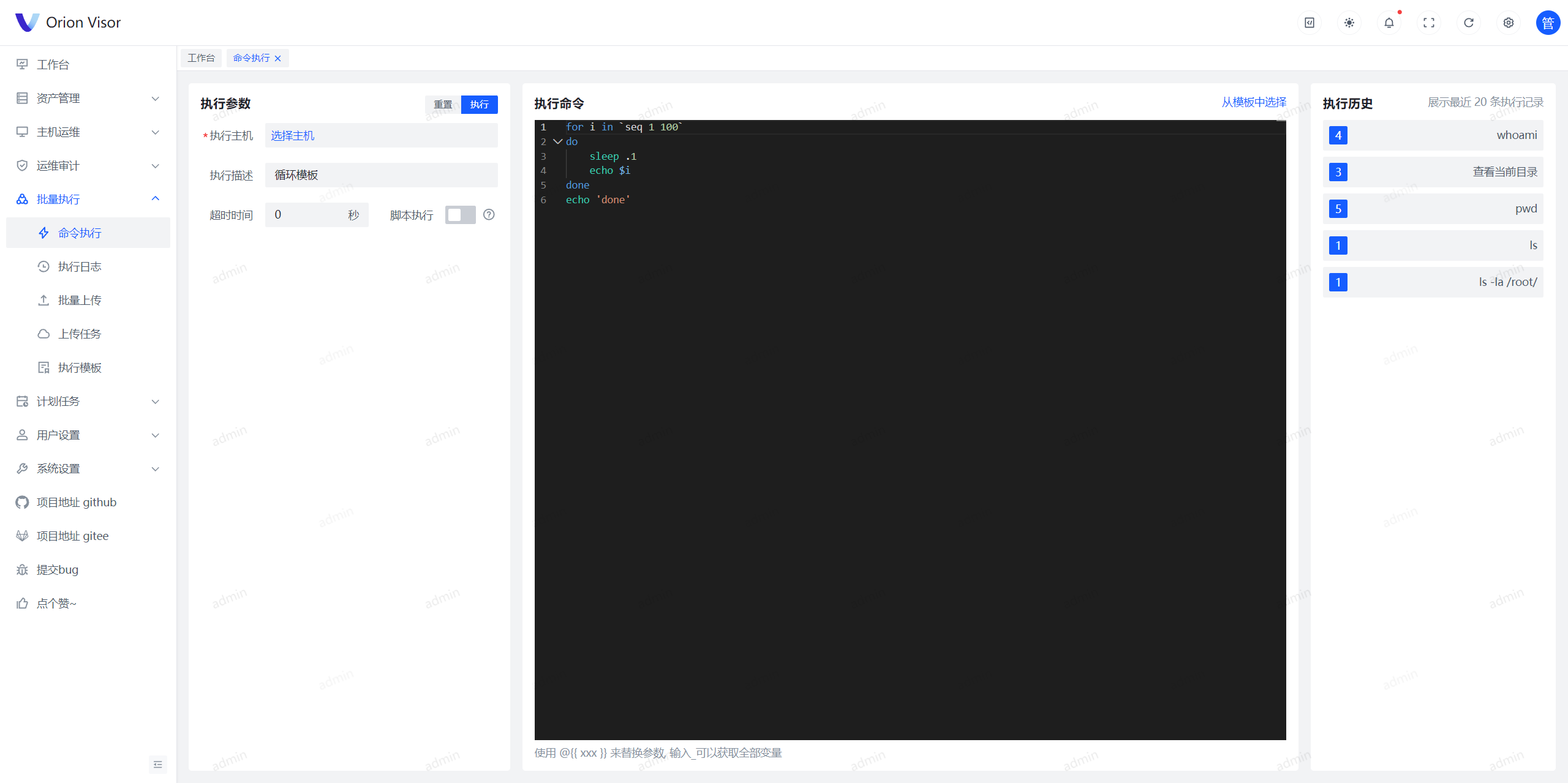
#### 批量执行
|
#### 批量执行
|
||||||
|
|
||||||
|
|
||||||
|
|
||||||
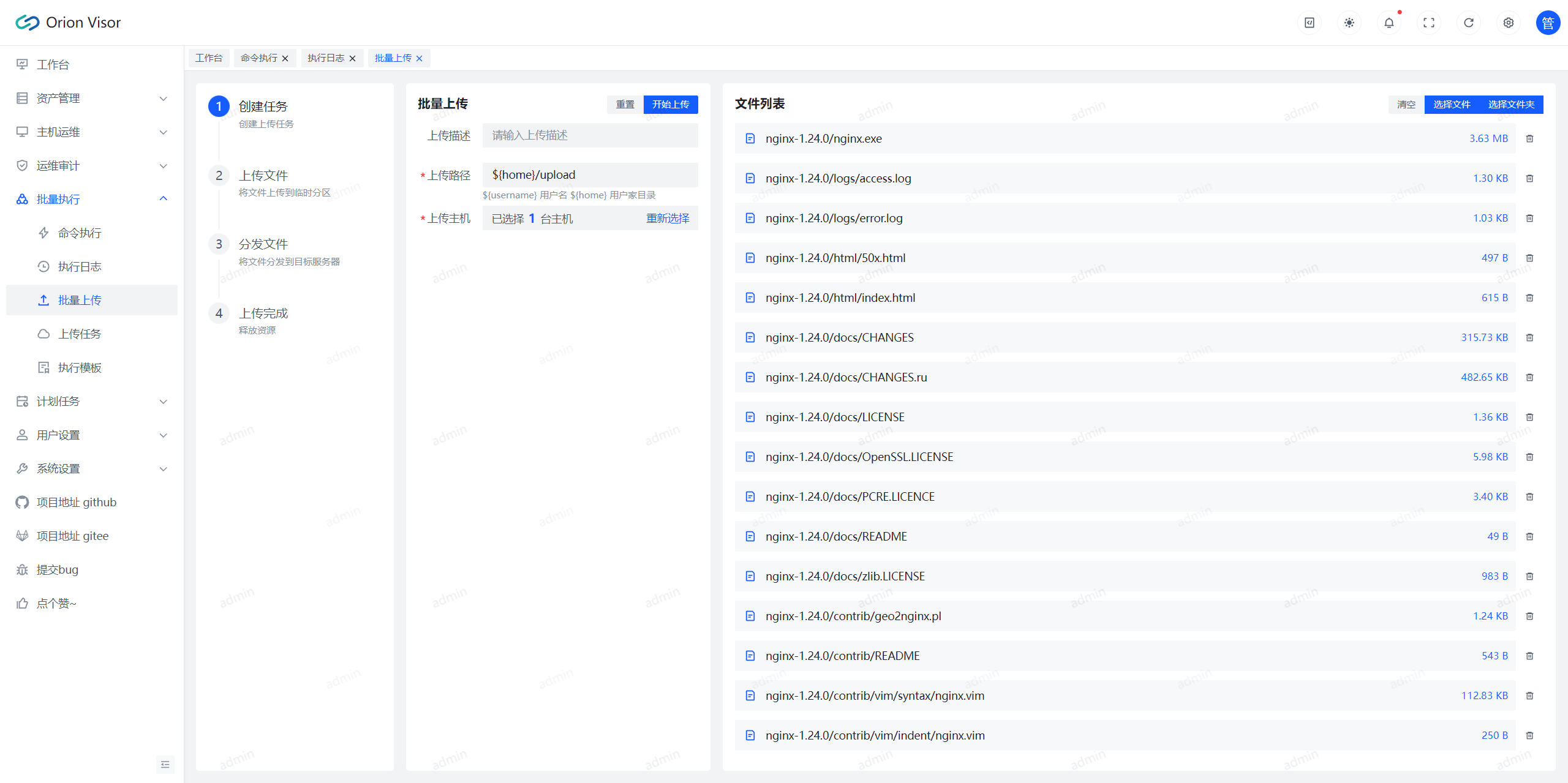
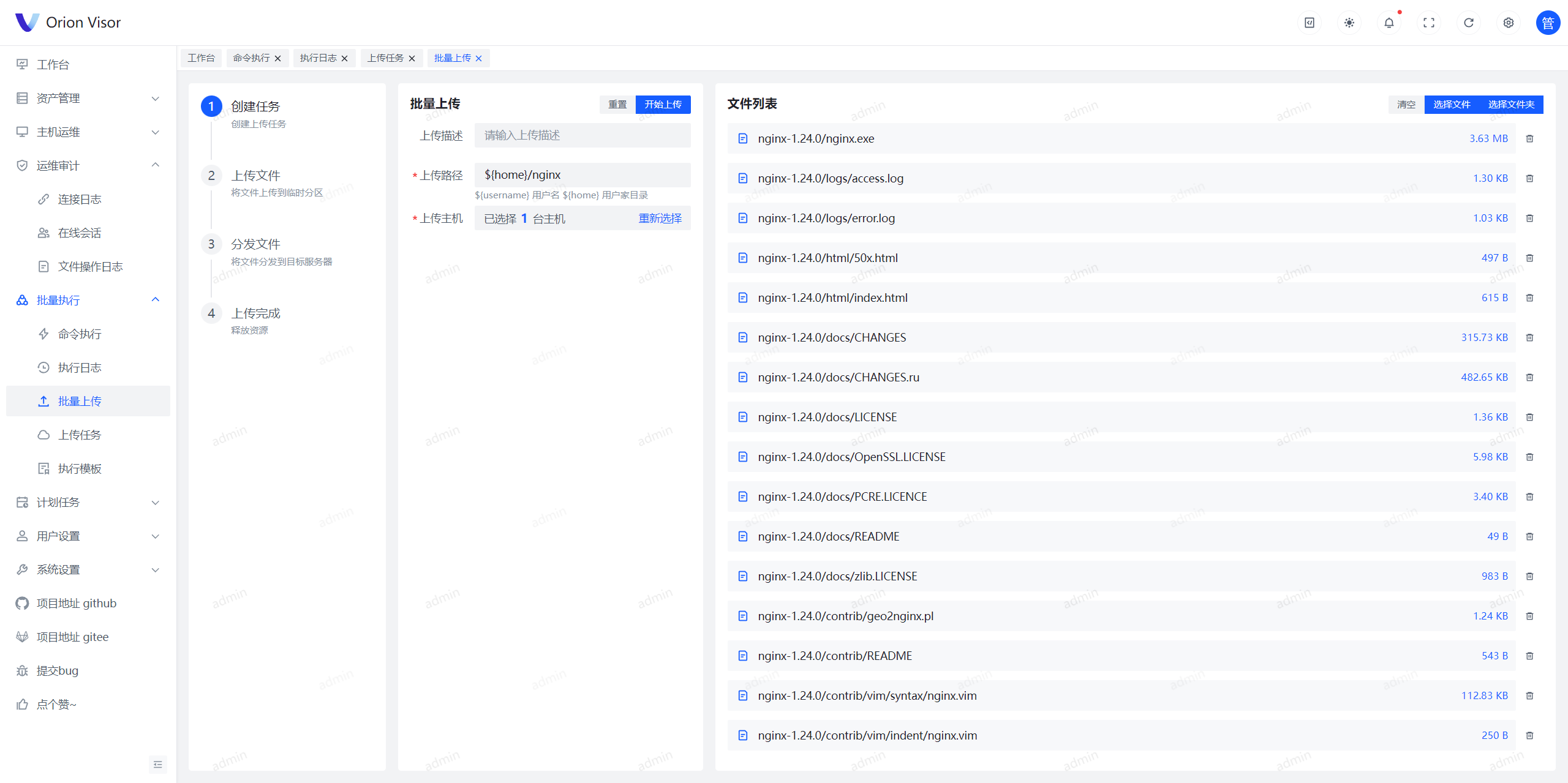
#### 批量上传
|
#### 批量上传
|
||||||
|
|
||||||
|
|
||||||
|
|
||||||
#### 计划任务
|
#### 计划任务
|
||||||
|
|
||||||
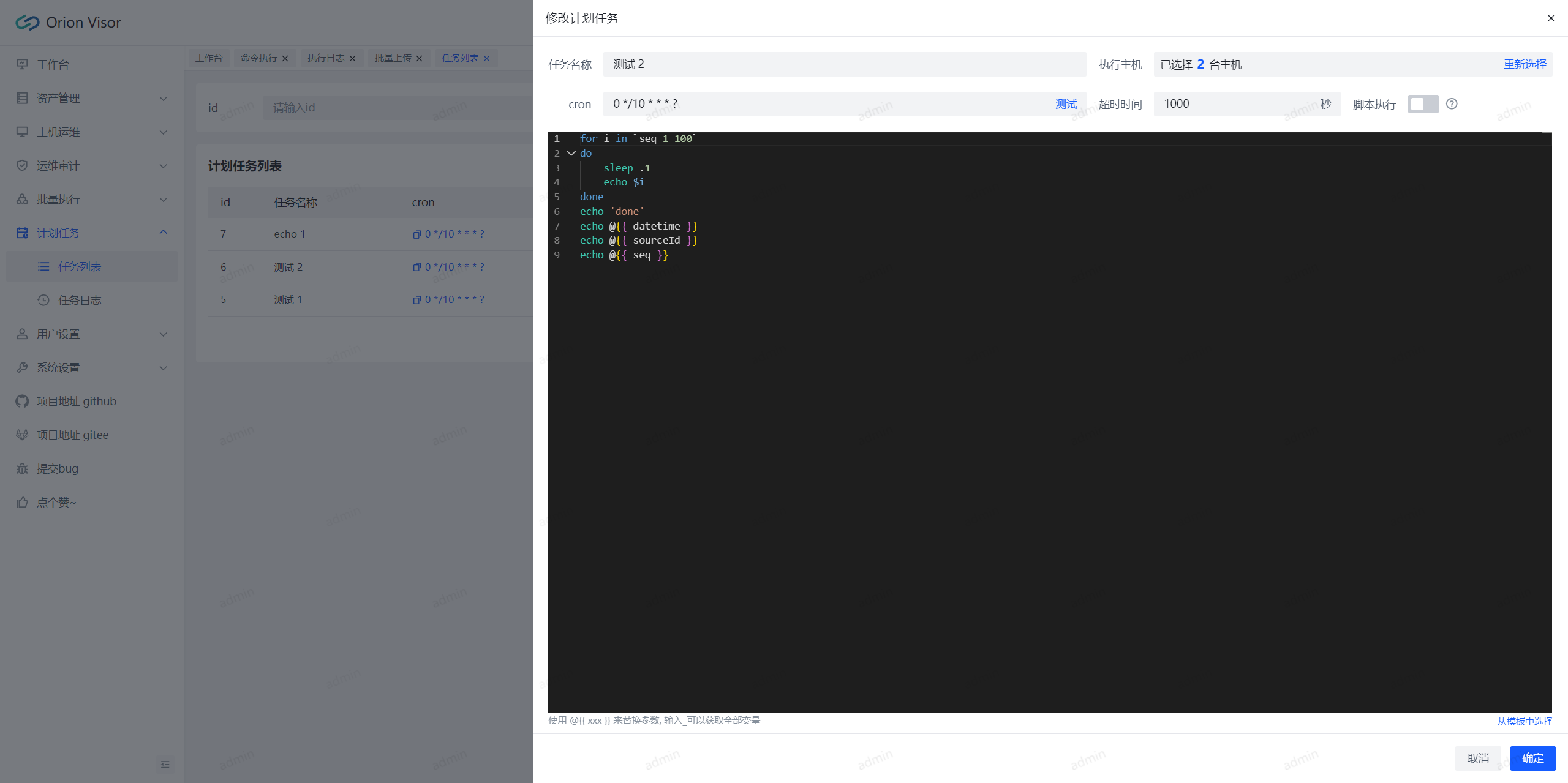
|
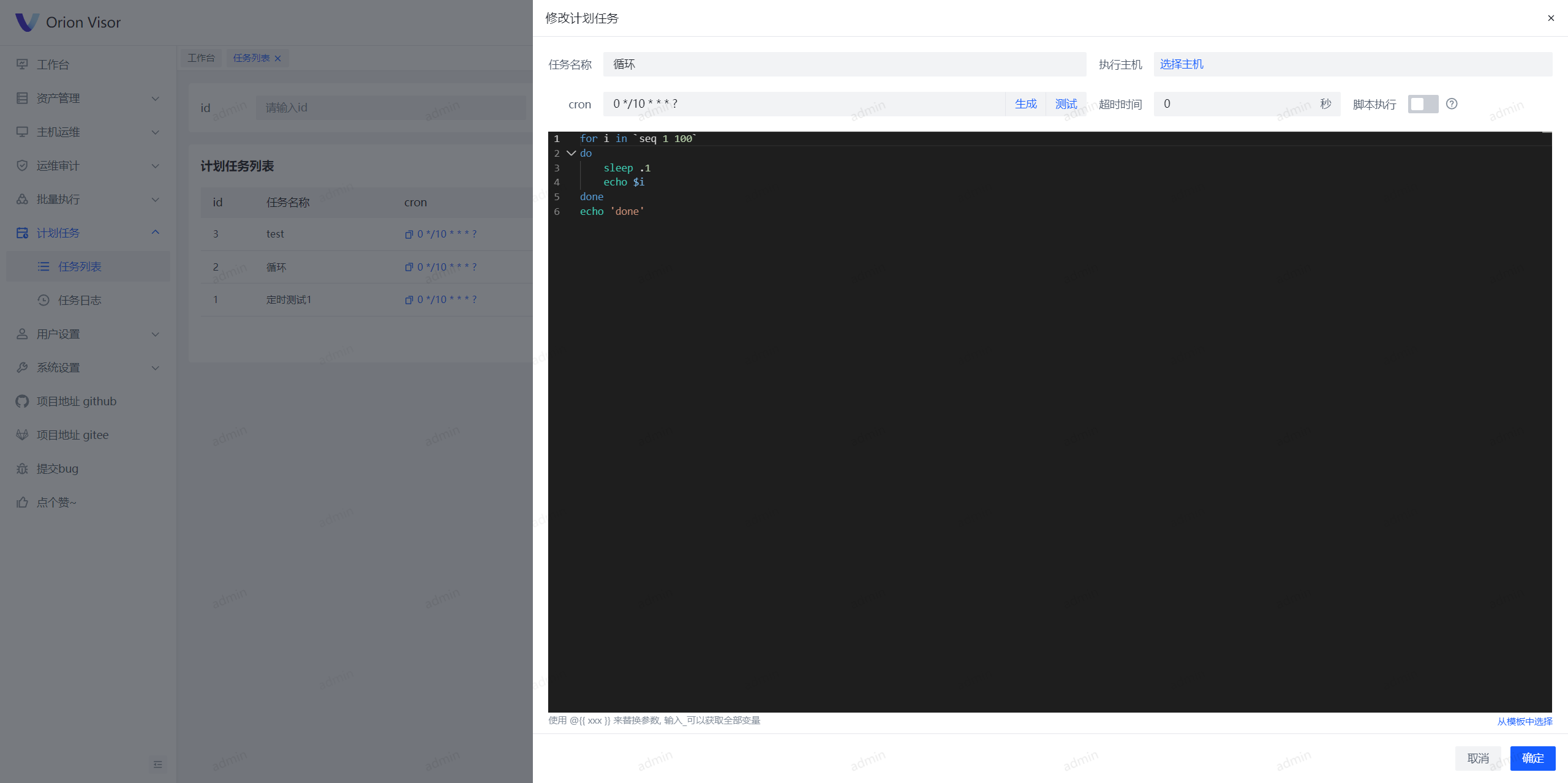
|
||||||
|
|
||||||
## Star History
|
## Star History
|
||||||
|
|
||||||
|
|||||||
@@ -1,7 +1,7 @@
|
|||||||
version: '3.3'
|
version: '3.3'
|
||||||
services:
|
services:
|
||||||
orion-visor-service:
|
orion-visor-service:
|
||||||
image: registry.cn-hangzhou.aliyuncs.com/lijiahangmax/orion-visor-service:2.0.2
|
image: registry.cn-hangzhou.aliyuncs.com/lijiahangmax/orion-visor-service:2.0.3
|
||||||
ports:
|
ports:
|
||||||
- 1081:80
|
- 1081:80
|
||||||
environment:
|
environment:
|
||||||
@@ -20,7 +20,7 @@ services:
|
|||||||
- orion-visor-mysql
|
- orion-visor-mysql
|
||||||
- orion-visor-redis
|
- orion-visor-redis
|
||||||
orion-visor-mysql:
|
orion-visor-mysql:
|
||||||
image: registry.cn-hangzhou.aliyuncs.com/lijiahangmax/orion-visor-mysql:2.0.2
|
image: registry.cn-hangzhou.aliyuncs.com/lijiahangmax/orion-visor-mysql:2.0.3
|
||||||
privileged: true
|
privileged: true
|
||||||
ports:
|
ports:
|
||||||
- 3307:3306
|
- 3307:3306
|
||||||
@@ -34,7 +34,7 @@ services:
|
|||||||
- /data/orion-visor-space/docker-volumes/orion-visor-mysql/var-lib-mysql-files:/var/lib/mysql-files
|
- /data/orion-visor-space/docker-volumes/orion-visor-mysql/var-lib-mysql-files:/var/lib/mysql-files
|
||||||
- /data/orion-visor-space/docker-volumes/orion-visor-mysql/etc-mysql:/etc/mysql
|
- /data/orion-visor-space/docker-volumes/orion-visor-mysql/etc-mysql:/etc/mysql
|
||||||
orion-visor-redis:
|
orion-visor-redis:
|
||||||
image: registry.cn-hangzhou.aliyuncs.com/lijiahangmax/orion-visor-redis:2.0.2
|
image: registry.cn-hangzhou.aliyuncs.com/lijiahangmax/orion-visor-redis:2.0.3
|
||||||
privileged: true
|
privileged: true
|
||||||
ports:
|
ports:
|
||||||
- 6380:6379
|
- 6380:6379
|
||||||
|
|||||||
@@ -1,9 +1,17 @@
|
|||||||
FROM mysql:8.0.28
|
FROM mysql:8.0.28
|
||||||
|
# 系统时区
|
||||||
|
ARG TZ=Asia/Shanghai
|
||||||
|
# 设置时区
|
||||||
|
RUN ln -sf /usr/share/zoneinfo/${TZ} /etc/localtime && \
|
||||||
|
echo '${TZ}' > /etc/timezone
|
||||||
|
# 复制配置
|
||||||
|
COPY ./my.cnf /etc/mysql/conf.d/my.cnf
|
||||||
|
# 复制初始化脚本
|
||||||
COPY ./sql/init-1-schema-databases.sql /tmp
|
COPY ./sql/init-1-schema-databases.sql /tmp
|
||||||
COPY ./sql/init-2-schema-tables.sql /tmp
|
COPY ./sql/init-2-schema-tables.sql /tmp
|
||||||
COPY ./sql/init-3-schema-quartz.sql /tmp
|
COPY ./sql/init-3-schema-quartz.sql /tmp
|
||||||
COPY ./sql/init-4-data.sql /tmp
|
COPY ./sql/init-4-data.sql /tmp
|
||||||
COPY ./my.cnf /etc/mysql/conf.d/my.cnf
|
# 设置初始化脚本
|
||||||
RUN cat /tmp/init-1-schema-databases.sql >> /tmp/init.sql && \
|
RUN cat /tmp/init-1-schema-databases.sql >> /tmp/init.sql && \
|
||||||
cat /tmp/init-2-schema-tables.sql >> /tmp/init.sql && \
|
cat /tmp/init-2-schema-tables.sql >> /tmp/init.sql && \
|
||||||
cat /tmp/init-3-schema-quartz.sql >> /tmp/init.sql && \
|
cat /tmp/init-3-schema-quartz.sql >> /tmp/init.sql && \
|
||||||
|
|||||||
@@ -1,5 +1,5 @@
|
|||||||
#/bin/bash
|
#/bin/bash
|
||||||
version=2.0.2
|
version=2.0.3
|
||||||
cp -r ../../sql ./sql
|
cp -r ../../sql ./sql
|
||||||
docker build -t orion-visor-mysql:${version} .
|
docker build -t orion-visor-mysql:${version} .
|
||||||
rm -rf ./sql
|
rm -rf ./sql
|
||||||
|
|||||||
@@ -1,4 +1,15 @@
|
|||||||
FROM redis:6.0.16-alpine
|
FROM redis:6.0.16-alpine
|
||||||
WORKDIR /data
|
WORKDIR /data
|
||||||
|
# 系统时区
|
||||||
|
ARG TZ=Asia/Shanghai
|
||||||
|
# 添加包
|
||||||
|
RUN \
|
||||||
|
sed -i 's/dl-cdn.alpinelinux.org/mirrors.aliyun.com/g' /etc/apk/repositories && \
|
||||||
|
apk update && \
|
||||||
|
apk add tzdata
|
||||||
|
# 设置时区
|
||||||
|
RUN ln -sf /usr/share/zoneinfo/${TZ} /etc/localtime && \
|
||||||
|
echo '${TZ}' > /etc/timezone
|
||||||
|
# redis 配置
|
||||||
COPY ./redis.conf /tmp
|
COPY ./redis.conf /tmp
|
||||||
RUN cat /tmp/redis.conf > /usr/local/redis.conf
|
RUN cat /tmp/redis.conf > /usr/local/redis.conf
|
||||||
|
|||||||
@@ -1,5 +1,5 @@
|
|||||||
#/bin/bash
|
#/bin/bash
|
||||||
version=2.0.2
|
version=2.0.3
|
||||||
docker build -t orion-visor-redis:${version} .
|
docker build -t orion-visor-redis:${version} .
|
||||||
docker tag orion-visor-redis:${version} registry.cn-hangzhou.aliyuncs.com/lijiahangmax/orion-visor-redis:${version}
|
docker tag orion-visor-redis:${version} registry.cn-hangzhou.aliyuncs.com/lijiahangmax/orion-visor-redis:${version}
|
||||||
docker push registry.cn-hangzhou.aliyuncs.com/lijiahangmax/orion-visor-redis:${version}
|
docker push registry.cn-hangzhou.aliyuncs.com/lijiahangmax/orion-visor-redis:${version}
|
||||||
|
|||||||
@@ -1,15 +1,23 @@
|
|||||||
FROM nginx:alpine
|
FROM nginx:alpine
|
||||||
USER root
|
USER root
|
||||||
RUN \
|
|
||||||
echo "" > /etc/apk/repositories && \
|
|
||||||
echo "http://mirrors.aliyun.com/alpine/v3.8/main" >> /etc/apk/repositories && \
|
|
||||||
echo "http://mirrors.aliyun.com/alpine/v3.8/community" >> /etc/apk/repositories && \
|
|
||||||
apk update
|
|
||||||
RUN apk add openjdk8
|
|
||||||
RUN rm -rf /etc/nginx/conf.d/*
|
|
||||||
WORKDIR /app
|
WORKDIR /app
|
||||||
|
# 系统时区
|
||||||
|
ARG TZ=Asia/Shanghai
|
||||||
|
# 添加包
|
||||||
|
RUN \
|
||||||
|
sed -i 's/dl-cdn.alpinelinux.org/mirrors.aliyun.com/g' /etc/apk/repositories && \
|
||||||
|
apk update && \
|
||||||
|
apk add tzdata && \
|
||||||
|
apk add openjdk8
|
||||||
|
# 设置时区
|
||||||
|
RUN ln -sf /usr/share/zoneinfo/${TZ} /etc/localtime && \
|
||||||
|
echo '${TZ}' > /etc/timezone
|
||||||
|
# 删除原 nginx 配置
|
||||||
|
RUN rm -rf /etc/nginx/conf.d/*
|
||||||
|
# 复制包
|
||||||
COPY ./orion-visor-launch.jar /app/app.jar
|
COPY ./orion-visor-launch.jar /app/app.jar
|
||||||
COPY ./dist /usr/share/nginx/html
|
COPY ./dist /usr/share/nginx/html
|
||||||
COPY ./entrypoint.sh /app/entrypoint.sh
|
COPY ./entrypoint.sh /app/entrypoint.sh
|
||||||
COPY ./nginx.conf /etc/nginx/conf.d
|
COPY ./nginx.conf /etc/nginx/conf.d
|
||||||
|
# 启动
|
||||||
ENTRYPOINT [ "sh", "/app/entrypoint.sh" ]
|
ENTRYPOINT [ "sh", "/app/entrypoint.sh" ]
|
||||||
|
|||||||
@@ -1,5 +1,5 @@
|
|||||||
#/bin/bash
|
#/bin/bash
|
||||||
version=2.0.2
|
version=2.0.3
|
||||||
mv ../../orion-visor-launch/target/orion-visor-launch.jar ./orion-visor-launch.jar
|
mv ../../orion-visor-launch/target/orion-visor-launch.jar ./orion-visor-launch.jar
|
||||||
mv ../../orion-visor-ui/dist ./dist
|
mv ../../orion-visor-ui/dist ./dist
|
||||||
docker build -t orion-visor-service:${version} .
|
docker build -t orion-visor-service:${version} .
|
||||||
|
|||||||
@@ -43,7 +43,8 @@
|
|||||||
**`orion-visor`** 提供一站式服务器运维解决方案。
|
**`orion-visor`** 提供一站式服务器运维解决方案。
|
||||||
|
|
||||||
* **资产管理**:支持对资产进行分组,实现对主机、密钥和身份的统一管理和授权。
|
* **资产管理**:支持对资产进行分组,实现对主机、密钥和身份的统一管理和授权。
|
||||||
* **在线终端**:提供在线 Terminal 服务,支持快捷命令、大文件上传、在线编辑等操作。
|
* **在线终端**:提供在线终端 SSH 服务,支持快捷命令、自定义快捷键和主题风格。
|
||||||
|
* **文件管理**:支持远程主机 SFTP 大文件的批量上传、下载和在线编辑等操作。
|
||||||
* **批量操作**:支持批量执行主机命令、多主机文件分发等功能。
|
* **批量操作**:支持批量执行主机命令、多主机文件分发等功能。
|
||||||
* **计划任务**:支持配置 cron 表达式,定时执行主机命令。
|
* **计划任务**:支持配置 cron 表达式,定时执行主机命令。
|
||||||
* **安全可靠**:动态配置权限,记录用户操作日志,提供简单的审计功能。
|
* **安全可靠**:动态配置权限,记录用户操作日志,提供简单的审计功能。
|
||||||
|
|||||||
@@ -1,6 +1,6 @@
|
|||||||
# orion-visor <small>2.0.2</small>
|
# orion-visor <small>2.0.3</small>
|
||||||
|
|
||||||
> 一款开箱即用的运维平台。
|
> 一款高颜值、现代化的智能运维&轻量堡垒机平台。
|
||||||
|
|
||||||
- 友好 易用
|
- 友好 易用
|
||||||
- 安全 稳定
|
- 安全 稳定
|
||||||
|
|||||||
@@ -14,6 +14,16 @@
|
|||||||
* 执行 升级的 `bash` 脚本
|
* 执行 升级的 `bash` 脚本
|
||||||
* 进入 代码目录执行 `sh docker-upgrade.sh` 进行容器升级 `down` > `pull` > `up -d`
|
* 进入 代码目录执行 `sh docker-upgrade.sh` 进行容器升级 `down` > `pull` > `up -d`
|
||||||
|
|
||||||
|
### v2.0.3
|
||||||
|
|
||||||
|
`2024-05-29` `release`
|
||||||
|
|
||||||
|
* 🐞 修复 部分 ui 显示错误
|
||||||
|
* 🐞 修复 计划任务编辑时报错
|
||||||
|
* 🐞 修复 计划任务手动触发时报错
|
||||||
|
* 🩰 修改 logo
|
||||||
|
* 🔨 修改 docker 时区
|
||||||
|
|
||||||
### v2.0.2
|
### v2.0.2
|
||||||
|
|
||||||
`2024-05-24` `release`
|
`2024-05-24` `release`
|
||||||
|
|||||||
BIN
docs/assert/favicon.ico
Normal file
|
After Width: | Height: | Size: 41 KiB |

|
Before Width: | Height: | Size: 128 KiB After Width: | Height: | Size: 125 KiB |

|
Before Width: | Height: | Size: 106 KiB |

|
Before Width: | Height: | Size: 155 KiB |

|
Before Width: | Height: | Size: 156 KiB After Width: | Height: | Size: 158 KiB |

|
Before Width: | Height: | Size: 156 KiB |

|
Before Width: | Height: | Size: 103 KiB |

|
Before Width: | Height: | Size: 113 KiB After Width: | Height: | Size: 106 KiB |

|
Before Width: | Height: | Size: 82 KiB After Width: | Height: | Size: 81 KiB |

|
Before Width: | Height: | Size: 120 KiB |

|
Before Width: | Height: | Size: 187 KiB After Width: | Height: | Size: 164 KiB |

|
Before Width: | Height: | Size: 85 KiB After Width: | Height: | Size: 88 KiB |

|
Before Width: | Height: | Size: 146 KiB After Width: | Height: | Size: 145 KiB |

|
Before Width: | Height: | Size: 112 KiB |

|
Before Width: | Height: | Size: 141 KiB |

@@ -1,17 +1,22 @@
|
|||||||
<svg id="图层_1" data-name="图层 1" xmlns="http://www.w3.org/2000/svg" viewBox="0 0 32 32">
|
<?xml version="1.0" encoding="utf-8"?>
|
||||||
<defs>
|
<svg version="1.1" id="图层_1" xmlns="http://www.w3.org/2000/svg" xmlns:xlink="http://www.w3.org/1999/xlink" x="0px" y="0px"
|
||||||
<style>.cls-1{fill:url(#未命名的渐变_4);}.cls-2{fill:url(#未命名的渐变_6);}</style>
|
viewBox="0 0 32 32" style="enable-background:new 0 0 32 32;" xml:space="preserve">
|
||||||
<linearGradient id="未命名的渐变_4" x1="0.32" y1="15.03" x2="20.16" y2="15.03" gradientUnits="userSpaceOnUse">
|
<style type="text/css">
|
||||||
<stop offset="0" stop-color="#23b6b6"/>
|
.st0{fill:url(#SVGID_1_);}
|
||||||
<stop offset="1" stop-color="#189c98"/>
|
.st1{fill:#3B28CC;}
|
||||||
</linearGradient>
|
</style>
|
||||||
<linearGradient id="未命名的渐变_6" x1="11.84" y1="16.97" x2="31.68" y2="16.97" gradientUnits="userSpaceOnUse">
|
<linearGradient id="SVGID_1_" gradientUnits="userSpaceOnUse" x1="27.1802" y1="7.7935" x2="15.2269" y2="25.137">
|
||||||
<stop offset="0" stop-color="#08589b"/>
|
<stop offset="0" style="stop-color:#ADD7F6"/>
|
||||||
<stop offset="1" stop-color="#2167b2"/>
|
<stop offset="0.2512" style="stop-color:#AAD5F6"/>
|
||||||
</linearGradient>
|
<stop offset="0.4195" style="stop-color:#A1CDF7"/>
|
||||||
</defs>
|
<stop offset="0.5636" style="stop-color:#92C1F8"/>
|
||||||
<path class="cls-1"
|
<stop offset="0.694" style="stop-color:#7DAFF9"/>
|
||||||
d="M20,17.37a1.56,1.56,0,0,0-2.13-.65l-7.56,4.07A4.65,4.65,0,0,1,4,18.91H4a4.65,4.65,0,0,1,1.88-6.3L13.6,8.44a1.56,1.56,0,0,0,.64-2.1h0a1.56,1.56,0,0,0-2.13-.65l-8,4.3a7.24,7.24,0,0,0-2.94,9.82l.51.94a7.24,7.24,0,0,0,9.82,2.94l7.81-4.22a1.56,1.56,0,0,0,.65-2.1Z"/>
|
<stop offset="0.8152" style="stop-color:#6198FB"/>
|
||||||
<path class="cls-2"
|
<stop offset="0.9279" style="stop-color:#407CFD"/>
|
||||||
d="M12,14.63a1.56,1.56,0,0,0,2.13.65l7.56-4.07A4.65,4.65,0,0,1,28,13.09h0a4.65,4.65,0,0,1-1.88,6.3L18.4,23.56a1.56,1.56,0,0,0-.64,2.1h0a1.56,1.56,0,0,0,2.13.65l8-4.3a7.24,7.24,0,0,0,2.94-9.82l-.51-.94a7.24,7.24,0,0,0-9.82-2.94l-7.81,4.22a1.56,1.56,0,0,0-.65,2.1Z"/>
|
<stop offset="1" style="stop-color:#2667FF"/>
|
||||||
|
</linearGradient>
|
||||||
|
<path class="st0" d="M31.41,4.01h-8.04c-0.27,0-0.51,0.18-0.57,0.44c-0.64,2.56-4.19,15.45-11.86,20.81c0,0,9.5,13.77,21.03-20.47
|
||||||
|
C32.1,4.4,31.81,4.01,31.41,4.01z"/>
|
||||||
|
<path class="st1" d="M0.62,3.98h8.02c0.28,0,0.52,0.18,0.59,0.45c0.69,2.58,4.47,15.52,12.14,20.88c0,0-10.88,13.73-21.34-20.54
|
||||||
|
C-0.09,4.37,0.2,3.98,0.62,3.98z"/>
|
||||||
</svg>
|
</svg>
|
||||||
|
|||||||
|
Before Width: | Height: | Size: 1.3 KiB After Width: | Height: | Size: 1.2 KiB |
@@ -2,10 +2,10 @@
|
|||||||
<html lang="en">
|
<html lang="en">
|
||||||
<head>
|
<head>
|
||||||
<meta charset="UTF-8">
|
<meta charset="UTF-8">
|
||||||
<title>关于 orion-visor</title>
|
<title>orion-visor</title>
|
||||||
<meta http-equiv="X-UA-Compatible" content="IE=edge,chrome=1"/>
|
<meta http-equiv="X-UA-Compatible" content="IE=edge,chrome=1"/>
|
||||||
<meta name="description" content="Description">
|
<meta name="description" content="Description">
|
||||||
<link rel="icon" href="./assert/logo.svg">
|
<link rel="icon" href="./assert/favicon.ico">
|
||||||
<meta name="viewport" content="width=device-width, initial-scale=1.0, minimum-scale=1.0">
|
<meta name="viewport" content="width=device-width, initial-scale=1.0, minimum-scale=1.0">
|
||||||
<!-- Theme: Defaults -->
|
<!-- Theme: Defaults -->
|
||||||
<link rel="stylesheet" href="./assert/font.css">
|
<link rel="stylesheet" href="./assert/font.css">
|
||||||
|
|||||||
@@ -34,7 +34,3 @@
|
|||||||
### 资产授权
|
### 资产授权
|
||||||
|
|
||||||
给用户/角色授权资产数据, 若无授权则无法访问资产。
|
给用户/角色授权资产数据, 若无授权则无法访问资产。
|
||||||
|
|
||||||
给用户授权时: 若当前选择的用户有管理员角色(admin)则无需配置, 管理员拥有全部权限。
|
|
||||||
给角色授权时: 无需给管理员(admin)配置, 管理员拥有全部权限。
|
|
||||||
|
|
||||||
|
|||||||
@@ -21,7 +21,7 @@
|
|||||||
* 命令: 查看执行时的命令
|
* 命令: 查看执行时的命令
|
||||||
* 参数: 查看执行时的参数
|
* 参数: 查看执行时的参数
|
||||||
* 中断: 中断命令执行
|
* 中断: 中断命令执行
|
||||||
* 日志: 查看执行日志, ctrl + 左键点击会用新页面打开
|
* 日志: 查看执行日志 `ctrl + 左键` 点击会用新页面打开
|
||||||
* 下载: 下载执行日志
|
* 下载: 下载执行日志
|
||||||
|
|
||||||
### 批量上传
|
### 批量上传
|
||||||
@@ -65,14 +65,14 @@
|
|||||||
### 日志面板快捷键
|
### 日志面板快捷键
|
||||||
|
|
||||||
* 回车: `Enter`
|
* 回车: `Enter`
|
||||||
* 向上滚动一行: `↑`
|
|
||||||
* 向上滚动一页: `Home`
|
|
||||||
* 向下滚动一行: `↓`
|
|
||||||
* 向下滚动一页: `End`
|
|
||||||
* 全选: `ctrl` `A`
|
* 全选: `ctrl` `A`
|
||||||
* 复制: `ctrl` `C`
|
* 复制: `ctrl` `C`
|
||||||
* 搜索: `ctrl` `F`
|
* 搜索: `ctrl` `F`
|
||||||
* 清空: `ctrl` `L`
|
* 清空: `ctrl` `L`
|
||||||
|
* 向上滚动一行: `↑`
|
||||||
|
* 向上滚动一页: `Home`
|
||||||
|
* 向下滚动一行: `↓`
|
||||||
|
* 向下滚动一页: `End`
|
||||||
|
|
||||||
### 命令内置参数
|
### 命令内置参数
|
||||||
|
|
||||||
|
|||||||
@@ -24,6 +24,7 @@
|
|||||||
> 右侧状态栏
|
> 右侧状态栏
|
||||||
|
|
||||||
* 命令片段: 自定义快速执行的命令片段, 双击直接执行
|
* 命令片段: 自定义快速执行的命令片段, 双击直接执行
|
||||||
|
* 路径书签: 自定义快速进入的目录
|
||||||
* 传输列表: 打开文件传输列表, 当前会话下, 所有的文件上传下载传输都会显示在这里
|
* 传输列表: 打开文件传输列表, 当前会话下, 所有的文件上传下载传输都会显示在这里
|
||||||
* 截图: 截屏终端并且自动下载
|
* 截图: 截屏终端并且自动下载
|
||||||
|
|
||||||
|
|||||||
@@ -1,6 +1,6 @@
|
|||||||
### 任务列表
|
### 任务列表
|
||||||
|
|
||||||
⚡ 内置参数同 `批量执行 > 命令执行` [查看](/operator/exec.md?id=命令内置参数)
|
⚡ 内置参数同 `批量执行` > `命令执行` [查看](/operator/exec.md?id=命令内置参数)
|
||||||
|
|
||||||
维护计划任务, 定时执行命令。
|
维护计划任务, 定时执行命令。
|
||||||
|
|
||||||
@@ -22,5 +22,5 @@
|
|||||||
* 命令: 查看执行时的命令
|
* 命令: 查看执行时的命令
|
||||||
* 参数: 查看执行时的参数
|
* 参数: 查看执行时的参数
|
||||||
* 中断: 中断命令执行
|
* 中断: 中断命令执行
|
||||||
* 日志: 查看执行日志, ctrl + 左键点击会用新页面打开
|
* 日志: 查看执行日志 `ctrl + 左键` 点击会用新页面打开
|
||||||
* 下载: 下载执行日志
|
* 下载: 下载执行日志
|
||||||
|
|||||||
@@ -13,7 +13,7 @@
|
|||||||
|
|
||||||
* 新增: 添加一个字典项
|
* 新增: 添加一个字典项
|
||||||
* 刷新缓存: 强制刷新服务器缓存, 一般是手动修改了数据库后需要点击此按钮
|
* 刷新缓存: 强制刷新服务器缓存, 一般是手动修改了数据库后需要点击此按钮
|
||||||
* 查看: 查看字典值的json
|
* 查看: 查看字典值的 json
|
||||||
* 修改: 修改字典项
|
* 修改: 修改字典项
|
||||||
* 删除: 删除字典项以及字典值
|
* 删除: 删除字典项以及字典值
|
||||||
|
|
||||||
|
|||||||
@@ -11,9 +11,7 @@
|
|||||||
⚡ npm 建议使用淘宝镜像 `npm config set registry https://registry.npmmirror.com/`
|
⚡ npm 建议使用淘宝镜像 `npm config set registry https://registry.npmmirror.com/`
|
||||||
⚡ pnpm 建议使用淘宝镜像 `pnpm config set registry https://registry.npmmirror.com/`
|
⚡ pnpm 建议使用淘宝镜像 `pnpm config set registry https://registry.npmmirror.com/`
|
||||||
|
|
||||||
### 配置
|
### 拉取代码
|
||||||
|
|
||||||
1. 拉取代码
|
|
||||||
|
|
||||||
```
|
```
|
||||||
# github
|
# github
|
||||||
@@ -22,7 +20,7 @@ git clone https://github.com/lijiahangmax/orion-visor
|
|||||||
git clone https://gitee.com/lijiahangmax/orion-visor
|
git clone https://gitee.com/lijiahangmax/orion-visor
|
||||||
```
|
```
|
||||||
|
|
||||||
2. 初始化数据库
|
### 初始化数据库
|
||||||
|
|
||||||
```
|
```
|
||||||
# 执行脚本
|
# 执行脚本
|
||||||
@@ -32,7 +30,7 @@ orion-visor/sql/init-3-schema-quartz.sql
|
|||||||
orion-visor/sql/init-4-data.sql
|
orion-visor/sql/init-4-data.sql
|
||||||
```
|
```
|
||||||
|
|
||||||
3. 修改后端配置
|
### 修改后端配置
|
||||||
|
|
||||||
```
|
```
|
||||||
# 修改配置文件 (mysql, redis, secret-key)
|
# 修改配置文件 (mysql, redis, secret-key)
|
||||||
@@ -46,9 +44,9 @@ mvn -U clean install -DskipTests
|
|||||||
com.orion.visor.launch.LaunchApplication
|
com.orion.visor.launch.LaunchApplication
|
||||||
```
|
```
|
||||||
|
|
||||||
4. 修改前端配置
|
### 修改前端配置
|
||||||
|
|
||||||
```
|
```shell
|
||||||
# 进入代码目录
|
# 进入代码目录
|
||||||
cd orion-visor/orion-visor-ui
|
cd orion-visor/orion-visor-ui
|
||||||
# 下载 pnpm
|
# 下载 pnpm
|
||||||
|
|||||||
@@ -19,7 +19,7 @@ Dashboard 修改)
|
|||||||
|
|
||||||
### 拉取代码
|
### 拉取代码
|
||||||
|
|
||||||
```
|
```shell
|
||||||
# github
|
# github
|
||||||
git clone https://github.com/lijiahangmax/orion-visor
|
git clone https://github.com/lijiahangmax/orion-visor
|
||||||
# gitee
|
# gitee
|
||||||
@@ -41,18 +41,18 @@ cd orion-visor
|
|||||||
|
|
||||||
### 启动
|
### 启动
|
||||||
|
|
||||||
```
|
```shell
|
||||||
docker compose up -d
|
docker compose up -d
|
||||||
```
|
```
|
||||||
|
|
||||||
### 连接 mysql (如果需要在 navicat 中连接)
|
### 修改加密方式
|
||||||
|
|
||||||
```
|
```
|
||||||
访问 adminer: http://localhost:8081
|
访问 adminer: http://localhost:8081
|
||||||
服务器: orion-visor-mysql
|
服务器: orion-visor-mysql
|
||||||
用户名: root
|
用户名: root
|
||||||
密码: Data@123456
|
密 码: Data@123456
|
||||||
数据库: orion-visor
|
数据库: orion_visor
|
||||||
|
|
||||||
点击左侧 SQL命令 输入:
|
点击左侧 SQL命令 输入:
|
||||||
ALTER USER 'root'@'%' IDENTIFIED WITH mysql_native_password BY 'Data@123456';
|
ALTER USER 'root'@'%' IDENTIFIED WITH mysql_native_password BY 'Data@123456';
|
||||||
@@ -62,5 +62,5 @@ ALTER USER 'root'@'%' IDENTIFIED WITH mysql_native_password BY 'Data@123456';
|
|||||||
### 测试访问
|
### 测试访问
|
||||||
|
|
||||||
在浏览器中输入 http://localhost:1081/ 访问
|
在浏览器中输入 http://localhost:1081/ 访问
|
||||||
账号: admin
|
账号: `admin`
|
||||||
密码: admin
|
密码: `admin`
|
||||||
|
|||||||
@@ -1,27 +1,42 @@
|
|||||||
> ##### 1. 数据误删除怎么办?
|
### 日志文件在哪?
|
||||||
|
|
||||||
|
```shell
|
||||||
|
# 宿主机
|
||||||
|
tail -f -n 200 /data/orion-visor-space/docker-volumes/orion-visor-service/root-orion/logs/orion-visor/app.log
|
||||||
|
# 容器内
|
||||||
|
tail -f -n 200 /root/orion/logs/orion-visor/app.log
|
||||||
|
# 滚动日志 .../logs/orion-visor/rolling/*
|
||||||
|
```
|
||||||
|
|
||||||
|
### 数据误删除怎么办?
|
||||||
|
|
||||||
数据库的数据都采用了逻辑删除, 可以将已删除的数据中的 `deleted` 字段改为 `0`
|
数据库的数据都采用了逻辑删除, 可以将已删除的数据中的 `deleted` 字段改为 `0`
|
||||||
如果不知道数据是哪一条, 可以查询用户操作日志, 点击 `参数` 寻找操作的id
|
如果不知道数据是哪一条, 可以查询用户操作日志, 点击 `参数` 寻找操作的id
|
||||||
|
|
||||||
> ##### 2. 执行命令时为什么会找不到环境变量?
|
### 执行命令时为什么会找不到环境变量?
|
||||||
|
|
||||||
可以在执行命令的第一行设置 `source /etc/profile` 来加载环境变量
|
可以在执行命令的第一行设置 `source /etc/profile` 来加载环境变量
|
||||||
|
|
||||||
> ##### 3. 命令中途执行失败如何设置中断执行?
|
### 命令中途执行失败如何设置中断执行?
|
||||||
|
|
||||||
可以在执行命令的第一行设置 `set -e`
|
可以在执行命令的第一行设置 `set -e`
|
||||||
作用是: 当执行出现意料之外的情况时, 立即退出
|
作用是: 当执行出现意料之外的情况时, 立即退出
|
||||||
|
|
||||||
> ##### 4. 在调度任务、批量执行 命令执行成功的依据是什么?
|
### 在调度任务、批量执行 命令执行成功的依据是什么?
|
||||||
|
|
||||||
是获取命令的 `exitcode` 判断是否为 `0` 如果非0则代表命令执行失败
|
是获取命令的 `exitcode` 判断是否为 `0` 如果非0则代表命令执行失败
|
||||||
同理, 在命令的最后一行设置 `exit 1` 结果将会是失败, 可以用此来中断后续流程
|
同理, 在命令的最后一行设置 `exit 1` 结果将会是失败, 可以用此来中断后续流程
|
||||||
|
|
||||||
> ##### 5. 调度任务、批量执行 的日志文件中如何只保存原始输出?
|
### 调度任务、批量执行 的日志文件中如何只保存原始输出?
|
||||||
|
|
||||||
修改 `application.yaml` `app.exec-log.append-ansi` 为 `false`
|
修改 `application.yaml` `app.exec-log.append-ansi` 为 `false`
|
||||||
|
|
||||||
> ##### 6. 为什么使用密钥认证还是无法连接机器?
|
### SFTP 为什么有些文件无法编辑?
|
||||||
|
|
||||||
|
只有普通文件可以在线编辑, 也就是 attr 为 `-` 开头的文件, 且文件大小不超过 `2MB` (默认)
|
||||||
|
修改 `.env.production` `VITE_SFTP_PREVIEW_MB` 改为一个合适的大小(MB) 重新构建
|
||||||
|
|
||||||
|
### 为什么使用密钥认证还是无法连接机器?
|
||||||
|
|
||||||
```
|
```
|
||||||
# 升级 openssh
|
# 升级 openssh
|
||||||
@@ -41,9 +56,3 @@ AuthorizedKeysFile .ssh/authorized_keys
|
|||||||
# 重启 sshd 服务
|
# 重启 sshd 服务
|
||||||
service sshd restart
|
service sshd restart
|
||||||
```
|
```
|
||||||
|
|
||||||
<br/>
|
|
||||||
|
|
||||||
⚡ 详细使用请参考操作手册~
|
|
||||||
|
|
||||||
<br/>
|
|
||||||
|
|||||||
@@ -12,9 +12,7 @@
|
|||||||
⚡ npm 建议使用淘宝镜像 `npm config set registry https://registry.npmmirror.com/`
|
⚡ npm 建议使用淘宝镜像 `npm config set registry https://registry.npmmirror.com/`
|
||||||
⚡ pnpm 建议使用淘宝镜像 `pnpm config set registry https://registry.npmmirror.com/`
|
⚡ pnpm 建议使用淘宝镜像 `pnpm config set registry https://registry.npmmirror.com/`
|
||||||
|
|
||||||
### 构建
|
### 拉取代码
|
||||||
|
|
||||||
1. 拉取代码
|
|
||||||
|
|
||||||
```
|
```
|
||||||
# github
|
# github
|
||||||
@@ -23,7 +21,7 @@ git clone https://github.com/lijiahangmax/orion-visor
|
|||||||
git clone https://gitee.com/lijiahangmax/orion-visor
|
git clone https://gitee.com/lijiahangmax/orion-visor
|
||||||
```
|
```
|
||||||
|
|
||||||
2. 初始化数据库
|
### 初始化数据库
|
||||||
|
|
||||||
```
|
```
|
||||||
# 执行脚本
|
# 执行脚本
|
||||||
@@ -33,7 +31,7 @@ orion-visor/sql/init-3-schema-quartz.sql
|
|||||||
orion-visor/sql/init-4-data.sql
|
orion-visor/sql/init-4-data.sql
|
||||||
```
|
```
|
||||||
|
|
||||||
3. 构建后端代码
|
### 构建后端代码
|
||||||
|
|
||||||
```
|
```
|
||||||
# 修改配置文件 (mysql, redis, secret-key)
|
# 修改配置文件 (mysql, redis, secret-key)
|
||||||
@@ -45,7 +43,7 @@ cd orion-visor
|
|||||||
mvn -U clean install -DskipTests
|
mvn -U clean install -DskipTests
|
||||||
```
|
```
|
||||||
|
|
||||||
4. 构建前端代码
|
### 构建前端代码
|
||||||
|
|
||||||
```
|
```
|
||||||
# 进入代码目录
|
# 进入代码目录
|
||||||
@@ -122,7 +120,7 @@ server {
|
|||||||
|
|
||||||
```
|
```
|
||||||
复制 orion-visor/orion-visor-ui/dist 到 /usr/share/nginx/html
|
复制 orion-visor/orion-visor-ui/dist 到 /usr/share/nginx/html
|
||||||
复制 orion-visor/orion-visor-launch/target/orion-visor-launch.jar 到 /data/orion
|
复制 orion-visor/orion-visor-launch/target/orion-visor-launch.jar 到 /data/orion-visor-space
|
||||||
# 启动后台服务
|
# 启动后台服务
|
||||||
nohup java -jar orion-visor-launch.jar --spring.profiles.active=prod 2>&1 &
|
nohup java -jar orion-visor-launch.jar --spring.profiles.active=prod 2>&1 &
|
||||||
# 启动 nginx
|
# 启动 nginx
|
||||||
|
|||||||
@@ -1,6 +1,6 @@
|
|||||||
## v1.0.0
|
### v1.0.0
|
||||||
|
|
||||||
> sql 脚本 - DML
|
### sql 脚本 - DML
|
||||||
|
|
||||||
```sql
|
```sql
|
||||||
-- 字典配置项
|
-- 字典配置项
|
||||||
|
|||||||
@@ -1,13 +1,13 @@
|
|||||||
## v1.0.1
|
### v1.0.1
|
||||||
|
|
||||||
> sql 脚本 - DDL
|
### sql 脚本 - DDL
|
||||||
|
|
||||||
```sql
|
```sql
|
||||||
DROP TABLE IF EXISTS `command_template`;
|
DROP TABLE IF EXISTS `command_template`;
|
||||||
ALTER TABLE `operator_log` ADD INDEX `idx_type`(`type`);
|
ALTER TABLE `operator_log` ADD INDEX `idx_type`(`type`);
|
||||||
```
|
```
|
||||||
|
|
||||||
> sql 脚本 - DML
|
### sql 脚本 - DML
|
||||||
|
|
||||||
```sql
|
```sql
|
||||||
-- 菜单配置
|
-- 菜单配置
|
||||||
|
|||||||
@@ -1,6 +1,6 @@
|
|||||||
## v1.0.2
|
### v1.0.2
|
||||||
|
|
||||||
> sql 脚本 - DDL
|
### sql 脚本 - DDL
|
||||||
|
|
||||||
```sql
|
```sql
|
||||||
ALTER TABLE `host_connect_log`
|
ALTER TABLE `host_connect_log`
|
||||||
@@ -83,7 +83,7 @@ CREATE TABLE `exec_template`
|
|||||||
ROW_FORMAT = Dynamic;
|
ROW_FORMAT = Dynamic;
|
||||||
```
|
```
|
||||||
|
|
||||||
> sql 脚本 - DML
|
### sql 脚本 - DML
|
||||||
|
|
||||||
```sql
|
```sql
|
||||||
-- 菜单配置
|
-- 菜单配置
|
||||||
|
|||||||
@@ -1,6 +1,6 @@
|
|||||||
## v1.0.3
|
### v1.0.3
|
||||||
|
|
||||||
> sql 脚本 - DML
|
### sql 脚本 - DML
|
||||||
|
|
||||||
```sql
|
```sql
|
||||||
DELETE FROM preference WHERE type = 'TERMINAL';
|
DELETE FROM preference WHERE type = 'TERMINAL';
|
||||||
|
|||||||
@@ -1,6 +1,6 @@
|
|||||||
## v1.0.4
|
### v1.0.4
|
||||||
|
|
||||||
> sql 脚本 - DDL
|
### sql 脚本 - DDL
|
||||||
|
|
||||||
```sql
|
```sql
|
||||||
-- 修改字段
|
-- 修改字段
|
||||||
@@ -260,7 +260,7 @@ CREATE TABLE `QRTZ_SCHEDULER_STATE`
|
|||||||
ROW_FORMAT = Dynamic;
|
ROW_FORMAT = Dynamic;
|
||||||
```
|
```
|
||||||
|
|
||||||
> sql 脚本 - DML
|
### sql 脚本 - DML
|
||||||
|
|
||||||
```sql
|
```sql
|
||||||
-- 操作日志修改
|
-- 操作日志修改
|
||||||
|
|||||||
@@ -1,6 +1,6 @@
|
|||||||
## v1.0.5
|
### v1.0.5
|
||||||
|
|
||||||
> sql 脚本 - DDL
|
### sql 脚本 - DDL
|
||||||
|
|
||||||
```sql
|
```sql
|
||||||
ALTER TABLE `system_user`
|
ALTER TABLE `system_user`
|
||||||
@@ -22,7 +22,7 @@ ALTER TABLE `exec_host_log`
|
|||||||
ADD COLUMN `script_path` varchar(512) NULL COMMENT '脚本路径' AFTER `log_path`;
|
ADD COLUMN `script_path` varchar(512) NULL COMMENT '脚本路径' AFTER `log_path`;
|
||||||
```
|
```
|
||||||
|
|
||||||
> sql 脚本 - DML
|
### sql 脚本 - DML
|
||||||
|
|
||||||
```sql
|
```sql
|
||||||
-- 初始化主机身份类型
|
-- 初始化主机身份类型
|
||||||
|
|||||||
@@ -1,6 +1,6 @@
|
|||||||
## v1.0.6
|
### v1.0.6
|
||||||
|
|
||||||
> sql 脚本 - DDL
|
### sql 脚本 - DDL
|
||||||
|
|
||||||
```sql
|
```sql
|
||||||
-- 数据分组添加 userId
|
-- 数据分组添加 userId
|
||||||
@@ -58,10 +58,9 @@ CREATE TABLE `path_bookmark`
|
|||||||
CHARACTER SET = utf8mb4
|
CHARACTER SET = utf8mb4
|
||||||
COLLATE = utf8mb4_general_ci COMMENT = '路径书签'
|
COLLATE = utf8mb4_general_ci COMMENT = '路径书签'
|
||||||
ROW_FORMAT = Dynamic;
|
ROW_FORMAT = Dynamic;
|
||||||
|
|
||||||
```
|
```
|
||||||
|
|
||||||
> sql 脚本 - DML
|
### sql 脚本 - DML
|
||||||
|
|
||||||
```sql
|
```sql
|
||||||
-- 设置数据分组 user_id
|
-- 设置数据分组 user_id
|
||||||
@@ -88,7 +87,7 @@ INSERT INTO `dict_value` VALUES (274, 39, 'pathBookmarkType', 'FILE', '文件',
|
|||||||
INSERT INTO `dict_value` VALUES (275, 39, 'pathBookmarkType', 'DIR', '文件夹', '{}', 20, '2024-04-24 13:43:39', '2024-04-24 13:43:39', '1', '1', 0);
|
INSERT INTO `dict_value` VALUES (275, 39, 'pathBookmarkType', 'DIR', '文件夹', '{}', 20, '2024-04-24 13:43:39', '2024-04-24 13:43:39', '1', '1', 0);
|
||||||
```
|
```
|
||||||
|
|
||||||
> sql 脚本 - 命令分组初始化
|
### sql 脚本 - 命令分组初始化
|
||||||
|
|
||||||
```sql
|
```sql
|
||||||
-- 插入命令片段分组
|
-- 插入命令片段分组
|
||||||
|
|||||||
@@ -1,6 +1,6 @@
|
|||||||
## v1.0.7
|
### v1.0.7
|
||||||
|
|
||||||
> sql 脚本 - DDL
|
### sql 脚本 - DDL
|
||||||
|
|
||||||
```sql
|
```sql
|
||||||
ALTER TABLE `data_permission` COMMENT = '数据权限表';
|
ALTER TABLE `data_permission` COMMENT = '数据权限表';
|
||||||
@@ -57,7 +57,7 @@ CREATE TABLE `upload_task_file`
|
|||||||
ROW_FORMAT = Dynamic;
|
ROW_FORMAT = Dynamic;
|
||||||
```
|
```
|
||||||
|
|
||||||
> sql 脚本 - DML
|
### sql 脚本 - DML
|
||||||
|
|
||||||
```sql
|
```sql
|
||||||
-- 字典项
|
-- 字典项
|
||||||
|
|||||||
@@ -1,6 +1,6 @@
|
|||||||
## v1.0.8
|
### v1.0.8
|
||||||
|
|
||||||
> sql 脚本 - DDL
|
### sql 脚本 - DDL
|
||||||
|
|
||||||
```sql
|
```sql
|
||||||
-- 修改字段名称
|
-- 修改字段名称
|
||||||
@@ -32,7 +32,7 @@ CREATE TABLE `system_message`
|
|||||||
ROW_FORMAT = Dynamic;
|
ROW_FORMAT = Dynamic;
|
||||||
```
|
```
|
||||||
|
|
||||||
> sql 脚本 - DML
|
### sql 脚本 - DML
|
||||||
|
|
||||||
```sql
|
```sql
|
||||||
-- 菜单
|
-- 菜单
|
||||||
|
|||||||
@@ -1,22 +1,20 @@
|
|||||||
## v2.0.0
|
### v2.0.0
|
||||||
|
|
||||||
### ⚡ **本次升级提示 本次更新较大 请仔细查阅** ⚡
|
### ⚡ **本次升级提示 本次更新较大 请仔细查阅** ⚡
|
||||||
|
|
||||||
##### 本次升级思路:
|
|
||||||
|
|
||||||
* 先执行以下 **`7`** 个脚本
|
* 先执行以下 **`7`** 个脚本
|
||||||
* 容器下线 `docker compose down`
|
* 容器下线 `docker compose down`
|
||||||
* 删除原代码目录 `rm -rf orion-ops-pro`
|
* 删除原代码目录 `rm -rf orion-ops-pro`
|
||||||
* 克隆改名后的项目 `git clone https://github.com/lijiahangmax/orion-visor.git` or `gitee`
|
* 克隆改名后的项目 `git clone https://github.com/lijiahangmax/orion-visor.git` or `gitee`
|
||||||
* 启动容器 `docker compose up -d`
|
* 启动容器 `docker compose up -d`
|
||||||
|
|
||||||
```readme
|
```text
|
||||||
sql 在 adminer/navicat 中执行, bash 脚本直接修改后粘贴执行 不要保存为文件执行否则会出错
|
sql 在 adminer/navicat 中执行, bash 脚本直接修改后粘贴执行 不要保存为文件执行否则会出错
|
||||||
本次升级包含数据库重命名操作。#3 创建新数据库, #4 进行数据迁移, #5 删除旧数据库。
|
本次升级包含数据库重命名操作。#3 创建新数据库, #4 进行数据迁移, #5 删除旧数据库。
|
||||||
[不推荐] 如果不想重命名可以修改 docker-compose.yml, 将 MYSQL_DATABASE 改为 orion-ops-pro 并且跳过步骤 #3 #4 #5
|
[不推荐] 如果不想重命名可以修改 docker-compose.yml, 将 MYSQL_DATABASE 改为 orion-ops-pro 并且跳过步骤 #3 #4 #5
|
||||||
```
|
```
|
||||||
|
|
||||||
> #1 sql 脚本 - DDL
|
### 1. sql 脚本 - DDL
|
||||||
|
|
||||||
```sql
|
```sql
|
||||||
-- 修改默认值
|
-- 修改默认值
|
||||||
@@ -29,7 +27,7 @@ MODIFY COLUMN `key_id` bigint(0) NULL DEFAULT NULL COMMENT '密钥id' AFTER `pas
|
|||||||
ALTER TABLE `host_key` COMMENT = '主机密钥';
|
ALTER TABLE `host_key` COMMENT = '主机密钥';
|
||||||
```
|
```
|
||||||
|
|
||||||
> #2 sql 脚本 - DML
|
### 2. sql 脚本 - DML
|
||||||
|
|
||||||
```sql
|
```sql
|
||||||
-- 删除 quartz 配置
|
-- 删除 quartz 配置
|
||||||
@@ -70,14 +68,14 @@ INSERT INTO `dict_value` VALUES (174, 26, 'hostExtraSshAuthType', 'CUSTOM_KEY',
|
|||||||
INSERT INTO `dict_value` VALUES (271, 37, 'hostIdentityType', 'KEY', '密钥', '{\"color\": \"arcoblue\"}', 20, '2024-04-16 17:18:12', '2024-05-17 12:49:16', '2', '2', 0);
|
INSERT INTO `dict_value` VALUES (271, 37, 'hostIdentityType', 'KEY', '密钥', '{\"color\": \"arcoblue\"}', 20, '2024-04-16 17:18:12', '2024-05-17 12:49:16', '2', '2', 0);
|
||||||
```
|
```
|
||||||
|
|
||||||
> #3 sql 脚本 - 创建数据库 orion_visor
|
### 3. sql 脚本 - 创建数据库 orion_visor
|
||||||
|
|
||||||
```sql
|
```sql
|
||||||
-- 创建数据库
|
-- 创建数据库
|
||||||
CREATE DATABASE IF NOT EXISTS `orion_visor` DEFAULT CHARACTER SET utf8mb4 COLLATE utf8mb4_general_ci;
|
CREATE DATABASE IF NOT EXISTS `orion_visor` DEFAULT CHARACTER SET utf8mb4 COLLATE utf8mb4_general_ci;
|
||||||
```
|
```
|
||||||
|
|
||||||
> #4 bash 脚本 - 数据迁移
|
### 4. bash 脚本 - 数据迁移
|
||||||
|
|
||||||
```bash
|
```bash
|
||||||
# 可以使用 navicat 的数据迁移功能, 下面描述的是 bash 中执行, 注意下面的变量替换
|
# 可以使用 navicat 的数据迁移功能, 下面描述的是 bash 中执行, 注意下面的变量替换
|
||||||
@@ -97,14 +95,14 @@ rm -f /tmp/orion-ops-pro_dump.sql
|
|||||||
exit
|
exit
|
||||||
```
|
```
|
||||||
|
|
||||||
> #5 sql 脚本 - 删除数据库
|
### 5. sql 脚本 - 删除数据库
|
||||||
|
|
||||||
```sql
|
```sql
|
||||||
-- 删除数据库
|
-- 删除数据库
|
||||||
DROP DATABASE `orion-ops-pro`;
|
DROP DATABASE `orion-ops-pro`;
|
||||||
```
|
```
|
||||||
|
|
||||||
> #6 bash 脚本 - 修改 nginx 配置
|
### 6. bash 脚本 - 修改 nginx 配置
|
||||||
|
|
||||||
```bash
|
```bash
|
||||||
pro_container_id=41dfd6aff736;
|
pro_container_id=41dfd6aff736;
|
||||||
@@ -118,7 +116,7 @@ nginx -s reload
|
|||||||
exit
|
exit
|
||||||
```
|
```
|
||||||
|
|
||||||
> #7 bash 脚本 - 工作空间迁移
|
### 7. bash 脚本 - 工作空间迁移
|
||||||
|
|
||||||
```bash
|
```bash
|
||||||
# 迁移工作空间
|
# 迁移工作空间
|
||||||
|
|||||||
@@ -1,11 +0,0 @@
|
|||||||
## v2.0.3
|
|
||||||
|
|
||||||
> sql 脚本 - DDL
|
|
||||||
|
|
||||||
```sql
|
|
||||||
```
|
|
||||||
|
|
||||||
> sql 脚本 - DML
|
|
||||||
|
|
||||||
```sql
|
|
||||||
```
|
|
||||||
11
docs/update/v2.0.x.md
Normal file
@@ -0,0 +1,11 @@
|
|||||||
|
### v2.0.x
|
||||||
|
|
||||||
|
### sql 脚本 - DDL
|
||||||
|
|
||||||
|
```sql
|
||||||
|
```
|
||||||
|
|
||||||
|
### sql 脚本 - DML
|
||||||
|
|
||||||
|
```sql
|
||||||
|
```
|
||||||
@@ -14,7 +14,7 @@
|
|||||||
<url>https://github.com/lijiahangmax/orion-visor</url>
|
<url>https://github.com/lijiahangmax/orion-visor</url>
|
||||||
|
|
||||||
<properties>
|
<properties>
|
||||||
<revision>2.0.2</revision>
|
<revision>2.0.3</revision>
|
||||||
<spring.boot.version>2.7.17</spring.boot.version>
|
<spring.boot.version>2.7.17</spring.boot.version>
|
||||||
<spring.boot.admin.version>2.7.15</spring.boot.admin.version>
|
<spring.boot.admin.version>2.7.15</spring.boot.admin.version>
|
||||||
<flatten.maven.plugin.version>1.5.0</flatten.maven.plugin.version>
|
<flatten.maven.plugin.version>1.5.0</flatten.maven.plugin.version>
|
||||||
|
|||||||
@@ -14,7 +14,7 @@ public interface AppConst extends OrionConst {
|
|||||||
/**
|
/**
|
||||||
* 同 ${orion.version} 迭代时候需要手动更改
|
* 同 ${orion.version} 迭代时候需要手动更改
|
||||||
*/
|
*/
|
||||||
String VERSION = "2.0.2";
|
String VERSION = "2.0.3";
|
||||||
|
|
||||||
String ORION_VISOR = "orion-visor";
|
String ORION_VISOR = "orion-visor";
|
||||||
|
|
||||||
|
|||||||
@@ -21,9 +21,6 @@ import org.springframework.core.annotation.Order;
|
|||||||
@Order(BeanOrderConst.DEMO_DISABLE_API_ASPECT)
|
@Order(BeanOrderConst.DEMO_DISABLE_API_ASPECT)
|
||||||
public class DemoDisableApiAspect {
|
public class DemoDisableApiAspect {
|
||||||
|
|
||||||
public DemoDisableApiAspect() {
|
|
||||||
}
|
|
||||||
|
|
||||||
@Pointcut("@annotation(e)")
|
@Pointcut("@annotation(e)")
|
||||||
public void disableApi(DemoDisableApi e) {
|
public void disableApi(DemoDisableApi e) {
|
||||||
}
|
}
|
||||||
|
|||||||
@@ -208,7 +208,7 @@ orion:
|
|||||||
session-idle-timeout: 1800000
|
session-idle-timeout: 1800000
|
||||||
swagger:
|
swagger:
|
||||||
# swagger 配置
|
# swagger 配置
|
||||||
author: lijiahang
|
author: Jiahang Li
|
||||||
title: orion-visor 运维平台
|
title: orion-visor 运维平台
|
||||||
description: 一站式运维服务平台
|
description: 一站式运维服务平台
|
||||||
version: ${orion.version}
|
version: ${orion.version}
|
||||||
|
|||||||
@@ -330,7 +330,16 @@ public class ExecCommandServiceImpl implements ExecCommandService {
|
|||||||
// 解析参数
|
// 解析参数
|
||||||
return schemaList.stream()
|
return schemaList.stream()
|
||||||
.collect(Collectors.toMap(ExecParameterSchemaDTO::getName,
|
.collect(Collectors.toMap(ExecParameterSchemaDTO::getName,
|
||||||
ExecParameterSchemaDTO::getValue,
|
s -> {
|
||||||
|
Object value = s.getValue();
|
||||||
|
if (value == null) {
|
||||||
|
value = s.getDefaultValue();
|
||||||
|
}
|
||||||
|
if (value == null) {
|
||||||
|
value = Const.EMPTY;
|
||||||
|
}
|
||||||
|
return value;
|
||||||
|
},
|
||||||
Functions.right()));
|
Functions.right()));
|
||||||
}
|
}
|
||||||
|
|
||||||
|
|||||||
@@ -5,6 +5,7 @@ import com.baomidou.mybatisplus.core.conditions.query.LambdaQueryWrapper;
|
|||||||
import com.orion.lang.define.wrapper.DataGrid;
|
import com.orion.lang.define.wrapper.DataGrid;
|
||||||
import com.orion.lang.utils.Booleans;
|
import com.orion.lang.utils.Booleans;
|
||||||
import com.orion.lang.utils.Strings;
|
import com.orion.lang.utils.Strings;
|
||||||
|
import com.orion.lang.utils.collect.Lists;
|
||||||
import com.orion.lang.utils.time.cron.Cron;
|
import com.orion.lang.utils.time.cron.Cron;
|
||||||
import com.orion.visor.framework.biz.operator.log.core.utils.OperatorLogs;
|
import com.orion.visor.framework.biz.operator.log.core.utils.OperatorLogs;
|
||||||
import com.orion.visor.framework.common.constant.ErrorMessage;
|
import com.orion.visor.framework.common.constant.ErrorMessage;
|
||||||
@@ -163,8 +164,12 @@ public class ExecJobServiceImpl implements ExecJobService {
|
|||||||
List<Long> hostIdList = execJobHostService.getHostIdByJobId(id);
|
List<Long> hostIdList = execJobHostService.getHostIdByJobId(id);
|
||||||
vo.setHostIdList(hostIdList);
|
vo.setHostIdList(hostIdList);
|
||||||
// 查询主机列表
|
// 查询主机列表
|
||||||
List<HostDO> hostList = hostDAO.selectBatchIds(hostIdList);
|
if (!Lists.isEmpty(hostIdList)) {
|
||||||
vo.setHostList(HostConvert.MAPPER.toList(hostList));
|
List<HostDO> hostList = hostDAO.selectBatchIds(hostIdList);
|
||||||
|
vo.setHostList(HostConvert.MAPPER.toList(hostList));
|
||||||
|
} else {
|
||||||
|
vo.setHostList(Lists.empty());
|
||||||
|
}
|
||||||
return vo;
|
return vo;
|
||||||
}
|
}
|
||||||
|
|
||||||
|
|||||||
@@ -1,5 +1,5 @@
|
|||||||
VITE_API_BASE_URL= 'http://127.0.0.1:9200/orion-visor/api'
|
VITE_API_BASE_URL= 'http://127.0.0.1:9200/orion-visor/api'
|
||||||
VITE_WS_BASE_URL= 'ws://127.0.0.1:9200/orion-visor/keep-alive'
|
VITE_WS_BASE_URL= 'ws://127.0.0.1:9200/orion-visor/keep-alive'
|
||||||
VITE_APP_VERSION= '2.0.2'
|
VITE_APP_VERSION= '2.0.3'
|
||||||
VITE_SFTP_PREVIEW_MB= 2
|
VITE_SFTP_PREVIEW_MB= 2
|
||||||
VITE_DEMO_MODE= false
|
VITE_DEMO_MODE= false
|
||||||
|
|||||||
@@ -1,5 +1,5 @@
|
|||||||
VITE_API_BASE_URL= '/orion-visor/api'
|
VITE_API_BASE_URL= '/orion-visor/api'
|
||||||
VITE_WS_BASE_URL= '/orion-visor/keep-alive'
|
VITE_WS_BASE_URL= '/orion-visor/keep-alive'
|
||||||
VITE_APP_VERSION= '2.0.2'
|
VITE_APP_VERSION= '2.0.3'
|
||||||
VITE_SFTP_PREVIEW_MB= 2
|
VITE_SFTP_PREVIEW_MB= 2
|
||||||
VITE_DEMO_MODE= false
|
VITE_DEMO_MODE= false
|
||||||
|
|||||||
@@ -37,8 +37,8 @@ const enabled = (): Partial<VitePWAOptions> => {
|
|||||||
description: '一款高颜值、现代化的智能运维&轻量堡垒机平台。',
|
description: '一款高颜值、现代化的智能运维&轻量堡垒机平台。',
|
||||||
theme_color: '#212529',
|
theme_color: '#212529',
|
||||||
icons: [{
|
icons: [{
|
||||||
src: 'logo_150.png',
|
src: 'manifest_logo_267.png',
|
||||||
sizes: '150x150',
|
sizes: '267x267',
|
||||||
type: 'image/png',
|
type: 'image/png',
|
||||||
}],
|
}],
|
||||||
},
|
},
|
||||||
|
|||||||
@@ -2,7 +2,7 @@
|
|||||||
<html lang="en">
|
<html lang="en">
|
||||||
<head>
|
<head>
|
||||||
<meta charset="UTF-8" />
|
<meta charset="UTF-8" />
|
||||||
<link rel="shortcut icon" type="image/x-icon" href="/src/assets/logo.svg?url">
|
<link rel="shortcut icon" type="image/x-icon" href="./favicon.ico">
|
||||||
<meta name="viewport" content="width=device-width, initial-scale=1.0" />
|
<meta name="viewport" content="width=device-width, initial-scale=1.0" />
|
||||||
<title>Orion Visor</title>
|
<title>Orion Visor</title>
|
||||||
</head>
|
</head>
|
||||||
|
|||||||
@@ -1,7 +1,7 @@
|
|||||||
{
|
{
|
||||||
"name": "orion-visor-ui",
|
"name": "orion-visor-ui",
|
||||||
"description": "Orion Visor UI",
|
"description": "Orion Visor UI",
|
||||||
"version": "2.0.2",
|
"version": "2.0.3",
|
||||||
"private": true,
|
"private": true,
|
||||||
"author": "Jiahang Li",
|
"author": "Jiahang Li",
|
||||||
"license": "Apache 2.0",
|
"license": "Apache 2.0",
|
||||||
@@ -9,8 +9,10 @@
|
|||||||
"dev": "vite --config ./config/vite.config.dev.ts",
|
"dev": "vite --config ./config/vite.config.dev.ts",
|
||||||
"dev:host": "vite --config ./config/vite.config.dev.ts --host",
|
"dev:host": "vite --config ./config/vite.config.dev.ts --host",
|
||||||
"build": "vue-tsc --noEmit && vite build --config ./config/vite.config.prod.ts",
|
"build": "vue-tsc --noEmit && vite build --config ./config/vite.config.prod.ts",
|
||||||
|
"build:demo": "cross-env VITE_DEMO_MODE=true npm run build",
|
||||||
"report": "cross-env REPORT=true npm run build",
|
"report": "cross-env REPORT=true npm run build",
|
||||||
"preview": "npm run build && vite preview --host",
|
"preview": "npm run build && vite preview --host",
|
||||||
|
"preview:demo": "npm run build:demo && vite preview --host",
|
||||||
"type:check": "vue-tsc --noEmit --skipLibCheck",
|
"type:check": "vue-tsc --noEmit --skipLibCheck",
|
||||||
"lint-staged": "npx lint-staged"
|
"lint-staged": "npx lint-staged"
|
||||||
},
|
},
|
||||||
|
|||||||
BIN
orion-visor-ui/public/favicon.ico
Normal file
|
After Width: | Height: | Size: 41 KiB |

|
Before Width: | Height: | Size: 4.6 KiB |
BIN
orion-visor-ui/public/manifest_logo_267.png
Normal file

|
After Width: | Height: | Size: 5.9 KiB |
22
orion-visor-ui/src/assets/images/logo.svg
Normal file

@@ -0,0 +1,22 @@
|
|||||||
|
<?xml version="1.0" encoding="utf-8"?>
|
||||||
|
<svg version="1.1" id="图层_1" xmlns="http://www.w3.org/2000/svg" xmlns:xlink="http://www.w3.org/1999/xlink" x="0px" y="0px"
|
||||||
|
viewBox="0 0 32 32" style="enable-background:new 0 0 32 32;" xml:space="preserve">
|
||||||
|
<style type="text/css">
|
||||||
|
.st0{fill:url(#SVGID_1_);}
|
||||||
|
.st1{fill:#3B28CC;}
|
||||||
|
</style>
|
||||||
|
<linearGradient id="SVGID_1_" gradientUnits="userSpaceOnUse" x1="27.1802" y1="7.7935" x2="15.2269" y2="25.137">
|
||||||
|
<stop offset="0" style="stop-color:#ADD7F6"/>
|
||||||
|
<stop offset="0.2512" style="stop-color:#AAD5F6"/>
|
||||||
|
<stop offset="0.4195" style="stop-color:#A1CDF7"/>
|
||||||
|
<stop offset="0.5636" style="stop-color:#92C1F8"/>
|
||||||
|
<stop offset="0.694" style="stop-color:#7DAFF9"/>
|
||||||
|
<stop offset="0.8152" style="stop-color:#6198FB"/>
|
||||||
|
<stop offset="0.9279" style="stop-color:#407CFD"/>
|
||||||
|
<stop offset="1" style="stop-color:#2667FF"/>
|
||||||
|
</linearGradient>
|
||||||
|
<path class="st0" d="M31.41,4.01h-8.04c-0.27,0-0.51,0.18-0.57,0.44c-0.64,2.56-4.19,15.45-11.86,20.81c0,0,9.5,13.77,21.03-20.47
|
||||||
|
C32.1,4.4,31.81,4.01,31.41,4.01z"/>
|
||||||
|
<path class="st1" d="M0.62,3.98h8.02c0.28,0,0.52,0.18,0.59,0.45c0.69,2.58,4.47,15.52,12.14,20.88c0,0-10.88,13.73-21.34-20.54
|
||||||
|
C-0.09,4.37,0.2,3.98,0.62,3.98z"/>
|
||||||
|
</svg>
|
||||||
|
After Width: | Height: | Size: 1.2 KiB |

|
Before Width: | Height: | Size: 4.0 KiB |

|
Before Width: | Height: | Size: 6.1 KiB |
BIN
orion-visor-ui/src/assets/images/logo_267.png
Normal file

|
After Width: | Height: | Size: 7.7 KiB |

|
Before Width: | Height: | Size: 1.1 KiB |
BIN
orion-visor-ui/src/assets/images/logo_transparent_267.png
Normal file

|
After Width: | Height: | Size: 4.6 KiB |
24
orion-visor-ui/src/assets/images/logo_white_fill.svg
Normal file

@@ -0,0 +1,24 @@
|
|||||||
|
<?xml version="1.0" encoding="utf-8"?>
|
||||||
|
<svg version="1.1" id="图层_1" xmlns="http://www.w3.org/2000/svg" xmlns:xlink="http://www.w3.org/1999/xlink" x="0px" y="0px"
|
||||||
|
viewBox="0 0 32 32" style="enable-background:new 0 0 32 32;" xml:space="preserve">
|
||||||
|
<style type="text/css">
|
||||||
|
.st0{fill:#FFFFFF;}
|
||||||
|
.st1{fill:url(#SVGID_1_);}
|
||||||
|
.st2{fill:#3B28CC;}
|
||||||
|
</style>
|
||||||
|
<path class="st0" d="M25.3,32H6.7C3,32,0,29,0,25.3V6.7C0,3,3,0,6.7,0h18.6C29,0,32,3,32,6.7v18.6C32,29,29,32,25.3,32z"/>
|
||||||
|
<linearGradient id="SVGID_1_" gradientUnits="userSpaceOnUse" x1="22.873" y1="10.9551" x2="15.5247" y2="21.6169">
|
||||||
|
<stop offset="0" style="stop-color:#ADD7F6"/>
|
||||||
|
<stop offset="0.2512" style="stop-color:#AAD5F6"/>
|
||||||
|
<stop offset="0.4195" style="stop-color:#A1CDF7"/>
|
||||||
|
<stop offset="0.5636" style="stop-color:#92C1F8"/>
|
||||||
|
<stop offset="0.694" style="stop-color:#7DAFF9"/>
|
||||||
|
<stop offset="0.8152" style="stop-color:#6198FB"/>
|
||||||
|
<stop offset="0.9279" style="stop-color:#407CFD"/>
|
||||||
|
<stop offset="1" style="stop-color:#2667FF"/>
|
||||||
|
</linearGradient>
|
||||||
|
<path class="st1" d="M25.47,8.63h-4.94c-0.17,0-0.31,0.11-0.35,0.27c-0.39,1.57-2.58,9.5-7.29,12.79c0,0,5.84,8.47,12.93-12.59
|
||||||
|
C25.9,8.87,25.72,8.63,25.47,8.63z"/>
|
||||||
|
<path class="st2" d="M6.54,8.61h4.93c0.17,0,0.32,0.11,0.36,0.28c0.43,1.59,2.75,9.54,7.46,12.84c0,0-6.69,8.44-13.12-12.63
|
||||||
|
C6.11,8.85,6.29,8.61,6.54,8.61z"/>
|
||||||
|
</svg>
|
||||||
|
After Width: | Height: | Size: 1.3 KiB |
BIN
orion-visor-ui/src/assets/images/logo_white_fill_100.png
Normal file

|
After Width: | Height: | Size: 2.8 KiB |
BIN
orion-visor-ui/src/assets/images/logo_white_fill_134.png
Normal file

|
After Width: | Height: | Size: 3.0 KiB |

@@ -0,0 +1,25 @@
|
|||||||
|
<?xml version="1.0" encoding="utf-8"?>
|
||||||
|
<svg version="1.1" id="图层_1" xmlns="http://www.w3.org/2000/svg" xmlns:xlink="http://www.w3.org/1999/xlink" x="0px" y="0px"
|
||||||
|
viewBox="0 0 32 32" style="enable-background:new 0 0 32 32;" xml:space="preserve">
|
||||||
|
<style type="text/css">
|
||||||
|
.st0{fill:#FFFFFF;}
|
||||||
|
.st1{fill:url(#SVGID_1_);}
|
||||||
|
.st2{fill:#3B28CC;}
|
||||||
|
</style>
|
||||||
|
<path class="st0" d="M23.89,30.59H8.11c-3.7,0-6.7-3-6.7-6.7V8.11c0-3.7,3-6.7,6.7-6.7h15.78c3.7,0,6.7,3,6.7,6.7v15.78
|
||||||
|
C30.59,27.59,27.59,30.59,23.89,30.59z"/>
|
||||||
|
<linearGradient id="SVGID_1_" gradientUnits="userSpaceOnUse" x1="22.266" y1="11.4006" x2="15.5667" y2="21.1209">
|
||||||
|
<stop offset="0" style="stop-color:#ADD7F6"/>
|
||||||
|
<stop offset="0.2512" style="stop-color:#AAD5F6"/>
|
||||||
|
<stop offset="0.4195" style="stop-color:#A1CDF7"/>
|
||||||
|
<stop offset="0.5636" style="stop-color:#92C1F8"/>
|
||||||
|
<stop offset="0.694" style="stop-color:#7DAFF9"/>
|
||||||
|
<stop offset="0.8152" style="stop-color:#6198FB"/>
|
||||||
|
<stop offset="0.9279" style="stop-color:#407CFD"/>
|
||||||
|
<stop offset="1" style="stop-color:#2667FF"/>
|
||||||
|
</linearGradient>
|
||||||
|
<path class="st1" d="M24.64,9.28h-4.5c-0.15,0-0.28,0.1-0.32,0.25c-0.36,1.43-2.35,8.66-6.65,11.66c0,0,5.32,7.72,11.79-11.47
|
||||||
|
C25.02,9.5,24.86,9.28,24.64,9.28z"/>
|
||||||
|
<path class="st2" d="M7.38,9.26h4.49c0.16,0,0.29,0.1,0.33,0.25c0.39,1.45,2.51,8.7,6.8,11.7c0,0-6.1,7.69-11.96-11.51
|
||||||
|
C6.98,9.48,7.15,9.26,7.38,9.26z"/>
|
||||||
|
</svg>
|
||||||
|
After Width: | Height: | Size: 1.3 KiB |

|
After Width: | Height: | Size: 2.7 KiB |

|
After Width: | Height: | Size: 2.9 KiB |

|
After Width: | Height: | Size: 5.9 KiB |

@@ -1,17 +1,22 @@
|
|||||||
<svg id="图层_1" data-name="图层 1" xmlns="http://www.w3.org/2000/svg" viewBox="0 0 32 32">
|
<?xml version="1.0" encoding="utf-8"?>
|
||||||
<defs>
|
<svg version="1.1" id="图层_1" xmlns="http://www.w3.org/2000/svg" xmlns:xlink="http://www.w3.org/1999/xlink" x="0px" y="0px"
|
||||||
<style>.cls-1{fill:url(#未命名的渐变_4);}.cls-2{fill:url(#未命名的渐变_6);}</style>
|
viewBox="0 0 32 32" style="enable-background:new 0 0 32 32;" xml:space="preserve">
|
||||||
<linearGradient id="未命名的渐变_4" x1="0.32" y1="15.03" x2="20.16" y2="15.03" gradientUnits="userSpaceOnUse">
|
<style type="text/css">
|
||||||
<stop offset="0" stop-color="#23b6b6"/>
|
.st0{fill:url(#SVGID_1_);}
|
||||||
<stop offset="1" stop-color="#189c98"/>
|
.st1{fill:#3B28CC;}
|
||||||
</linearGradient>
|
</style>
|
||||||
<linearGradient id="未命名的渐变_6" x1="11.84" y1="16.97" x2="31.68" y2="16.97" gradientUnits="userSpaceOnUse">
|
<linearGradient id="SVGID_1_" gradientUnits="userSpaceOnUse" x1="27.1802" y1="7.7935" x2="15.2269" y2="25.137">
|
||||||
<stop offset="0" stop-color="#08589b"/>
|
<stop offset="0" style="stop-color:#ADD7F6"/>
|
||||||
<stop offset="1" stop-color="#2167b2"/>
|
<stop offset="0.2512" style="stop-color:#AAD5F6"/>
|
||||||
</linearGradient>
|
<stop offset="0.4195" style="stop-color:#A1CDF7"/>
|
||||||
</defs>
|
<stop offset="0.5636" style="stop-color:#92C1F8"/>
|
||||||
<path class="cls-1"
|
<stop offset="0.694" style="stop-color:#7DAFF9"/>
|
||||||
d="M20,17.37a1.56,1.56,0,0,0-2.13-.65l-7.56,4.07A4.65,4.65,0,0,1,4,18.91H4a4.65,4.65,0,0,1,1.88-6.3L13.6,8.44a1.56,1.56,0,0,0,.64-2.1h0a1.56,1.56,0,0,0-2.13-.65l-8,4.3a7.24,7.24,0,0,0-2.94,9.82l.51.94a7.24,7.24,0,0,0,9.82,2.94l7.81-4.22a1.56,1.56,0,0,0,.65-2.1Z"/>
|
<stop offset="0.8152" style="stop-color:#6198FB"/>
|
||||||
<path class="cls-2"
|
<stop offset="0.9279" style="stop-color:#407CFD"/>
|
||||||
d="M12,14.63a1.56,1.56,0,0,0,2.13.65l7.56-4.07A4.65,4.65,0,0,1,28,13.09h0a4.65,4.65,0,0,1-1.88,6.3L18.4,23.56a1.56,1.56,0,0,0-.64,2.1h0a1.56,1.56,0,0,0,2.13.65l8-4.3a7.24,7.24,0,0,0,2.94-9.82l-.51-.94a7.24,7.24,0,0,0-9.82-2.94l-7.81,4.22a1.56,1.56,0,0,0-.65,2.1Z"/>
|
<stop offset="1" style="stop-color:#2667FF"/>
|
||||||
|
</linearGradient>
|
||||||
|
<path class="st0" d="M31.41,4.01h-8.04c-0.27,0-0.51,0.18-0.57,0.44c-0.64,2.56-4.19,15.45-11.86,20.81c0,0,9.5,13.77,21.03-20.47
|
||||||
|
C32.1,4.4,31.81,4.01,31.41,4.01z"/>
|
||||||
|
<path class="st1" d="M0.62,3.98h8.02c0.28,0,0.52,0.18,0.59,0.45c0.69,2.58,4.47,15.52,12.14,20.88c0,0-10.88,13.73-21.34-20.54
|
||||||
|
C-0.09,4.37,0.2,3.98,0.62,3.98z"/>
|
||||||
</svg>
|
</svg>
|
||||||
|
|||||||
|
Before Width: | Height: | Size: 1.3 KiB After Width: | Height: | Size: 1.2 KiB |
@@ -135,11 +135,8 @@
|
|||||||
}
|
}
|
||||||
|
|
||||||
// 抽屉
|
// 抽屉
|
||||||
.arco-drawer {
|
.arco-drawer .arco-drawer-body {
|
||||||
|
padding: 0;
|
||||||
&-body {
|
|
||||||
padding: 0;
|
|
||||||
}
|
|
||||||
}
|
}
|
||||||
|
|
||||||
.arco-trigger-menu {
|
.arco-trigger-menu {
|
||||||
|
|||||||
@@ -1,7 +1,14 @@
|
|||||||
<template>
|
<template>
|
||||||
<div class="login-form-wrapper">
|
<div class="login-form-wrapper">
|
||||||
|
<!-- 标题 -->
|
||||||
<div class="login-form-title usn">{{ $t('login.form.title') }}</div>
|
<div class="login-form-title usn">{{ $t('login.form.title') }}</div>
|
||||||
|
<!-- 子标题 -->
|
||||||
|
<div v-if="!isDemoMode" class="login-form-sub-title">{{ $t('login.form.sub.title') }}</div>
|
||||||
|
<!-- 演示模式 -->
|
||||||
|
<div v-else class="login-form-sub-title ">演示模式账号: admin/admin</div>
|
||||||
|
<!-- 错误信息 -->
|
||||||
<div class="login-form-error-msg">{{ errorMessage }}</div>
|
<div class="login-form-error-msg">{{ errorMessage }}</div>
|
||||||
|
<!-- 登录表单 -->
|
||||||
<a-form ref="loginForm"
|
<a-form ref="loginForm"
|
||||||
:model="userInfo"
|
:model="userInfo"
|
||||||
class="login-form"
|
class="login-form"
|
||||||
@@ -30,6 +37,7 @@
|
|||||||
</template>
|
</template>
|
||||||
</a-input-password>
|
</a-input-password>
|
||||||
</a-form-item>
|
</a-form-item>
|
||||||
|
<!-- 登录按钮 -->
|
||||||
<a-space :size="16" direction="vertical">
|
<a-space :size="16" direction="vertical">
|
||||||
<a-button type="primary" html-type="submit" long :loading="loading">
|
<a-button type="primary" html-type="submit" long :loading="loading">
|
||||||
{{ $t('login.form.login') }}
|
{{ $t('login.form.login') }}
|
||||||
@@ -48,6 +56,7 @@
|
|||||||
import { useI18n } from 'vue-i18n';
|
import { useI18n } from 'vue-i18n';
|
||||||
import { useUserStore } from '@/store';
|
import { useUserStore } from '@/store';
|
||||||
import useLoading from '@/hooks/loading';
|
import useLoading from '@/hooks/loading';
|
||||||
|
import { isDemoMode } from '@/utils/env';
|
||||||
|
|
||||||
const router = useRouter();
|
const router = useRouter();
|
||||||
const { t } = useI18n();
|
const { t } = useI18n();
|
||||||
|
|||||||
@@ -1,5 +1,6 @@
|
|||||||
export default {
|
export default {
|
||||||
'login.form.title': '登录 Orion Visor',
|
'login.form.title': '登录 Orion Visor',
|
||||||
|
'login.form.sub.title': '一站式服务器运维解决方案',
|
||||||
'login.form.userName.errMsg': '用户名不能为空',
|
'login.form.userName.errMsg': '用户名不能为空',
|
||||||
'login.form.password.errMsg': '密码不能为空',
|
'login.form.password.errMsg': '密码不能为空',
|
||||||
'login.form.login.errMsg': '登录出错, 轻刷新重试',
|
'login.form.login.errMsg': '登录出错, 轻刷新重试',
|
||||||
|
|||||||
@@ -142,8 +142,10 @@
|
|||||||
}
|
}
|
||||||
|
|
||||||
&-desc {
|
&-desc {
|
||||||
color: var(--color-text-2);
|
|
||||||
width: calc(100% - 36px);
|
width: calc(100% - 36px);
|
||||||
|
height: 24px;
|
||||||
|
padding-top: 3px;
|
||||||
|
color: var(--color-text-2);
|
||||||
overflow: hidden;
|
overflow: hidden;
|
||||||
white-space: nowrap;
|
white-space: nowrap;
|
||||||
text-align: end;
|
text-align: end;
|
||||||
|
|||||||
@@ -86,8 +86,8 @@
|
|||||||
}
|
}
|
||||||
|
|
||||||
&-logo {
|
&-logo {
|
||||||
width: 32px;
|
width: 28px;
|
||||||
height: 32px;
|
height: 28px;
|
||||||
}
|
}
|
||||||
|
|
||||||
&-logo-text {
|
&-logo-text {
|
||||||
|
|||||||
@@ -25,6 +25,9 @@
|
|||||||
<template #option="{ data }">
|
<template #option="{ data }">
|
||||||
<span :style="{ fontFamily: data.value }">{{ data.label }}</span>
|
<span :style="{ fontFamily: data.value }">{{ data.label }}</span>
|
||||||
</template>
|
</template>
|
||||||
|
<template #label="{ data }">
|
||||||
|
<span :style="{ fontFamily: data.value }">{{ data.label }}</span>
|
||||||
|
</template>
|
||||||
</a-select>
|
</a-select>
|
||||||
</a-form-item>
|
</a-form-item>
|
||||||
<!-- 字体大小 -->
|
<!-- 字体大小 -->
|
||||||
|
|||||||
2
pom.xml
@@ -22,7 +22,7 @@
|
|||||||
</modules>
|
</modules>
|
||||||
|
|
||||||
<properties>
|
<properties>
|
||||||
<revision>2.0.2</revision>
|
<revision>2.0.3</revision>
|
||||||
<maven.compiler.source>8</maven.compiler.source>
|
<maven.compiler.source>8</maven.compiler.source>
|
||||||
<maven.compiler.target>8</maven.compiler.target>
|
<maven.compiler.target>8</maven.compiler.target>
|
||||||
<maven.surefire.plugin.version>3.0.0-M5</maven.surefire.plugin.version>
|
<maven.surefire.plugin.version>3.0.0-M5</maven.surefire.plugin.version>
|
||||||
|
|||||||