Compare commits
65 Commits
| Author | SHA1 | Date | |
|---|---|---|---|

|
6d18b016c1 | ||
|
|
f54acf595b | ||
|
|
8acebd5ad7 | ||
|
|
c28c12ee01 | ||
|
|
532c4afeaa | ||
|
|
c201eb301f | ||
|
|
ca8e629e4c | ||
|
|
35ee4faffc | ||
|
|
aee2795285 | ||
|
|
0656c18e85 | ||
|
|
cce511c4b4 | ||
|
|
4f0f320fcd | ||
|
|
2fed2aaa34 | ||
|
|
4eeedb85de | ||
|
|
4523138864 | ||
|
|
630291df46 | ||
|
|
8ff1ec35df | ||
|
|
5a51d598ac | ||
|
|
a23a2b292c | ||
|
|
a9dd8f2f36 | ||
|
|
c85ab97cc5 | ||
|
|
97d88ddea3 | ||
|
|
d13ec07f4c | ||
|
|
89d9cd4c25 | ||
|
|
9a7437e8db | ||
|
|
77cf635eea | ||
|
|
d3a045ec20 | ||
|
|
f7189e34cb | ||
|
|
31df0c6cdf | ||
|
|
81b7c7d592 | ||
|
|
a6209751de | ||
|
|
4fe6208d0e | ||
|
|
2fa3eb2251 | ||
|
|
a0717c3338 | ||
|
|
e86bf3f19d | ||
|
|
1ae47f8ab9 | ||
|
|
4b17d7b4ab | ||
|
|
faefed54c2 | ||
|
|
1e819eadc2 | ||
|
|
0bde1b0c05 | ||
|
|
f7a7b6905f | ||
|
|
cce6da2017 | ||
|
|
69a2cffaa6 | ||
|
|
049d102792 | ||
|
|
792ec067ab | ||
|
|
978d94dddf | ||
|
|
0a43e5db45 | ||
|
|
564e40a31d | ||
|
|
cd312ef5c8 | ||
|
|
cf17cf93b0 | ||
|
|
af00e71651 | ||
|
|
42f1c6f0cb | ||
|
|
26172ea651 | ||
|
|
0774662b4f | ||
|
|
f323690472 | ||
|
|
f416e63b66 | ||
|
|
1379150369 | ||
|
|
908c4a3345 | ||
|
|
b19911bfa7 | ||
|
|
320c4c272a | ||
|
|
69bad68cbc | ||
|
|
8c8098ea85 | ||
|
|
8cc801f3b7 | ||
|
|
bea8dc3511 | ||
|
|
4d43021cd6 |
@@ -1,6 +1,6 @@
|
||||
## 免责声明
|
||||
|
||||
> 欢迎您选择使用 orion-ops-pro(以下简称「本项目」)。在使用本项目前,请您仔细阅读本免责声明,并确保您已充分理解其中的内容。您的使用行为将视为对本声明全部内容的认可和接受。
|
||||
> 欢迎您选择使用 orion-visor(以下简称「本项目」)。在使用本项目前,请您仔细阅读本免责声明,并确保您已充分理解其中的内容。您的使用行为将视为对本声明全部内容的认可和接受。
|
||||
|
||||
> 本项目为一款开源免费的运维管理工具,采用 Apache 2.0 许可证授权。您可在遵守相关法律法规及许可证条款的前提下,自由修改和使用本项目。
|
||||
|
||||
|
||||
175
README.md
@@ -1,119 +1,136 @@
|
||||
<h1 style="display: flex; align-items: center;">
|
||||
<img style="margin-right: 8px;" src="https://bjuimg.obs.cn-north-4.myhuaweicloud.com/images/2024/2/27/8c687ef1-5711-4a93-9db0-79c010af7902.png" width="32px" height="32px"/> orion-ops-pro 是什么
|
||||
</h1>
|
||||
|
||||
`orion-ops-pro`
|
||||
是一款现代化、高颜值的一站式智能运维管理平台,集资产管理、资产授权、批量执行、计划任务、WebShell、WebSftp、角色管理、系统管理等功能于一体,致力于简化运维团队的治理工作。
|
||||
|
||||
<p style="text-align: left">
|
||||
<a target="_blank" style="text-decoration: none" href="https://app.codacy.com/gh/lijiahangmax/orion-ops-pro/dashboard?utm_source=gh&utm_medium=referral&utm_content=&utm_campaign=Badge_grade">
|
||||
<img src="https://app.codacy.com/project/badge/Grade/49eaab3a9a474af3b87e1d21ffec71c4" alt="quality"/>
|
||||
<div align="center"><img src="https://bjuimg.obs.cn-north-4.myhuaweicloud.com/images/2024/2/27/8c687ef1-5711-4a93-9db0-79c010af7902.png" alt="logo" width="32" /></div>
|
||||
<p style="margin-top: 12px" align="center"><b>一款高颜值、现代化的智能运维&轻量堡垒机平台。</b></p>
|
||||
<p align="center">
|
||||
<a target="_blank"
|
||||
style="text-decoration: none !important;"
|
||||
href="https://app.codacy.com/gh/lijiahangmax/orion-visor/dashboard?utm_source=gh&utm_medium=referral&utm_content=&utm_campaign=Badge_grade">
|
||||
<img src="https://app.codacy.com/project/badge/Grade/49eaab3a9a474af3b87e1d21ffec71c4" alt="quality" />
|
||||
</a>
|
||||
<a target="_blank"
|
||||
style="text-decoration: none !important;"
|
||||
href="https://www.apache.org/licenses/LICENSE-2.0">
|
||||
<img src="https://img.shields.io/github/license/lijiahangmax/orion-visor" alt="License" />
|
||||
</a>
|
||||
<a target="_blank"
|
||||
style="text-decoration: none !important;"
|
||||
href="https://github.com/lijiahangmax/orion-visor/releases">
|
||||
<img src="https://img.shields.io/github/v/release/lijiahangmax/orion-visor" alt="release" />
|
||||
</a>
|
||||
<a target="_blank"
|
||||
style="text-decoration: none !important;"
|
||||
href="https://gitee.com/lijiahangmax/orion-visor/stargazers">
|
||||
<img src="https://gitee.com/lijiahangmax/orion-visor/badge/star.svg?theme=dark" alt="star" />
|
||||
</a>
|
||||
<a target="_blank"
|
||||
style="text-decoration: none !important;"
|
||||
href="https://gitee.com/lijiahangmax/orion-visor/members">
|
||||
<img src="https://gitee.com/lijiahangmax/orion-visor/badge/fork.svg?theme=dark" alt="fork" />
|
||||
</a>
|
||||
<a target="_blank"
|
||||
style="text-decoration: none !important;"
|
||||
href="https://github.com/lijiahangmax/orion-visor">
|
||||
<img src="https://img.shields.io/github/stars/lijiahangmax/orion-visor" alt="star" />
|
||||
</a>
|
||||
<a target="_blank"
|
||||
style="text-decoration: none !important;"
|
||||
href="https://github.com/lijiahangmax/orion-visor">
|
||||
<img src="https://img.shields.io/github/forks/lijiahangmax/orion-visor" alt="star" />
|
||||
</a>
|
||||
<a target="_blank" style="text-decoration: none" href="https://www.oracle.com/java/technologies/javase/javase-jdk8-downloads.html">
|
||||
<img src="https://img.shields.io/badge/JDK-8+-green.svg" alt="jdk8"/>
|
||||
</a>
|
||||
<a target="_blank" style="text-decoration: none" href="https://www.apache.org/licenses/LICENSE-2.0">
|
||||
<img src="https://img.shields.io/github/license/lijiahangmax/orion-ops-pro" alt="License"/>
|
||||
</a>
|
||||
<a target="_blank" style="text-decoration: none" href="https://gitee.com/lijiahangmax/orion-ops-pro/stargazers">
|
||||
<img src="https://gitee.com/lijiahangmax/orion-ops-pro/badge/star.svg?theme=dark" alt="star"/>
|
||||
</a>
|
||||
<a target="_blank" style="text-decoration: none" href="https://gitee.com/lijiahangmax/orion-ops-pro/members">
|
||||
<img src="https://gitee.com/lijiahangmax/orion-ops-pro/badge/fork.svg?theme=dark" alt="fork"/>
|
||||
</a>
|
||||
<a target="_blank" style="text-decoration: none" href="https://github.com/lijiahangmax/orion-ops-pro">
|
||||
<img src="https://img.shields.io/github/stars/lijiahangmax/orion-ops-pro.svg?style=social" alt="star"/>
|
||||
</a>
|
||||
</p>
|
||||
|
||||
当前版本: **1.0.6**
|
||||
------------------------------
|
||||
|
||||
**github:** https://github.com/lijiahangmax/orion-ops-pro
|
||||
**gitee:** https://gitee.com/lijiahangmax/orion-ops-pro
|
||||
**文档:** https://lijiahangmax.gitee.io/orion-ops-pro/#/
|
||||
**demo:** http://101.43.254.243:1081/
|
||||
**`orion-visor`** 提供一站式服务器运维解决方案。
|
||||
|
||||
* **资产管理**:支持对资产进行分组,实现对主机、密钥和身份的统一管理和授权。
|
||||
* **在线终端**:提供在线 Terminal 服务,支持快捷命令、大文件上传、在线编辑等操作。
|
||||
* **批量操作**:支持批量执行主机命令、多主机文件分发等功能。
|
||||
* **计划任务**:支持配置 cron 表达式,定时执行主机命令。
|
||||
* **安全可靠**:动态配置权限,记录用户操作日志,提供简单的审计功能。
|
||||
|
||||
## 演示环境
|
||||
|
||||
演示地址: http://101.43.254.243:1081/
|
||||
演示账号: admin/admin
|
||||
|
||||
演示账号: `admin`
|
||||
演示密码: `admin`
|
||||
⭐ 体验后可以点一下 `star` 这对我很重要!
|
||||
🌈 如果本项目对你有帮助请帮忙推广一下 让更多的人知道此项目!
|
||||
📞 合作/功能定制请联系底部 备注: '合作'
|
||||
|
||||
## 特性
|
||||
|
||||
* **快速稳定**: 使用全新的系统架构, 提高系统性能以及稳定性。
|
||||
* **交互友好**: 对与用户的交互进行了细致化的打磨, 操作更加方便快捷。
|
||||
* **资产管理**: 支持对资产进行分组, 实现对主机、秘钥和身份的统一管理和授权。
|
||||
* **权限控制**: 全面管理用户角色, 支持动态菜单配置和强制下线等功能。
|
||||
* **在线终端**: 提供便捷的在线 Web 终端服务, 支持快捷命令、自定义快捷键和主题风格。
|
||||
* **文件管理**: 实现远程主机大文件的批量上传、下载和在线编辑等操作。
|
||||
* **批量操作**: 支持远程主机批量执行主机命令。
|
||||
* **计划任务**: 支持配置 cron 表达式, 定时执行主机命令。
|
||||
* **操作审计**: 记录用户操作日志,确保操作可追溯, 提高系统安全性。
|
||||
🌈 如果本项目对你有帮助请帮忙推广一下 让更多的人知道此项目!
|
||||
[github](https://github.com/lijiahangmax/orion-visor) [gitee](https://gitee.com/lijiahangmax/orion-visor)
|
||||
|
||||
## 快速开始
|
||||
|
||||
* [docker安装](https://lijiahangmax.gitee.io/orion-ops-pro/#/quickstart/docker-install)
|
||||
* [普通安装](https://lijiahangmax.gitee.io/orion-ops-pro/#/quickstart/install)
|
||||
* [更新日志](https://lijiahangmax.gitee.io/orion-ops-pro/#/about/change-log)
|
||||
* [操作手册](https://lijiahangmax.gitee.io/orion-ops-pro/#/operator/asset)
|
||||
* [常见问题](https://lijiahangmax.gitee.io/orion-ops-pro/#/quickstart/faq)
|
||||
```bash
|
||||
# clone
|
||||
git clone https://github.com/lijiahangmax/orion-visor
|
||||
cd orion-visor
|
||||
# 启动
|
||||
docker compose up -d
|
||||
```
|
||||
|
||||
## 项目文档
|
||||
|
||||
* [文档地址](https://lijiahangmax.github.io/orion-visor/#/)
|
||||
* [docker安装](https://lijiahangmax.github.io/orion-visor/#/quickstart/docker-install)
|
||||
* [普通安装](https://lijiahangmax.github.io/orion-visor/#/quickstart/install)
|
||||
* [更新日志](https://lijiahangmax.github.io/orion-visor/#/about/change-log)
|
||||
* [操作手册](https://lijiahangmax.github.io/orion-visor/#/operator/asset)
|
||||
* [常见问题](https://lijiahangmax.github.io/orion-visor/#/quickstart/faq)
|
||||
|
||||
## 技术栈
|
||||
|
||||
* Docker
|
||||
* SpringBoot
|
||||
* Mysql
|
||||
* Redis
|
||||
* Vue3
|
||||
* Arco Design
|
||||
* SpringBoot 2.7.17
|
||||
* Mysql 8.0.+
|
||||
* Redis 6.0.+
|
||||
* Vue3 3.2.+
|
||||
* Arco Design 2.55.+
|
||||
|
||||
## 主要功能预览
|
||||
|
||||
> 主机终端
|
||||
#### 主机终端
|
||||
|
||||
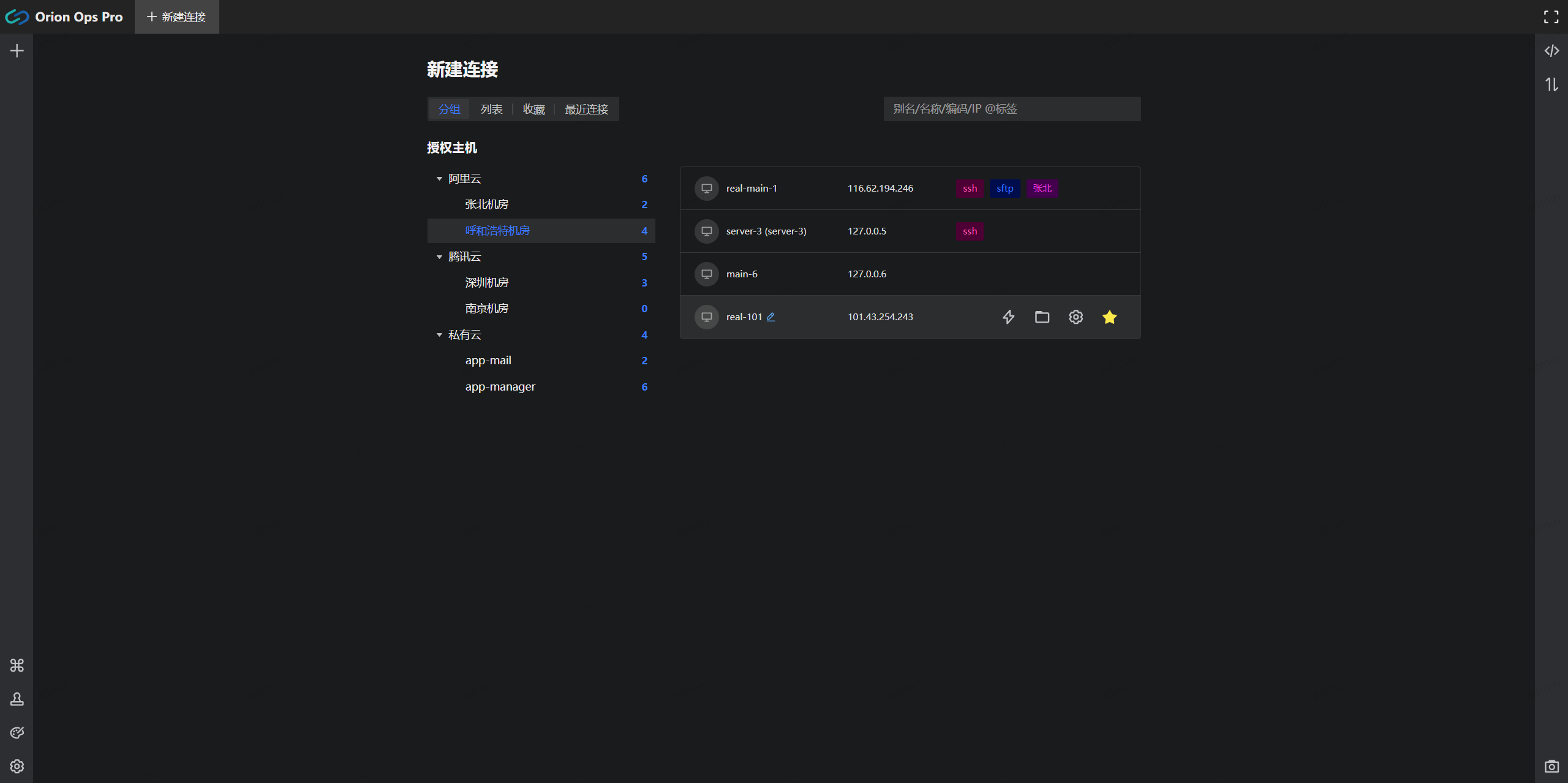
|
||||
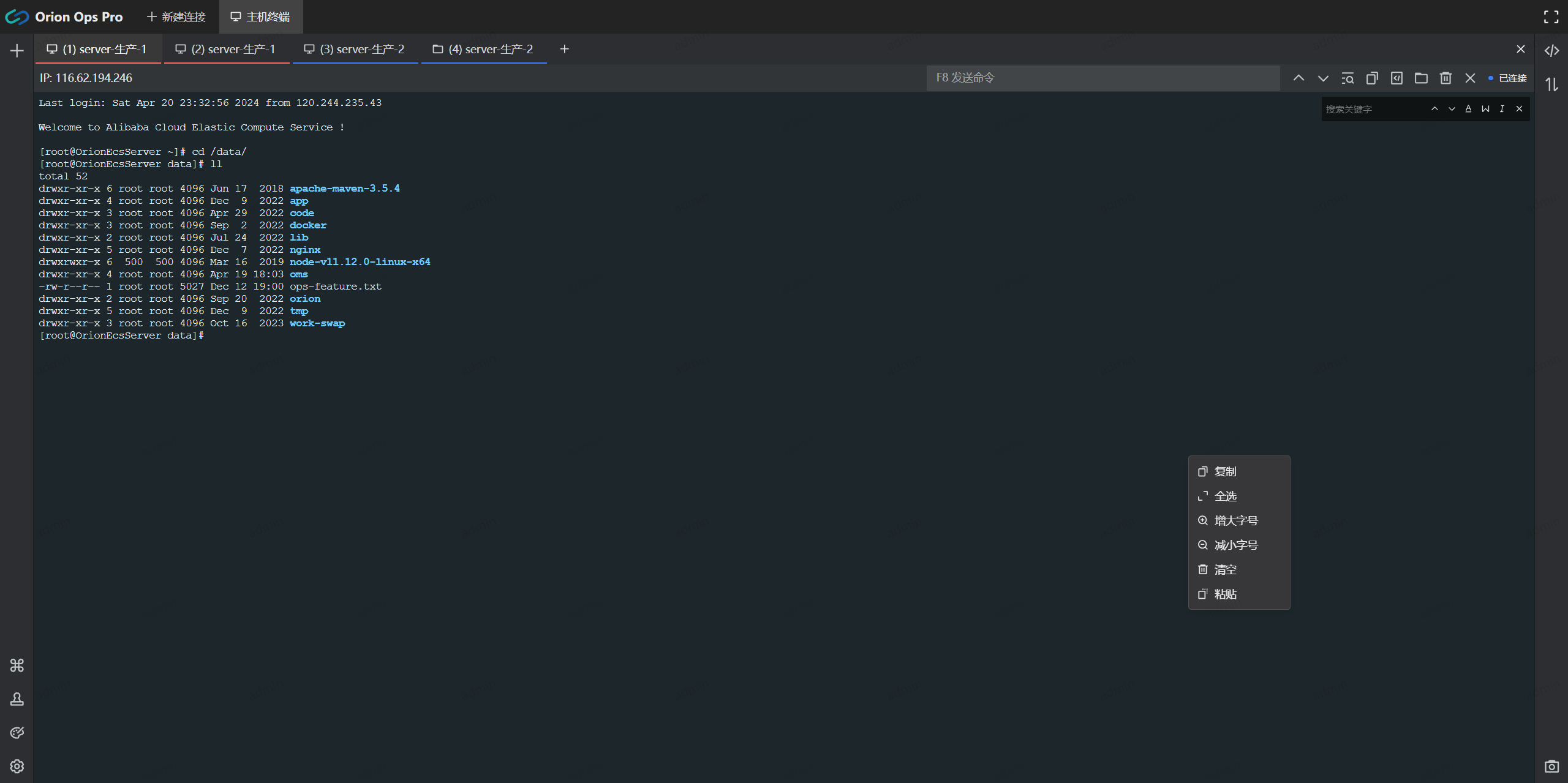
|
||||
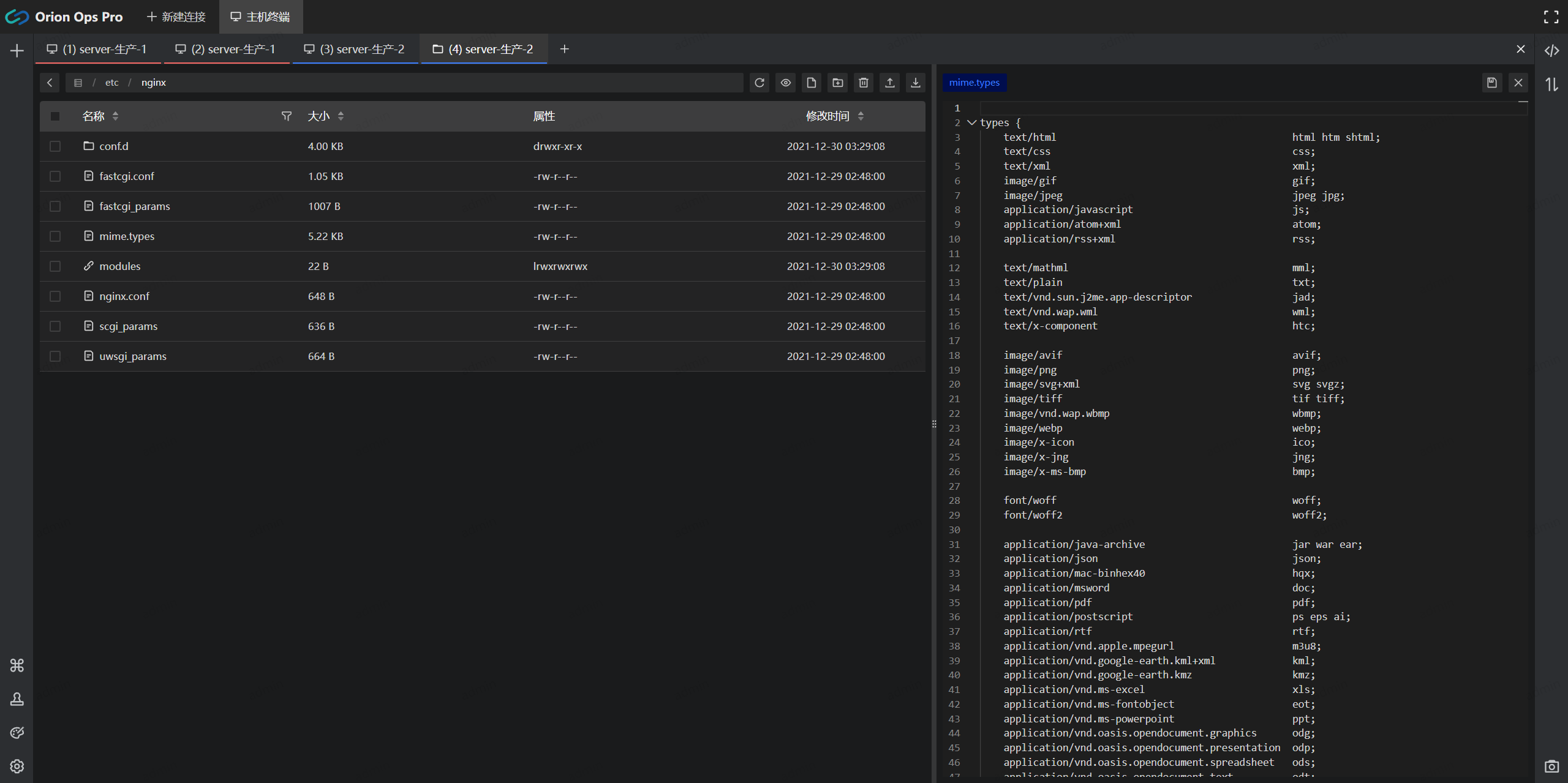
|
||||
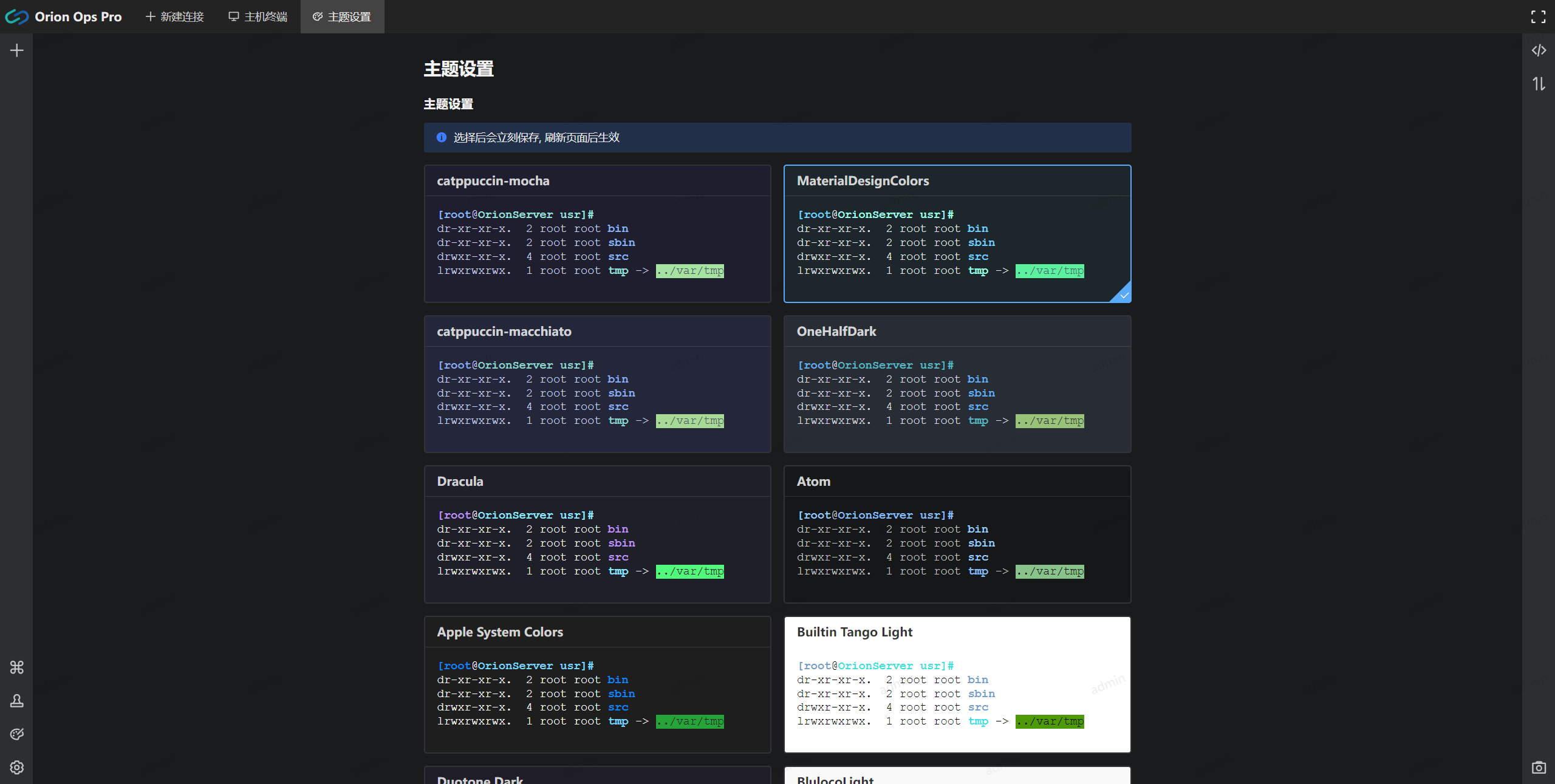
|
||||
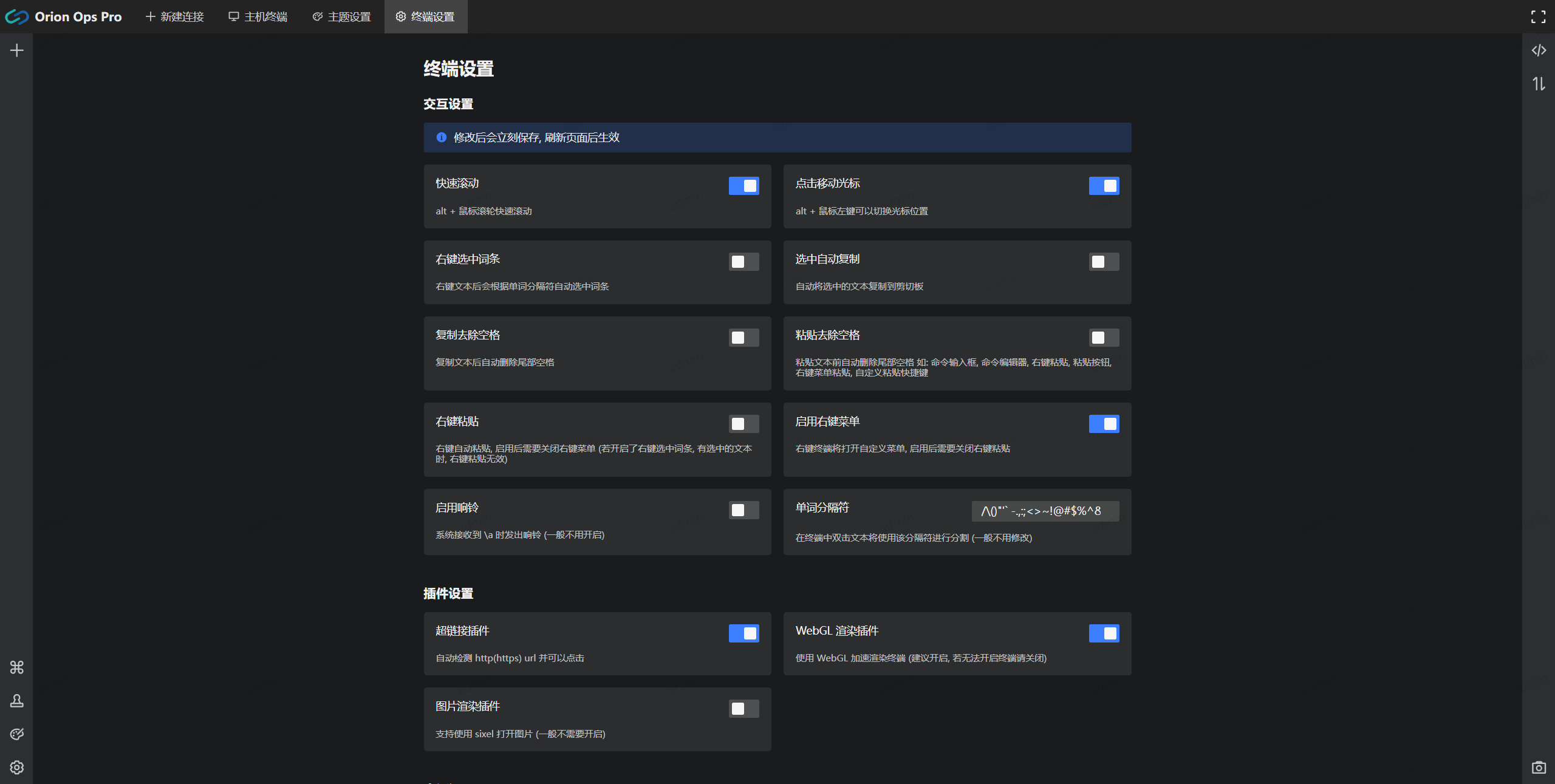
|
||||
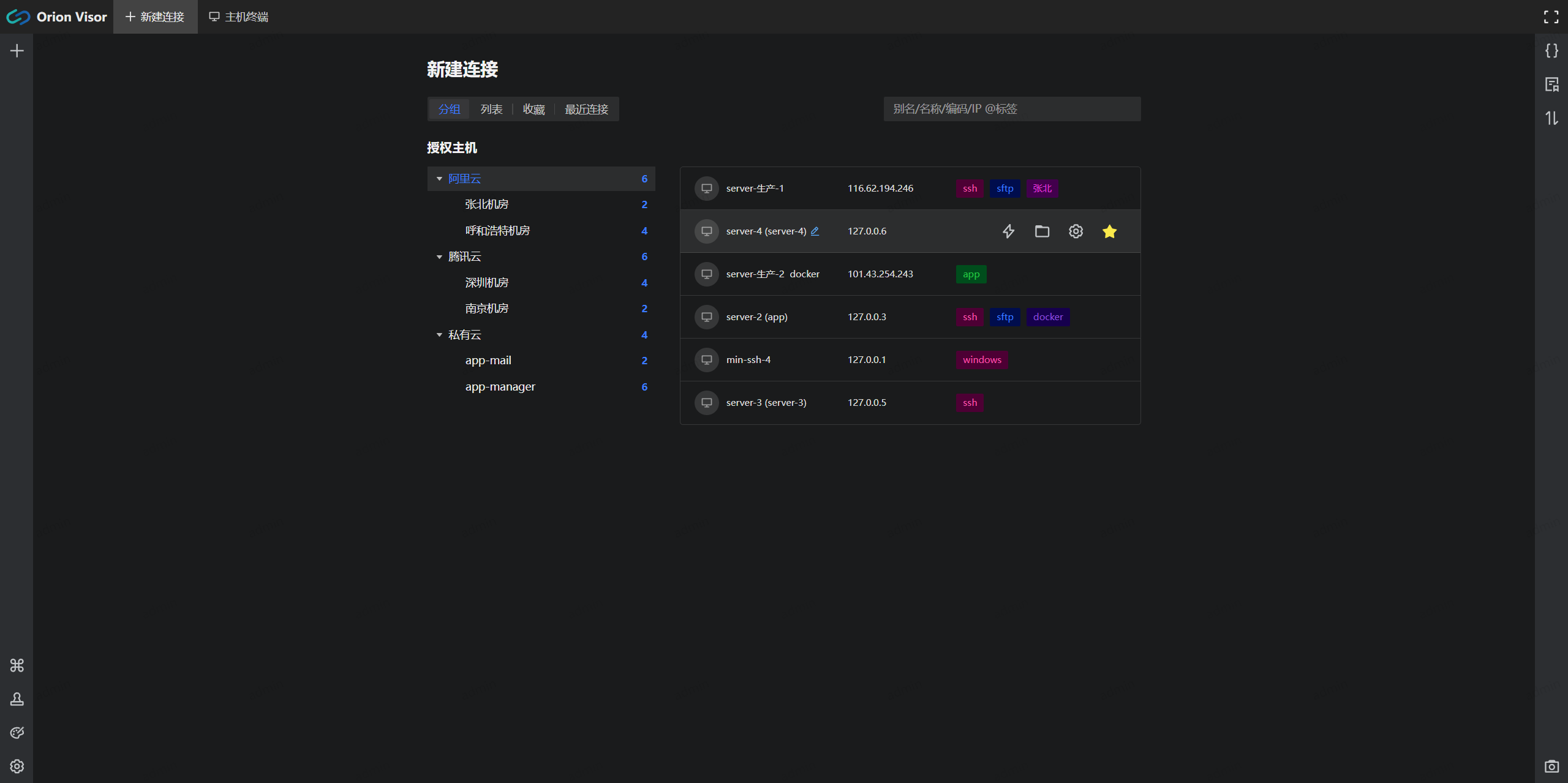
|
||||
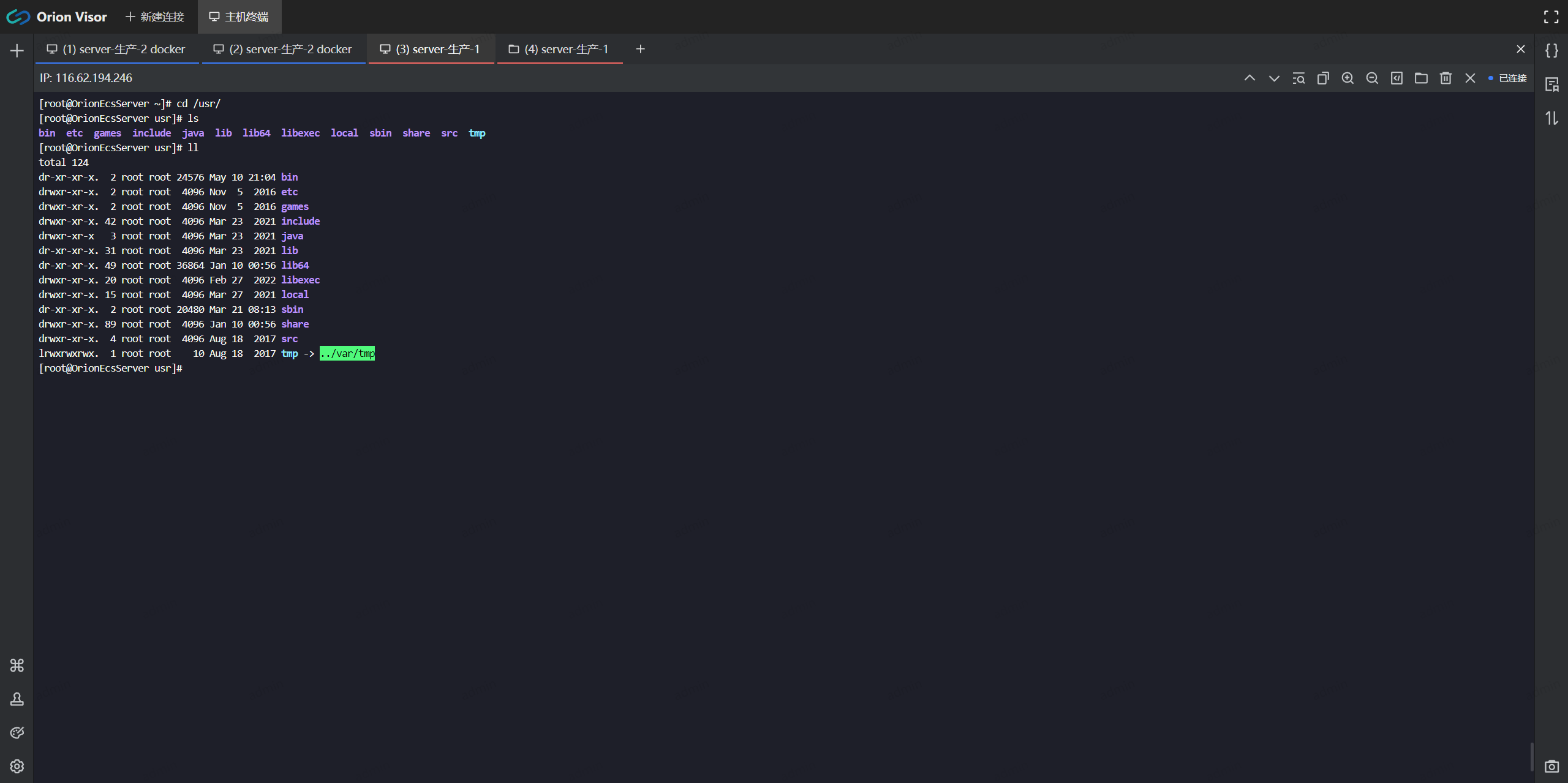
|
||||
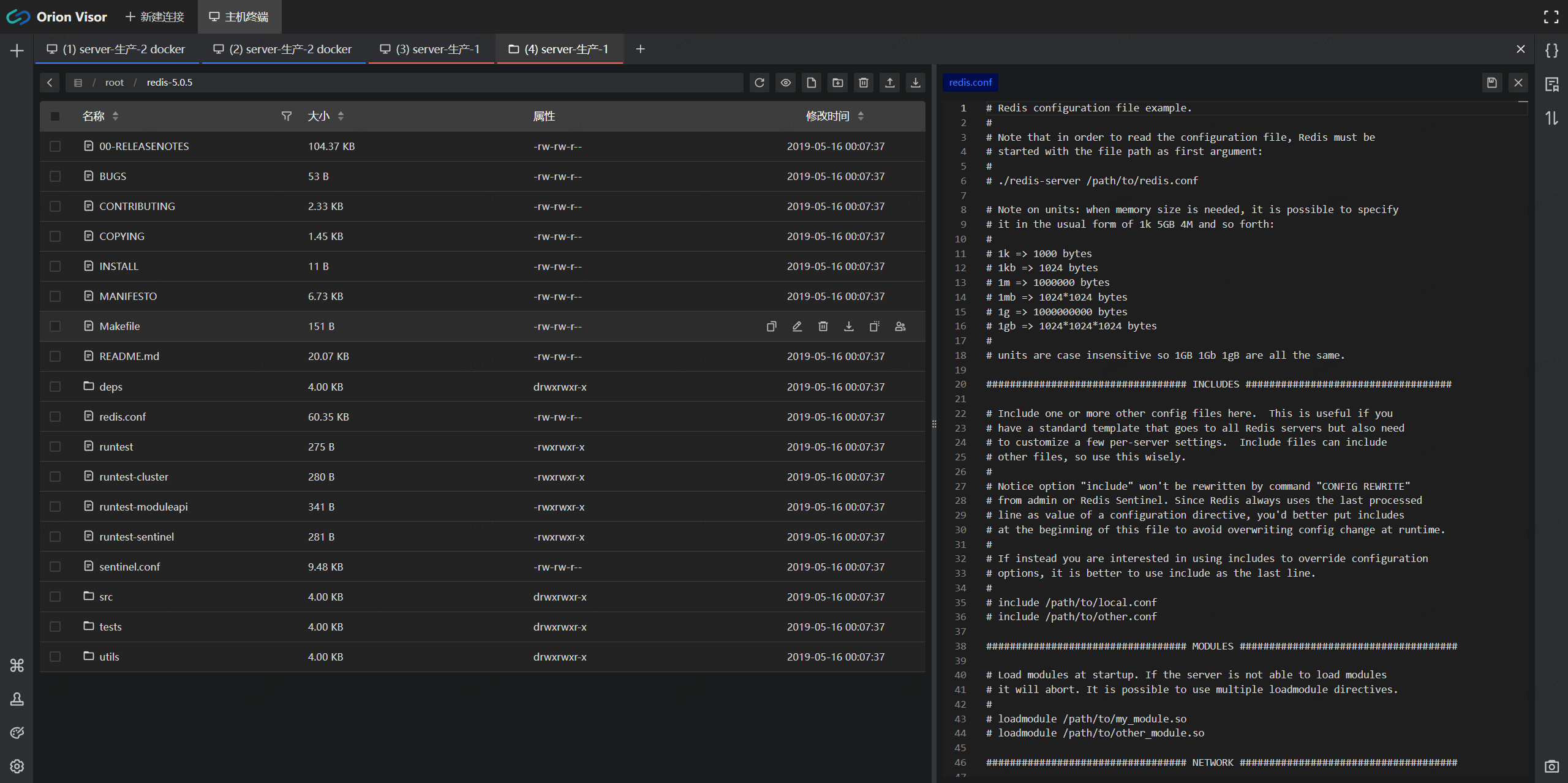
|
||||
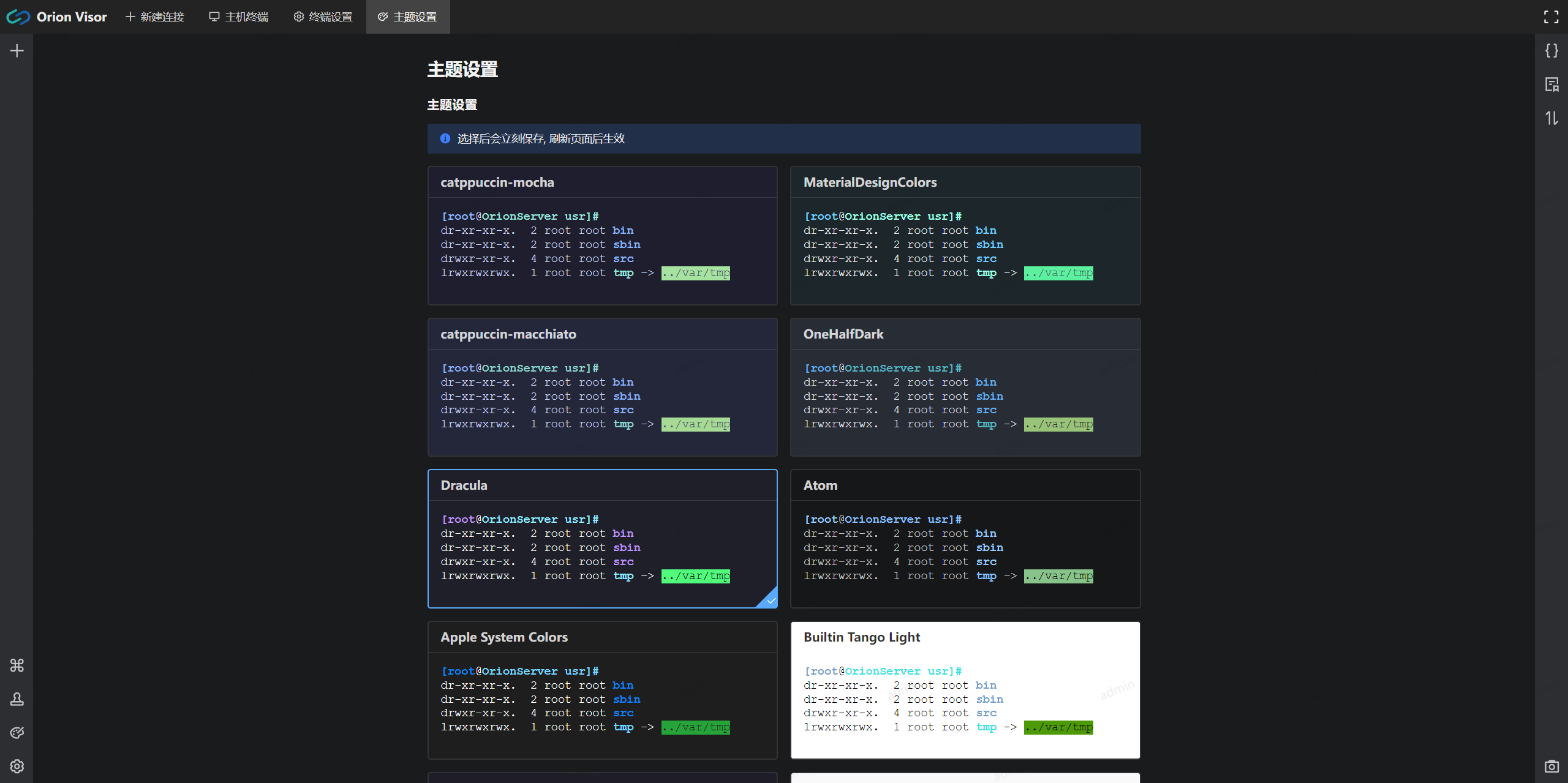
|
||||
|
||||
> 批量执行
|
||||
#### 批量执行
|
||||
|
||||
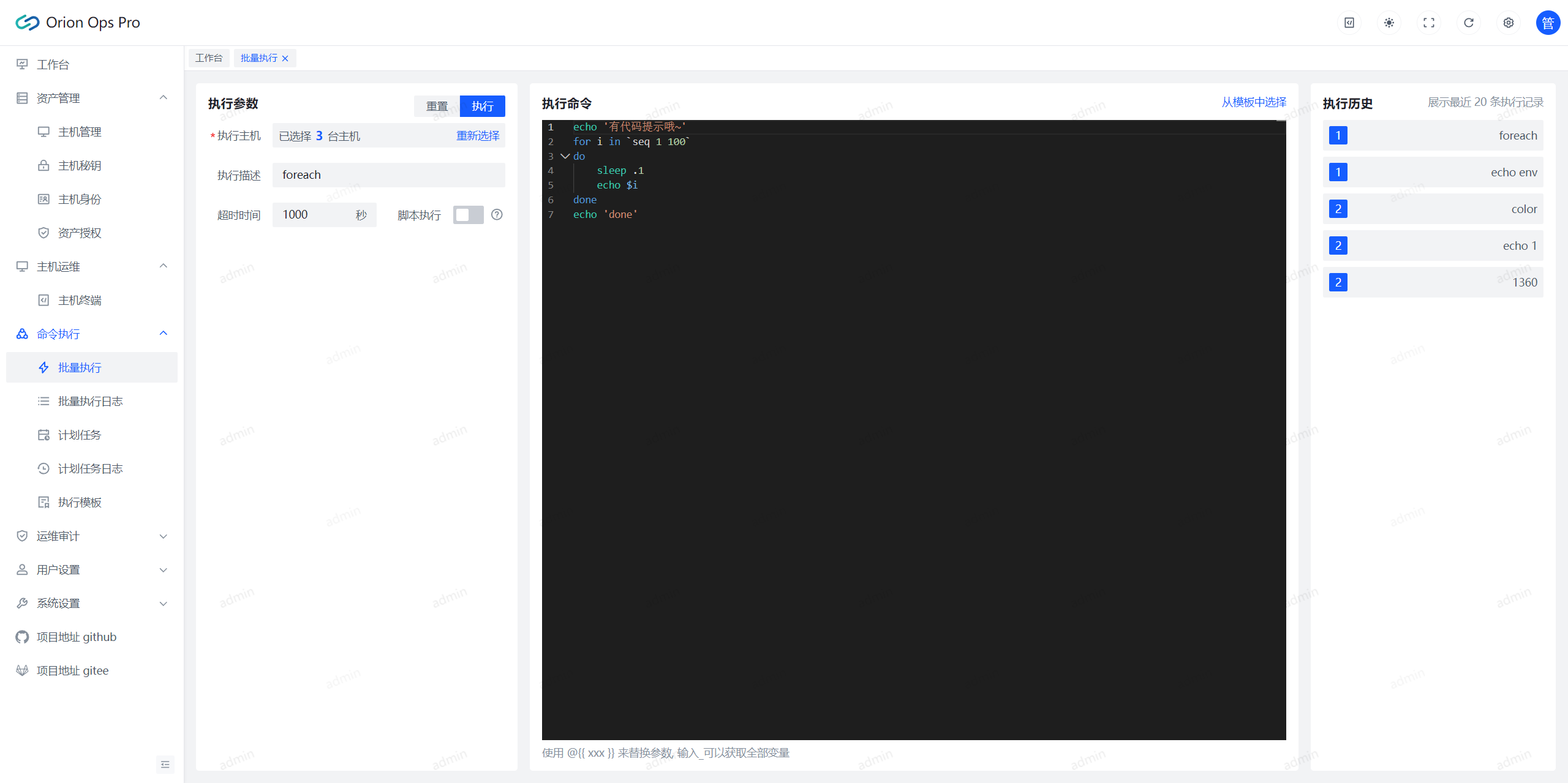
|
||||
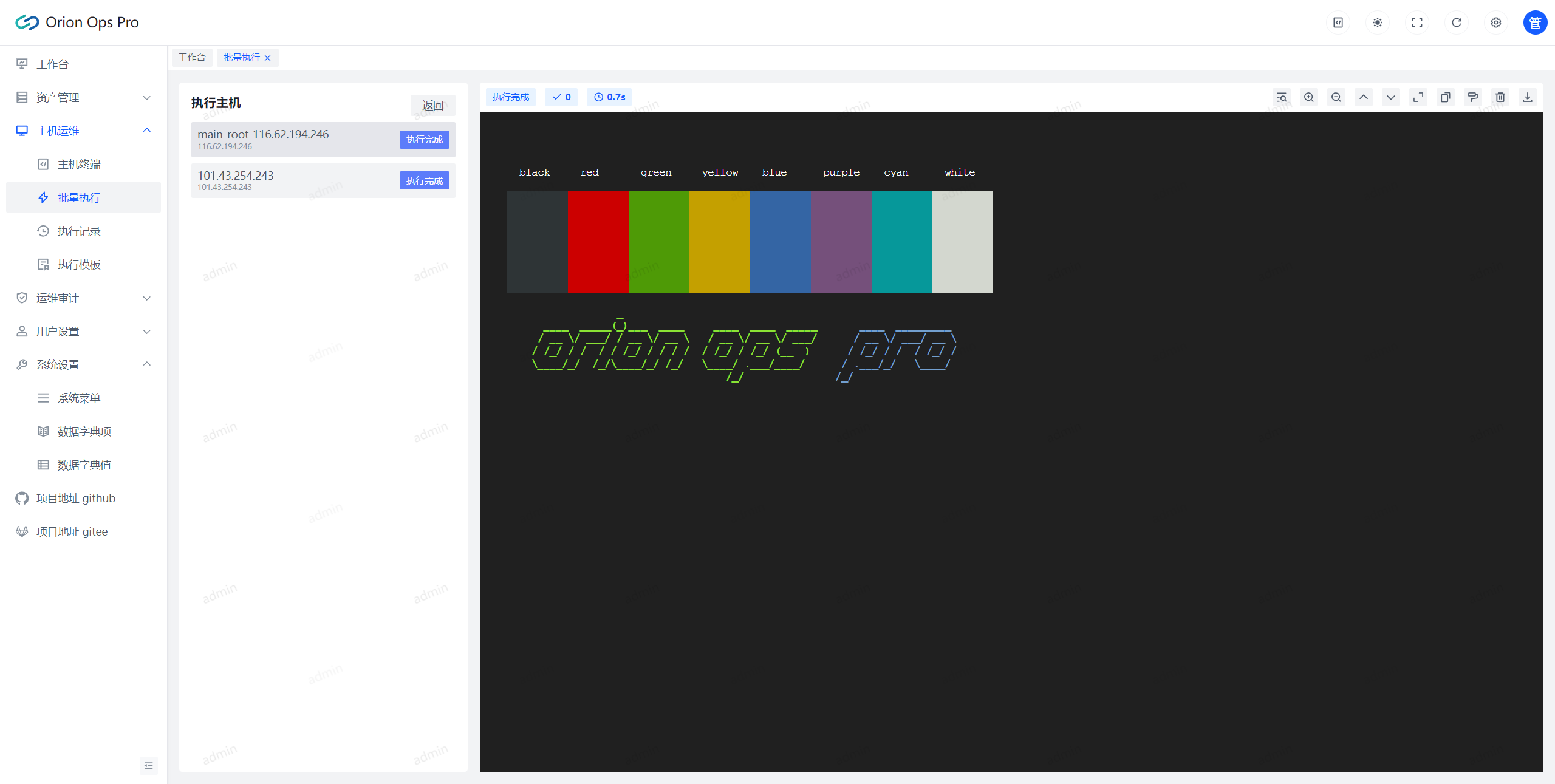
|
||||
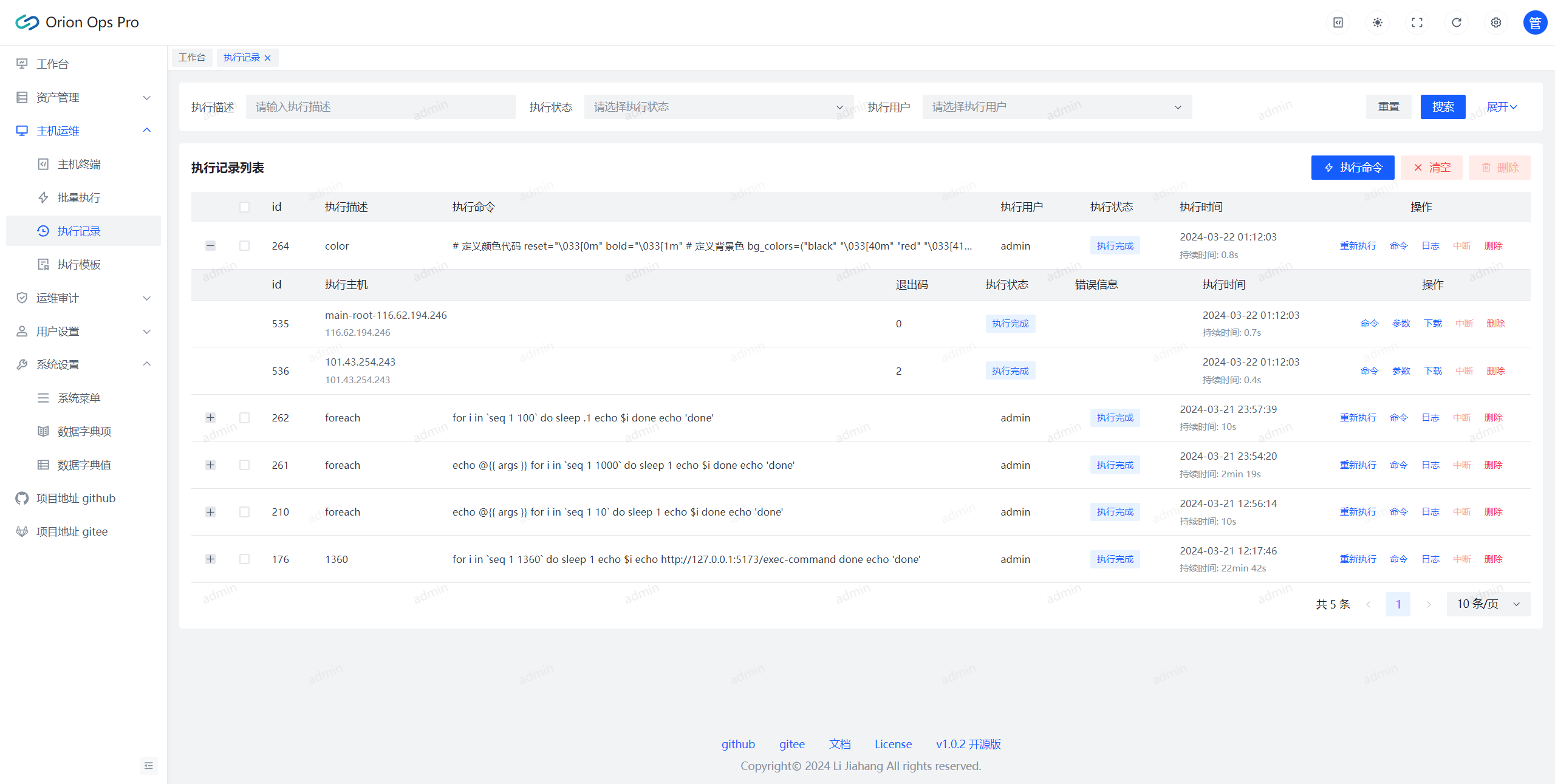
|
||||
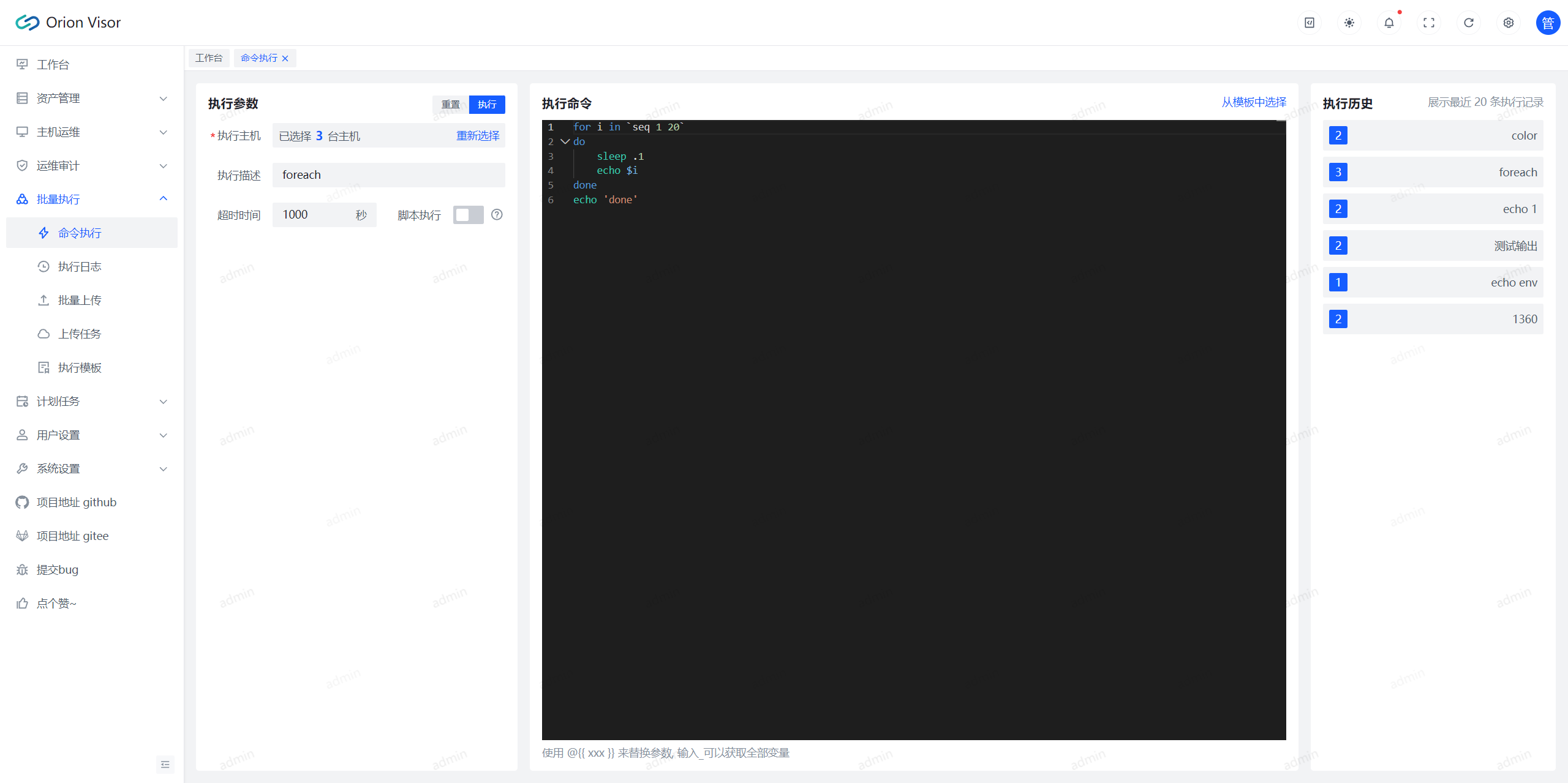
|
||||
|
||||
> 计划任务
|
||||
#### 批量上传
|
||||
|
||||
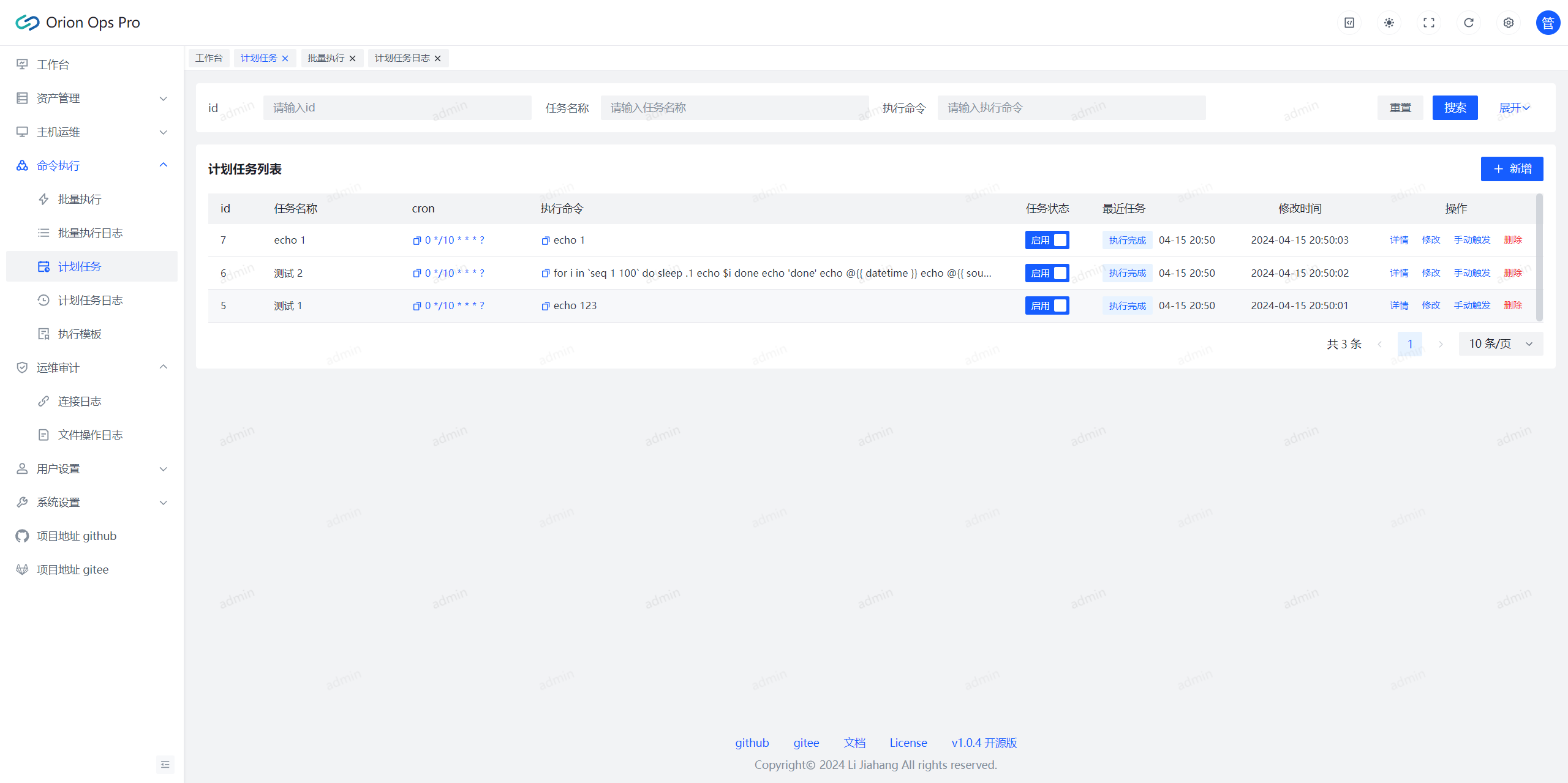
|
||||
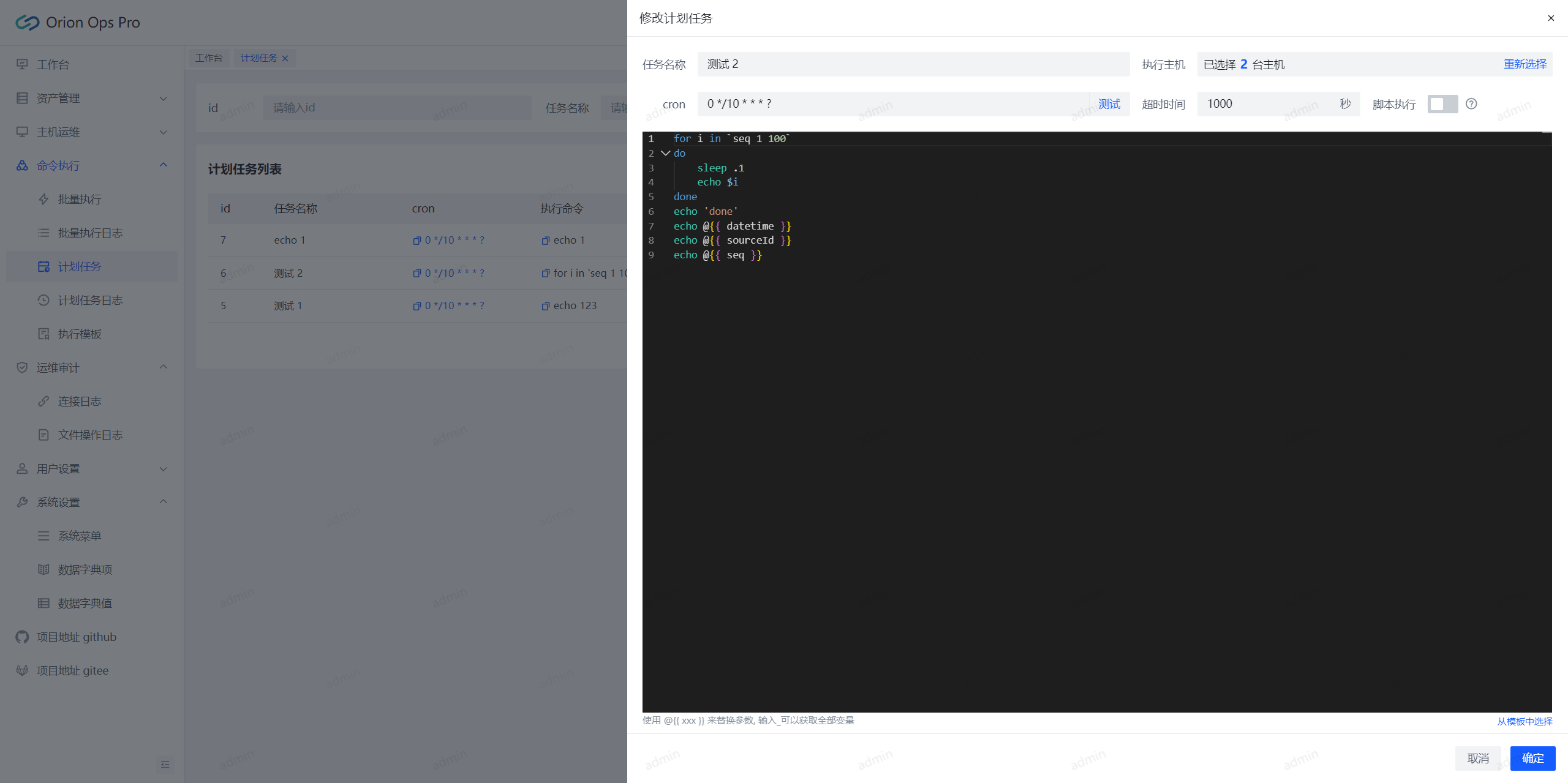
|
||||
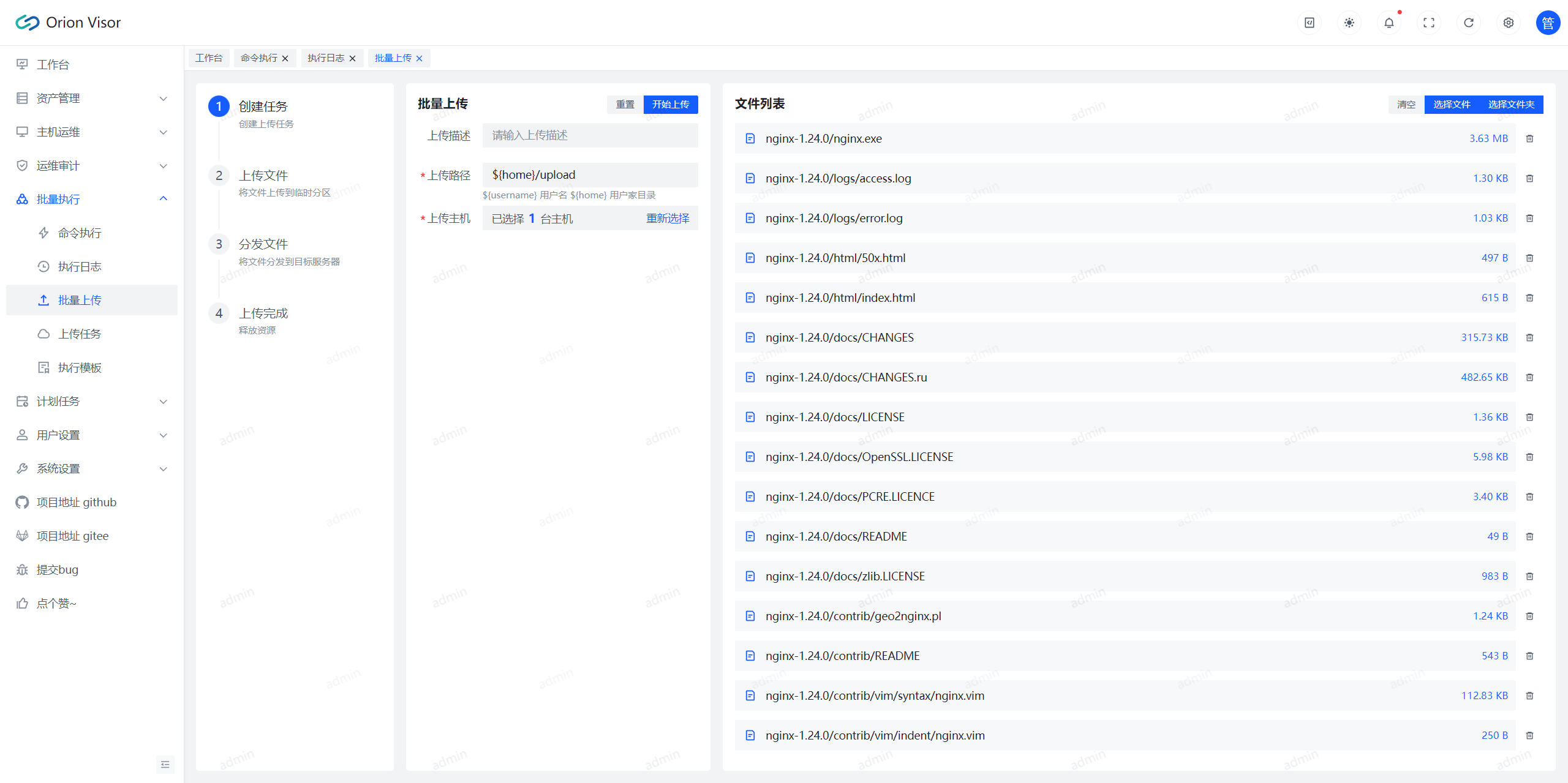
|
||||
|
||||
> 用户管理
|
||||
#### 计划任务
|
||||
|
||||
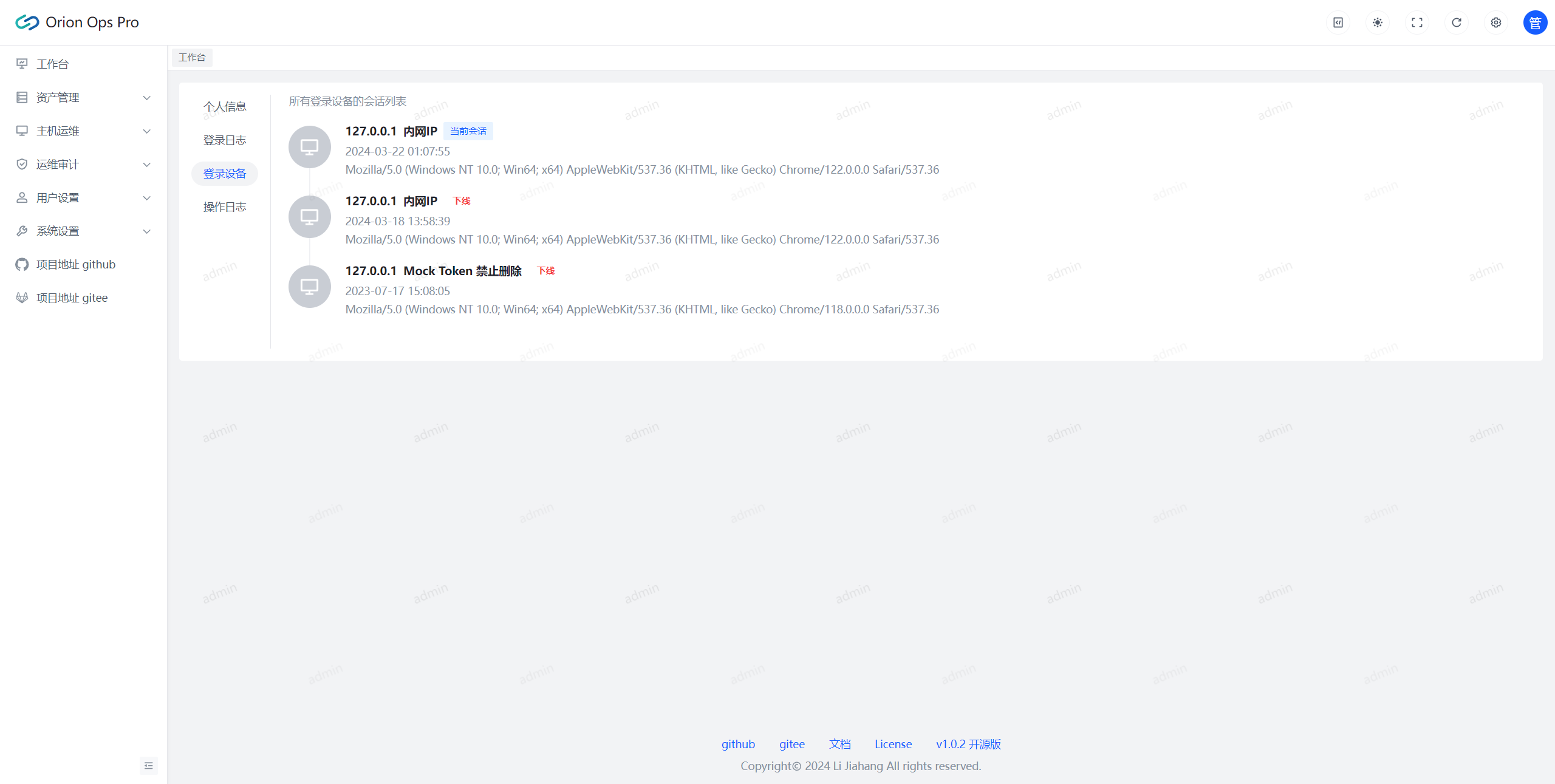
|
||||
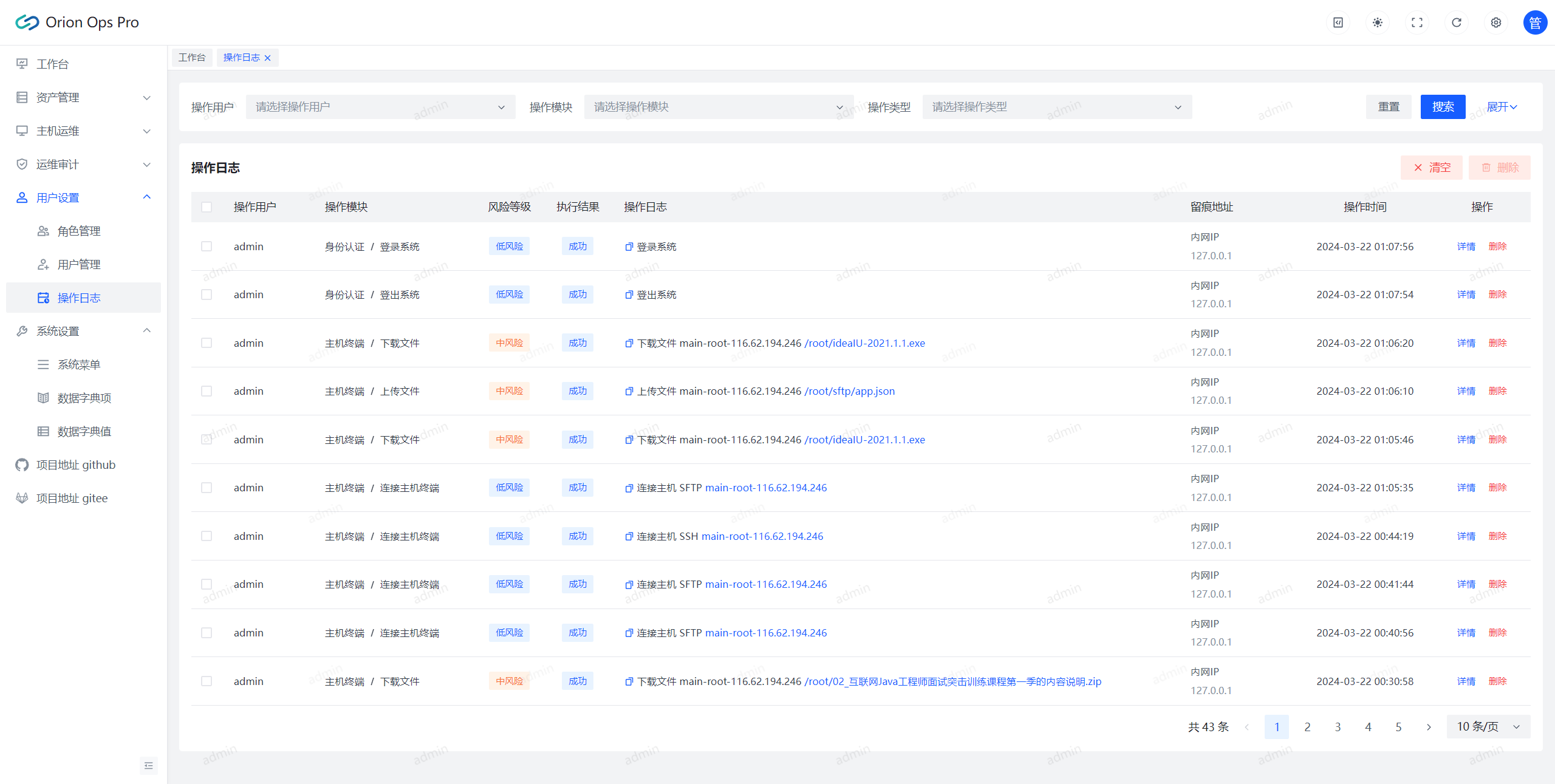
|
||||
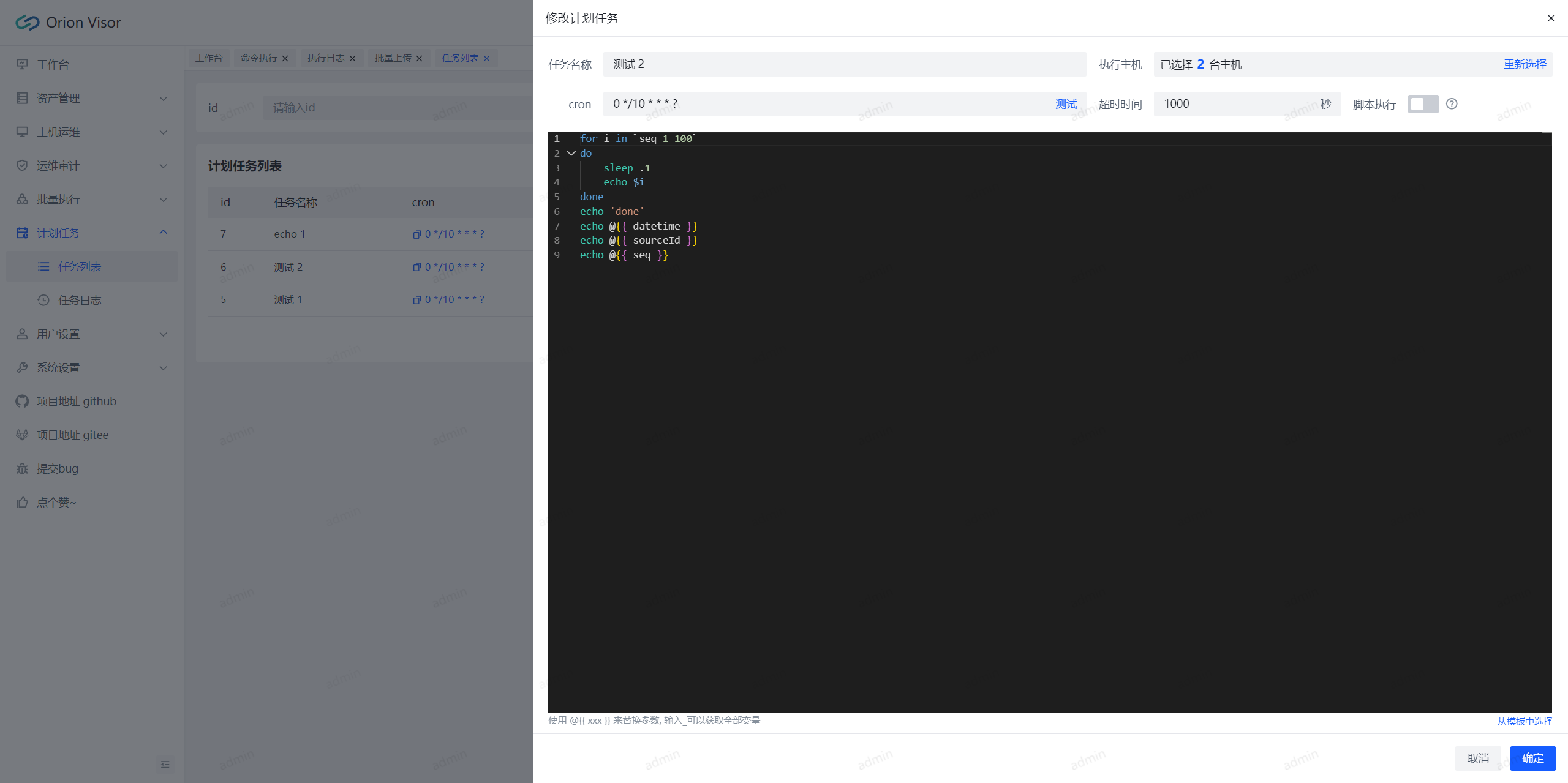
|
||||
|
||||
## Star History
|
||||
|
||||
[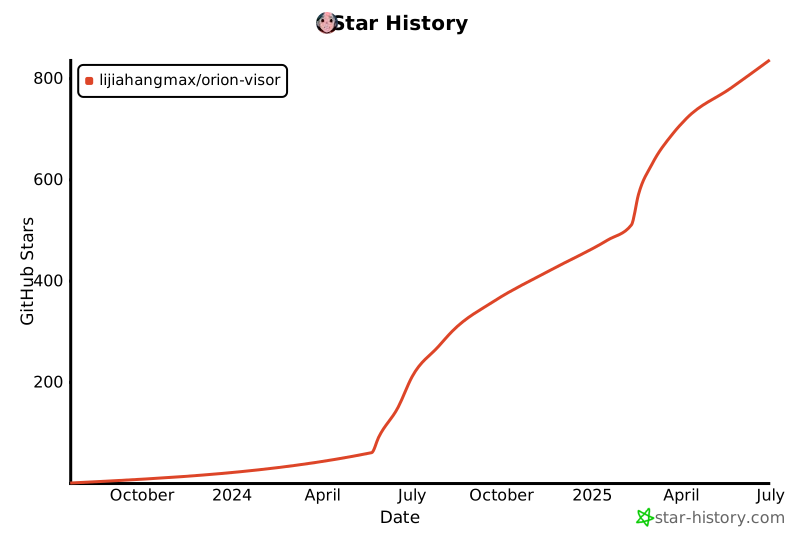](https://star-history.com/#lijiahangmax/orion-visor&Date)
|
||||
|
||||
## 联系我
|
||||
|
||||
<div style="display: flex;">
|
||||
<img src="https://bjuimg.obs.cn-north-4.myhuaweicloud.com/images/2024/2/27/d452cd30-cecd-4236-86f5-5ecbf3eac091.jpg" alt="qq" width="268px" height="398px"/>
|
||||
<img src="https://bjuimg.obs.cn-north-4.myhuaweicloud.com/images/2024/2/27/4f1c4e77-8e36-45a3-8be6-9da5387bb96e.jpg" alt="wx" width="298px" height="398px"/>
|
||||
<img src="https://bjuimg.obs.cn-north-4.myhuaweicloud.com/images/2024/5/17/d42d91f3-f0ee-4c63-adab-a35809e0804c.jpg" alt="wx" width="298px" height="398px"/>
|
||||
</div>
|
||||
|
||||
📧 咨询问题微信备注: ops
|
||||

|
||||

|
||||
|
||||
📧 咨询问题微信备注: vis
|
||||
📧 合作/功能定制备注: 合作
|
||||
|
||||
## 支持一下
|
||||
|
||||
<img src="https://bjuimg.obs.cn-north-4.myhuaweicloud.com/images/2024/2/27/8063cf87-9de9-4df2-8009-d5dea6d69861.jpg" alt="收款码" width="540px"/>
|
||||
<img src="https://bjuimg.obs.cn-north-4.myhuaweicloud.com/images/2024/5/17/a5351e59-294c-4bec-b767-1a44c362fcbc.jpg" alt="收款码" width="540px"/>
|
||||
|
||||
🎁 为了项目能健康持续的发展, 我期望获得相应的资金支持, 你们的支持是我不断更新前进的动力!
|
||||
|
||||
## 免责声明
|
||||
|
||||
在使用本项目之前, 请确保您已经了解并同意相关的使用协议和隐私政策。[免责声明](https://github.com/lijiahangmax/orion-ops-pro/blob/main/DISCLAIMER.md)
|
||||
在使用本项目之前, 请确保您已经了解并同意相关的使用协议和隐私政策。[免责声明](https://github.com/lijiahangmax/orion-visor/blob/main/DISCLAIMER.md)
|
||||
|
||||
## License
|
||||
|
||||
本项目遵循 [Apache-2.0](https://github.com/lijiahangmax/orion-ops-pro/blob/main/LICENSE) 开源许可证。
|
||||
本项目遵循 [Apache-2.0](https://github.com/lijiahangmax/orion-visor/blob/main/LICENSE) 开源许可证。
|
||||
|
||||
@@ -1,47 +1,49 @@
|
||||
version: '3.3'
|
||||
services:
|
||||
orion-ops-pro:
|
||||
image: registry.cn-hangzhou.aliyuncs.com/lijiahangmax/orion-ops-pro:1.0.6
|
||||
orion-visor-service:
|
||||
image: registry.cn-hangzhou.aliyuncs.com/lijiahangmax/orion-visor-service:2.0.2
|
||||
ports:
|
||||
- 1081:80
|
||||
environment:
|
||||
- MYSQL_HOST=orion-ops-pro-db
|
||||
- MYSQL_USER=orion
|
||||
- MYSQL_HOST=orion-visor-mysql
|
||||
- MYSQL_PORT=3306
|
||||
- MYSQL_DATABASE=orion_visor
|
||||
- MYSQL_USER=root
|
||||
- MYSQL_PASSWORD=Data@123456
|
||||
- REDIS_HOST=orion-ops-pro-redis
|
||||
- REDIS_HOST=orion-visor-redis
|
||||
- REDIS_PASSWORD=Data@123456
|
||||
- SECRET_KEY=uQeacXV8b3isvKLK
|
||||
- DEMO_MODE=false
|
||||
volumes:
|
||||
- /data/orion-ops-pro-space/docker-volumes/orion-ops-pro/logs:/root/orion/logs/orion-ops-pro
|
||||
- /data/orion-ops-pro-space/docker-volumes/orion-ops-pro/app:/root/orion/orion-ops-pro
|
||||
- /data/orion-visor-space/docker-volumes/orion-visor-service/root-orion:/root/orion
|
||||
depends_on:
|
||||
- orion-ops-pro-db
|
||||
- orion-ops-pro-redis
|
||||
orion-ops-pro-db:
|
||||
build:
|
||||
context: .
|
||||
dockerfile: docker/mysql/Dockerfile
|
||||
- orion-visor-mysql
|
||||
- orion-visor-redis
|
||||
orion-visor-mysql:
|
||||
image: registry.cn-hangzhou.aliyuncs.com/lijiahangmax/orion-visor-mysql:2.0.2
|
||||
privileged: true
|
||||
ports:
|
||||
- 3307:3306
|
||||
environment:
|
||||
- MYSQL_DATABASE=orion-ops-pro
|
||||
- MYSQL_DATABASE=orion_visor
|
||||
- MYSQL_USER=orion
|
||||
- MYSQL_PASSWORD=Data@123456
|
||||
- MYSQL_ROOT_PASSWORD=Data@123456
|
||||
volumes:
|
||||
- /data/orion-ops-pro-space/docker-volumes/mysql/var-lib-mysql:/var/lib/mysql
|
||||
- /data/orion-ops-pro-space/docker-volumes/mysql/var-lib-mysql-files:/var/lib/mysql-files
|
||||
- /data/orion-ops-pro-space/docker-volumes/mysql/etc-mysql:/etc/mysql
|
||||
orion-ops-pro-redis:
|
||||
image: redis:6.0.16-alpine
|
||||
command: redis-server --appendonly yes --requirepass Data@123456
|
||||
- /data/orion-visor-space/docker-volumes/orion-visor-mysql/var-lib-mysql:/var/lib/mysql
|
||||
- /data/orion-visor-space/docker-volumes/orion-visor-mysql/var-lib-mysql-files:/var/lib/mysql-files
|
||||
- /data/orion-visor-space/docker-volumes/orion-visor-mysql/etc-mysql:/etc/mysql
|
||||
orion-visor-redis:
|
||||
image: registry.cn-hangzhou.aliyuncs.com/lijiahangmax/orion-visor-redis:2.0.2
|
||||
privileged: true
|
||||
ports:
|
||||
- 6380:6379
|
||||
environment:
|
||||
- REDIS_PASSWORD=Data@123456
|
||||
volumes:
|
||||
- /data/orion-ops-pro-space/docker-volumes/redis/data:/data
|
||||
- /data/orion-ops-pro-space/docker-volumes/redis/redis.conf:/usr/local/etc/redis/redis.conf
|
||||
orion-ops-pro-adminer:
|
||||
- /data/orion-visor-space/docker-volumes/orion-visor-redis/data:/data
|
||||
command: sh -c "redis-server /usr/local/redis.conf --requirepass $${REDIS_PASSWORD}"
|
||||
orion-visor-adminer:
|
||||
image: adminer
|
||||
ports:
|
||||
- 8081:8080
|
||||
|
||||
8
docker-upgrade.sh
Normal file
@@ -0,0 +1,8 @@
|
||||
#/bin/bash
|
||||
docker compose down
|
||||
sh ./pull.sh
|
||||
# demo 启动
|
||||
if [ "$1" == "demo" ]; then
|
||||
sed -i 's/DEMO_MODE=false/DEMO_MODE=true/g' docker-compose.yml
|
||||
fi
|
||||
docker compose up -d
|
||||
@@ -1,3 +0,0 @@
|
||||
mv ../../orion-ops-launch/target/orion-ops-launch.jar ./
|
||||
mv ../../orion-ops-ui/dist ./dist
|
||||
docker build -t orion-ops-pro:1.0.6 .
|
||||
@@ -1,8 +1,9 @@
|
||||
FROM mysql:8.0.28
|
||||
COPY sql/init-1-schema-databases.sql /tmp
|
||||
COPY sql/init-2-schema-tables.sql /tmp
|
||||
COPY sql/init-3-data.sql /tmp
|
||||
COPY docker/mysql/my.cnf /etc/mysql/conf.d/my.cnf
|
||||
COPY ./sql/init-1-schema-databases.sql /tmp
|
||||
COPY ./sql/init-2-schema-tables.sql /tmp
|
||||
COPY ./sql/init-3-schema-quartz.sql /tmp
|
||||
COPY ./sql/init-4-data.sql /tmp
|
||||
COPY ./my.cnf /etc/mysql/conf.d/my.cnf
|
||||
RUN cat /tmp/init-1-schema-databases.sql >> /tmp/init.sql && \
|
||||
cat /tmp/init-2-schema-tables.sql >> /tmp/init.sql && \
|
||||
cat /tmp/init-3-schema-quartz.sql >> /tmp/init.sql && \
|
||||
7
docker/orion-visor-mysql/build.sh
Normal file
@@ -0,0 +1,7 @@
|
||||
#/bin/bash
|
||||
version=2.0.2
|
||||
cp -r ../../sql ./sql
|
||||
docker build -t orion-visor-mysql:${version} .
|
||||
rm -rf ./sql
|
||||
docker tag orion-visor-mysql:${version} registry.cn-hangzhou.aliyuncs.com/lijiahangmax/orion-visor-mysql:${version}
|
||||
docker push registry.cn-hangzhou.aliyuncs.com/lijiahangmax/orion-visor-mysql:${version}
|
||||
4
docker/orion-visor-redis/Dockerfile
Normal file
@@ -0,0 +1,4 @@
|
||||
FROM redis:6.0.16-alpine
|
||||
WORKDIR /data
|
||||
COPY ./redis.conf /tmp
|
||||
RUN cat /tmp/redis.conf > /usr/local/redis.conf
|
||||
5
docker/orion-visor-redis/build.sh
Normal file
@@ -0,0 +1,5 @@
|
||||
#/bin/bash
|
||||
version=2.0.2
|
||||
docker build -t orion-visor-redis:${version} .
|
||||
docker tag orion-visor-redis:${version} registry.cn-hangzhou.aliyuncs.com/lijiahangmax/orion-visor-redis:${version}
|
||||
docker push registry.cn-hangzhou.aliyuncs.com/lijiahangmax/orion-visor-redis:${version}
|
||||
1877
docker/orion-visor-redis/redis.conf
Normal file
@@ -2,13 +2,13 @@ FROM nginx:alpine
|
||||
USER root
|
||||
RUN \
|
||||
echo "" > /etc/apk/repositories && \
|
||||
echo "http://mirrors.aliyun.com/alpine/v3.8/main" >> /etc/apk/repositories &&\
|
||||
echo "http://mirrors.aliyun.com/alpine/v3.8/main" >> /etc/apk/repositories && \
|
||||
echo "http://mirrors.aliyun.com/alpine/v3.8/community" >> /etc/apk/repositories && \
|
||||
apk update
|
||||
RUN apk add openjdk8
|
||||
RUN rm -rf /etc/nginx/conf.d/*
|
||||
WORKDIR /app
|
||||
COPY ./orion-ops-launch.jar /app/app.jar
|
||||
COPY ./orion-visor-launch.jar /app/app.jar
|
||||
COPY ./dist /usr/share/nginx/html
|
||||
COPY ./entrypoint.sh /app/entrypoint.sh
|
||||
COPY ./nginx.conf /etc/nginx/conf.d
|
||||
9
docker/orion-visor-service/build.sh
Normal file
@@ -0,0 +1,9 @@
|
||||
#/bin/bash
|
||||
version=2.0.2
|
||||
mv ../../orion-visor-launch/target/orion-visor-launch.jar ./orion-visor-launch.jar
|
||||
mv ../../orion-visor-ui/dist ./dist
|
||||
docker build -t orion-visor-service:${version} .
|
||||
rm -rf ./orion-visor-launch.jar
|
||||
rm -rf ./dist
|
||||
docker tag orion-visor-service:${version} registry.cn-hangzhou.aliyuncs.com/lijiahangmax/orion-visor-service:${version}
|
||||
docker push registry.cn-hangzhou.aliyuncs.com/lijiahangmax/orion-visor-service:${version}
|
||||
@@ -26,16 +26,16 @@ server {
|
||||
try_files $uri $uri/ /index.html;
|
||||
}
|
||||
|
||||
location /orion/api {
|
||||
proxy_pass http://localhost:9200/orion/api;
|
||||
location /orion-visor/api {
|
||||
proxy_pass http://localhost:9200/orion-visor/api;
|
||||
proxy_set_header Host $host;
|
||||
proxy_set_header X-Real-IP $remote_addr;
|
||||
proxy_set_header X-Forwarded-For $proxy_add_x_forwarded_for;
|
||||
proxy_set_header X-Forwarded-Proto $scheme;
|
||||
}
|
||||
|
||||
location /orion/keep-alive {
|
||||
proxy_pass http://localhost:9200/orion/keep-alive;
|
||||
location /orion-visor/keep-alive {
|
||||
proxy_pass http://localhost:9200/orion-visor/keep-alive;
|
||||
proxy_http_version 1.1;
|
||||
proxy_set_header Upgrade $http_upgrade;
|
||||
proxy_set_header Connection "upgrade";
|
||||
@@ -1,6 +1,6 @@
|
||||
## 免责声明
|
||||
|
||||
> 欢迎您选择使用 orion-ops-pro(以下简称「本项目」)。在使用本项目前,请您仔细阅读本免责声明,并确保您已充分理解其中的内容。您的使用行为将视为对本声明全部内容的认可和接受。
|
||||
> 欢迎您选择使用 orion-visor(以下简称「本项目」)。在使用本项目前,请您仔细阅读本免责声明,并确保您已充分理解其中的内容。您的使用行为将视为对本声明全部内容的认可和接受。
|
||||
|
||||
> 本项目为一款开源免费的运维管理工具,采用 Apache 2.0 许可证授权。您可在遵守相关法律法规及许可证条款的前提下,自由修改和使用本项目。
|
||||
|
||||
|
||||
159
docs/README.md
@@ -1,107 +1,124 @@
|
||||
<h1 style="display: flex; align-items: center;">
|
||||
<img style="margin-right: 8px;" src="./assert/logo.svg" width="32px" height="32px"/> orion-ops-pro 是什么
|
||||
</h1>
|
||||
|
||||
`orion-ops-pro`
|
||||
是一款现代化、高颜值的一站式智能运维管理平台,集资产管理、资产授权、批量执行、计划任务、WebShell、WebSftp、角色管理、系统管理等功能于一体,致力于简化运维团队的治理工作。
|
||||
|
||||
<p style="text-align: left">
|
||||
<a target="_blank" style="text-decoration: none" href="https://app.codacy.com/gh/lijiahangmax/orion-ops-pro/dashboard?utm_source=gh&utm_medium=referral&utm_content=&utm_campaign=Badge_grade">
|
||||
<img src="https://app.codacy.com/project/badge/Grade/49eaab3a9a474af3b87e1d21ffec71c4" alt="quality"/>
|
||||
<div align="center"><img src="./assert/logo.svg" alt="logo" width="32" /></div>
|
||||
<p style="margin-top: 12px" align="center"><b>一款高颜值、现代化的智能运维&轻量堡垒机平台。</b></p>
|
||||
<p align="center">
|
||||
<a target="_blank"
|
||||
style="text-decoration: none !important;"
|
||||
href="https://app.codacy.com/gh/lijiahangmax/orion-visor/dashboard?utm_source=gh&utm_medium=referral&utm_content=&utm_campaign=Badge_grade">
|
||||
<img src="https://app.codacy.com/project/badge/Grade/49eaab3a9a474af3b87e1d21ffec71c4" alt="quality" />
|
||||
</a>
|
||||
<a target="_blank"
|
||||
style="text-decoration: none !important;"
|
||||
href="https://www.apache.org/licenses/LICENSE-2.0">
|
||||
<img src="https://img.shields.io/github/license/lijiahangmax/orion-visor" alt="License" />
|
||||
</a>
|
||||
<a target="_blank"
|
||||
style="text-decoration: none !important;"
|
||||
href="https://github.com/lijiahangmax/orion-visor/releases">
|
||||
<img src="https://img.shields.io/github/v/release/lijiahangmax/orion-visor" alt="release" />
|
||||
</a>
|
||||
<a target="_blank"
|
||||
style="text-decoration: none !important;"
|
||||
href="https://gitee.com/lijiahangmax/orion-visor/stargazers">
|
||||
<img src="https://gitee.com/lijiahangmax/orion-visor/badge/star.svg?theme=dark" alt="star" />
|
||||
</a>
|
||||
<a target="_blank"
|
||||
style="text-decoration: none !important;"
|
||||
href="https://gitee.com/lijiahangmax/orion-visor/members">
|
||||
<img src="https://gitee.com/lijiahangmax/orion-visor/badge/fork.svg?theme=dark" alt="fork" />
|
||||
</a>
|
||||
<a target="_blank"
|
||||
style="text-decoration: none !important;"
|
||||
href="https://github.com/lijiahangmax/orion-visor">
|
||||
<img src="https://img.shields.io/github/stars/lijiahangmax/orion-visor" alt="star" />
|
||||
</a>
|
||||
<a target="_blank"
|
||||
style="text-decoration: none !important;"
|
||||
href="https://github.com/lijiahangmax/orion-visor">
|
||||
<img src="https://img.shields.io/github/forks/lijiahangmax/orion-visor" alt="star" />
|
||||
</a>
|
||||
<a target="_blank" style="text-decoration: none" href="https://www.oracle.com/java/technologies/javase/javase-jdk8-downloads.html">
|
||||
<img src="https://img.shields.io/badge/JDK-8+-green.svg" alt="jdk8"/>
|
||||
</a>
|
||||
<a target="_blank" style="text-decoration: none" href="https://www.apache.org/licenses/LICENSE-2.0">
|
||||
<img src="https://img.shields.io/github/license/lijiahangmax/orion-ops-pro" alt="License"/>
|
||||
</a>
|
||||
<a target="_blank" style="text-decoration: none" href="https://gitee.com/lijiahangmax/orion-ops-pro/stargazers">
|
||||
<img src="https://gitee.com/lijiahangmax/orion-ops-pro/badge/star.svg?theme=dark" alt="star"/>
|
||||
</a>
|
||||
<a target="_blank" style="text-decoration: none" href="https://gitee.com/lijiahangmax/orion-ops-pro/members">
|
||||
<img src="https://gitee.com/lijiahangmax/orion-ops-pro/badge/fork.svg?theme=dark" alt="fork"/>
|
||||
</a>
|
||||
<a target="_blank" style="text-decoration: none" href="https://github.com/lijiahangmax/orion-ops-pro">
|
||||
<img src="https://img.shields.io/github/stars/lijiahangmax/orion-ops-pro.svg?style=social" alt="star"/>
|
||||
</a>
|
||||
</p>
|
||||
|
||||
当前版本: **1.0.6**
|
||||
------------------------------
|
||||
|
||||
**github:** https://github.com/lijiahangmax/orion-ops-pro
|
||||
**gitee:** https://gitee.com/lijiahangmax/orion-ops-pro
|
||||
**文档:** https://lijiahangmax.gitee.io/orion-ops-pro/#/
|
||||
**demo:** http://101.43.254.243:1081/
|
||||
**`orion-visor`** 提供一站式服务器运维解决方案。
|
||||
|
||||
* **资产管理**:支持对资产进行分组,实现对主机、密钥和身份的统一管理和授权。
|
||||
* **在线终端**:提供在线 Terminal 服务,支持快捷命令、大文件上传、在线编辑等操作。
|
||||
* **批量操作**:支持批量执行主机命令、多主机文件分发等功能。
|
||||
* **计划任务**:支持配置 cron 表达式,定时执行主机命令。
|
||||
* **安全可靠**:动态配置权限,记录用户操作日志,提供简单的审计功能。
|
||||
|
||||
## 演示环境
|
||||
|
||||
演示地址: http://101.43.254.243:1081/
|
||||
演示账号: admin/admin
|
||||
|
||||
演示账号: `admin`
|
||||
演示密码: `admin`
|
||||
⭐ 体验后可以点一下 `star` 这对我很重要!
|
||||
🌈 如果本项目对你有帮助请帮忙推广一下 让更多的人知道此项目!
|
||||
📞 合作/功能定制请联系底部 备注: '合作'
|
||||
|
||||
## 特性
|
||||
|
||||
* **快速稳定**: 使用全新的系统架构, 提高系统性能以及稳定性。
|
||||
* **交互友好**: 对与用户的交互进行了细致化的打磨, 操作更加方便快捷。
|
||||
* **资产管理**: 支持对资产进行分组, 实现对主机、秘钥和身份的统一管理和授权。
|
||||
* **权限控制**: 全面管理用户角色, 支持动态菜单配置和强制下线等功能。
|
||||
* **在线终端**: 提供便捷的在线 Web 终端服务, 支持快捷命令、自定义快捷键和主题风格。
|
||||
* **文件管理**: 实现远程主机大文件的批量上传、下载和在线编辑等操作。
|
||||
* **批量操作**: 支持远程主机批量执行主机命令。
|
||||
* **计划任务**: 支持配置 cron 表达式, 定时执行主机命令。
|
||||
* **操作审计**: 记录用户操作日志,确保操作可追溯, 提高系统安全性。
|
||||
🌈 如果本项目对你有帮助请帮忙推广一下 让更多的人知道此项目!
|
||||
[github](https://github.com/lijiahangmax/orion-visor) [gitee](https://gitee.com/lijiahangmax/orion-visor)
|
||||
|
||||
## 快速开始
|
||||
|
||||
* [docker安装](https://lijiahangmax.gitee.io/orion-ops-pro/#/quickstart/docker-install)
|
||||
* [普通安装](https://lijiahangmax.gitee.io/orion-ops-pro/#/quickstart/install)
|
||||
* [更新日志](https://lijiahangmax.gitee.io/orion-ops-pro/#/about/change-log)
|
||||
* [操作手册](https://lijiahangmax.gitee.io/orion-ops-pro/#/operator/asset)
|
||||
* [常见问题](https://lijiahangmax.gitee.io/orion-ops-pro/#/quickstart/faq)
|
||||
```bash
|
||||
# clone
|
||||
git clone https://github.com/lijiahangmax/orion-visor
|
||||
cd orion-visor
|
||||
# 启动
|
||||
docker compose up -d
|
||||
```
|
||||
|
||||
## 项目文档
|
||||
|
||||
* [文档地址](https://lijiahangmax.github.io/orion-visor/#/)
|
||||
* [docker安装](/quickstart/docker-install)
|
||||
* [普通安装](/quickstart/install)
|
||||
* [更新日志](/about/change-log)
|
||||
* [操作手册](/operator/asset)
|
||||
* [常见问题](/quickstart/faq)
|
||||
|
||||
## 技术栈
|
||||
|
||||
* Docker
|
||||
* SpringBoot
|
||||
* Mysql
|
||||
* Redis
|
||||
* Vue3
|
||||
* Arco Design
|
||||
* SpringBoot 2.7.17
|
||||
* Mysql 8.0.+
|
||||
* Redis 6.0.+
|
||||
* Vue3 3.2.+
|
||||
* Arco Design 2.55.+
|
||||
|
||||
## 主要功能预览
|
||||
|
||||
> 主机终端
|
||||
#### 主机终端
|
||||
|
||||

|
||||

|
||||

|
||||

|
||||

|
||||
|
||||
> 批量执行
|
||||
#### 批量执行
|
||||
|
||||

|
||||

|
||||

|
||||
|
||||
> 计划任务
|
||||
#### 批量上传
|
||||
|
||||

|
||||

|
||||

|
||||
|
||||
> 用户管理
|
||||
#### 计划任务
|
||||
|
||||

|
||||

|
||||

|
||||
|
||||
## Star History
|
||||
|
||||
[](https://star-history.com/#lijiahangmax/orion-visor&Date)
|
||||
|
||||
## 联系我
|
||||
|
||||
<div style="display: flex;">
|
||||
<img src="./assert/img/qq_group1.jpg" alt="qq" width="268px" height="398px"/>
|
||||
<img src="./assert/img/wx.jpg" alt="wx" width="298px" height="398px"/>
|
||||
</div>
|
||||
|
||||
📧 咨询问题微信备注: ops
|
||||

|
||||

|
||||
|
||||
📧 咨询问题微信备注: vis
|
||||
📧 合作/功能定制备注: 合作
|
||||
|
||||
## 支持一下
|
||||
@@ -116,4 +133,4 @@
|
||||
|
||||
## License
|
||||
|
||||
本项目遵循 [Apache-2.0](https://github.com/lijiahangmax/orion-ops-pro/blob/main/LICENSE) 开源许可证。
|
||||
本项目遵循 [Apache-2.0](https://github.com/lijiahangmax/orion-visor/blob/main/LICENSE) 开源许可证。
|
||||
|
||||
@@ -1,4 +1,4 @@
|
||||
# orion-ops-pro <small>1.0.6</small>
|
||||
# orion-visor <small>2.0.2</small>
|
||||
|
||||
> 一款开箱即用的运维平台。
|
||||
|
||||
@@ -6,6 +6,6 @@
|
||||
- 安全 稳定
|
||||
- 智能 高效
|
||||
|
||||
[GitHub](https://github.com/lijiahangmax/orion-ops-pro)
|
||||
[Gitee](https://gitee.com/lijiahangmax/orion-ops-pro)
|
||||
[GitHub](https://github.com/lijiahangmax/orion-visor)
|
||||
[Gitee](https://gitee.com/lijiahangmax/orion-visor)
|
||||
[Get Started](README.md)
|
||||
|
||||
@@ -9,7 +9,8 @@
|
||||
* 操作手册
|
||||
* [资产管理](operator/asset.md)
|
||||
* [主机运维](operator/host-ops.md)
|
||||
* [命令执行](operator/exec.md)
|
||||
* [运维审计](operator/asset-audit.md)
|
||||
* [批量执行](operator/exec.md)
|
||||
* [计划任务](operator/job.md)
|
||||
* [用户管理](operator/user.md)
|
||||
* [系统管理](operator/system.md)
|
||||
|
||||
@@ -2,11 +2,65 @@
|
||||
|
||||
### 升级须知
|
||||
|
||||
* 应用 **不支持** 跨版本升级, 可以进行 **多次升级**。
|
||||
* docker 安装的 sql 脚本可以在 `adminer` 中执行。
|
||||
* 应用 **不支持** 跨版本升级, 可以进行 **多次升级**
|
||||
* docker 安装的 sql 脚本可以在 `adminer` 中执行
|
||||
* 执行完成菜单 sql 后请刷新缓存 `系统设置` > `系统菜单` > `刷新缓存`
|
||||
* 执行完成字典 sql 后请刷新缓存 `系统设置` > `数据字典项` > `刷新缓存`
|
||||
|
||||
### docker 升级流程
|
||||
|
||||
* 备份 `volumes` (必要时可以回滚)
|
||||
* 进入 `adminer` 执行升级的 `sql` 脚本
|
||||
* 执行 升级的 `bash` 脚本
|
||||
* 进入 代码目录执行 `sh docker-upgrade.sh` 进行容器升级 `down` > `pull` > `up -d`
|
||||
|
||||
### v2.0.2
|
||||
|
||||
`2024-05-24` `release`
|
||||
|
||||
* 🐞 修复 资产授权密钥时间显示错误
|
||||
* 🌈 添加 演示模式
|
||||
* ⭐ 支持 Chrome PWA
|
||||
|
||||
### v2.0.1
|
||||
|
||||
`2024-05-21` `release`
|
||||
|
||||
* ⭐ 添加 cron 组件
|
||||
* 🐞 修复 批量执行后日志偶尔不展示的问题
|
||||
* 🐞 修复 批量上传进度条显示异常的问题
|
||||
|
||||
### v2.0.0
|
||||
|
||||
`2024-05-17` `release`
|
||||
|
||||
* ⭐ 修改 项目名称为 `orion-visor`
|
||||
* 🩰 修改 终端默认字体
|
||||
|
||||
[如何升级](/update/v2.0.0.md)
|
||||
|
||||
### v1.0.8
|
||||
|
||||
`2024-05-15` `release`
|
||||
|
||||
* 🌈 新增 站内信模块
|
||||
* 🔨 优化 执行命令日志跳转逻辑
|
||||
* 🔨 修改 `exitStatus` 改为 `exitCode`
|
||||
|
||||
[如何升级](/update/v1.0.8.md)
|
||||
|
||||
### v1.0.7
|
||||
|
||||
`2024-05-13` `release`
|
||||
|
||||
* 🐞 修复 查看计划任务日志时提示日志不存在
|
||||
* 🩰 修改 命令执行日志 UI 修改
|
||||
* 🌈 新增 文件传输列表添加操作栏
|
||||
* 🌈 新增 主机在线会话功能
|
||||
* 🌈 新增 文件批量上传功能
|
||||
|
||||
[如何升级](/update/v1.0.7.md)
|
||||
|
||||
### v1.0.6
|
||||
|
||||
`2024-04-26` `release`
|
||||
@@ -137,7 +191,7 @@
|
||||
`2024-02-28` `preview`
|
||||
|
||||
* 🌈 主机管理
|
||||
* 🌈 主机秘钥
|
||||
* 🌈 主机密钥
|
||||
* 🌈 主机身份
|
||||
* 🌈 资产授权
|
||||
* 🌈 主机终端
|
||||
|
||||
@@ -1,15 +1,11 @@
|
||||
## 功能排期
|
||||
|
||||
* 批量上传
|
||||
* 站内消息
|
||||
* 终端背景图片
|
||||
* 资产授权 UI 改版
|
||||
* RDP 远程桌面
|
||||
* 接入 config 后端动态配置
|
||||
* 文档中巡检模板
|
||||
* 导入快捷命令
|
||||
* 导入命令模板
|
||||
* 使用 vite press 开发文档
|
||||
|
||||
## 已知问题
|
||||
|
||||
|
||||

|
Before Width: | Height: | Size: 131 KiB After Width: | Height: | Size: 128 KiB |

|
Before Width: | Height: | Size: 108 KiB After Width: | Height: | Size: 106 KiB |

|
Before Width: | Height: | Size: 140 KiB After Width: | Height: | Size: 155 KiB |
BIN
docs/assert/img/batch_upload_form.png
Normal file

|
After Width: | Height: | Size: 156 KiB |
BIN
docs/assert/img/batch_upload_uploading.png
Normal file

|
After Width: | Height: | Size: 156 KiB |

|
Before Width: | Height: | Size: 108 KiB After Width: | Height: | Size: 103 KiB |
BIN
docs/assert/img/exec_job_detail.png
Normal file

|
After Width: | Height: | Size: 113 KiB |

|
Before Width: | Height: | Size: 120 KiB |

|
Before Width: | Height: | Size: 601 KiB |


|
Before Width: | Height: | Size: 73 KiB After Width: | Height: | Size: 82 KiB |

|
Before Width: | Height: | Size: 116 KiB After Width: | Height: | Size: 120 KiB |

|
Before Width: | Height: | Size: 148 KiB After Width: | Height: | Size: 187 KiB |

|
Before Width: | Height: | Size: 88 KiB After Width: | Height: | Size: 85 KiB |

|
Before Width: | Height: | Size: 147 KiB After Width: | Height: | Size: 146 KiB |

|
Before Width: | Height: | Size: 96 KiB |
BIN
docs/assert/img/user_login_session.png
Normal file

|
After Width: | Height: | Size: 112 KiB |

|
Before Width: | Height: | Size: 151 KiB After Width: | Height: | Size: 141 KiB |
@@ -2,7 +2,7 @@
|
||||
<html lang="en">
|
||||
<head>
|
||||
<meta charset="UTF-8">
|
||||
<title>关于 orion-ops-pro</title>
|
||||
<title>关于 orion-visor</title>
|
||||
<meta http-equiv="X-UA-Compatible" content="IE=edge,chrome=1"/>
|
||||
<meta name="description" content="Description">
|
||||
<link rel="icon" href="./assert/logo.svg">
|
||||
@@ -18,9 +18,9 @@
|
||||
<script>
|
||||
window.$docsify = {
|
||||
// 左侧文档名称
|
||||
name: 'orion-ops-pro',
|
||||
name: 'orion-visor',
|
||||
// 右上角仓库
|
||||
repo: 'https://github.com/lijiahangmax/orion-ops-pro',
|
||||
repo: 'https://github.com/lijiahangmax/orion-visor',
|
||||
coverpage: true,
|
||||
// 加载侧边栏
|
||||
loadSidebar: true,
|
||||
|
||||
@@ -1,12 +1,18 @@
|
||||
### 连接日志
|
||||
|
||||
在主机终端页面打开的 `SSH` `SFTP` 连接都会记录下来。
|
||||
查看主机终端连接记录。
|
||||
|
||||
* 详情: 查看连接详情
|
||||
* 断开: 断开会话连接
|
||||
* 下线: 强制断开会话连接
|
||||
* 删除: 删除连接记录
|
||||
* 清理: 根据条件清理数据
|
||||
|
||||
### 在线会话
|
||||
|
||||
查看连接中的主机会话。
|
||||
|
||||
* 下线: 强制断开会话连接
|
||||
|
||||
### 文件操作日志
|
||||
|
||||
查看用户 SFTP 操作日志, 是从用户操作日志中过滤查询。
|
||||
|
||||
@@ -10,20 +10,20 @@
|
||||
* 配置: 修改主机配置信息
|
||||
* 删除: 删除这台主机以及主机关联的数据
|
||||
|
||||
### 主机秘钥
|
||||
### 主机密钥
|
||||
|
||||
统一管理和维护用于连接主机的秘钥。
|
||||
统一管理和维护用于连接主机的密钥。
|
||||
|
||||
* 角色授权: 跳转页面到主机秘钥授权页面(角色)
|
||||
* 用户授权: 跳转页面到主机秘钥授权页面(用户)
|
||||
* 新增: 添加一个主机秘钥
|
||||
* 修改: 修改主机秘钥信息
|
||||
* 详情: 查看主机秘钥信息
|
||||
* 删除: 删除当前主机秘钥
|
||||
* 角色授权: 跳转页面到主机密钥授权页面(角色)
|
||||
* 用户授权: 跳转页面到主机密钥授权页面(用户)
|
||||
* 新增: 添加一个主机密钥
|
||||
* 修改: 修改主机密钥信息
|
||||
* 详情: 查看主机密钥信息
|
||||
* 删除: 删除当前主机密钥
|
||||
|
||||
### 主机身份
|
||||
|
||||
统一管理和维护用于连接主机的身份。这里同时维护了用户名,密码/秘钥。
|
||||
统一管理和维护用于连接主机的身份。这里同时维护了用户名、密码和密钥。
|
||||
|
||||
* 角色授权: 跳转页面到主机身份授权页面(角色)
|
||||
* 用户授权: 跳转页面到主机身份授权页面(用户)
|
||||
|
||||
@@ -1,14 +1,16 @@
|
||||
### 批量执行
|
||||
### 命令执行
|
||||
|
||||
批量执行 ssh 主机 shell 脚本。
|
||||
|
||||
⚡ 如果只需要保存日志的原始输出则需要修改 `application.yaml` `app.exec-log.append-ansi` 为 `false`
|
||||
|
||||
* 重置: 重置全部参数
|
||||
* 执行: 执行所输入的命令
|
||||
* 返回: 返回到执行命令页面
|
||||
* 从模板中选择: 从模板中选择需要执行的命令
|
||||
* 执行历史: 点击历史命令可以快速填入
|
||||
|
||||
### 批量执行日志
|
||||
### 执行日志
|
||||
|
||||
查看批量执行任务日志。
|
||||
|
||||
@@ -22,28 +24,34 @@
|
||||
* 日志: 查看执行日志, ctrl + 左键点击会用新页面打开
|
||||
* 下载: 下载执行日志
|
||||
|
||||
### 计划任务
|
||||
### 批量上传
|
||||
|
||||
维护计划任务, 定时执行命令。
|
||||
将文件批量上传到远程服务器。
|
||||
|
||||
* 新增: 新增计划任务
|
||||
* 详情: 查看计划任务详情
|
||||
* 修改: 修改计划任务
|
||||
* 状态: 修改计划任务状态
|
||||
* 手动触发: 手动触发计划任务
|
||||
* 删除: 删除计划任务
|
||||
* 重置: 重置表单参数
|
||||
* 返回: 返回到表单页面
|
||||
* 开始上传: 执行文件上传
|
||||
* 取消上传: 取消文件上传
|
||||
* 清空: 清空已选择的文件
|
||||
* 选择文件: 批量选择上传的文件
|
||||
* 选择文件夹: 选择上传的文件夹
|
||||
|
||||
### 计划任务日志
|
||||
> 上传路径可以使用内置变量来替换。
|
||||
|
||||
查看计划任务执行日志
|
||||
| 参数 | 描述 | 参数示例 |
|
||||
|:------------|:------|-------------|
|
||||
| ${username} | 用户名 | admin |
|
||||
| ${home} | 用户家目录 | /home/admin |
|
||||
|
||||
* 清空: 清空执行日志
|
||||
* 删除: 删除执行日志
|
||||
* 命令: 查看执行时的命令
|
||||
* 参数: 查看执行时的参数
|
||||
* 中断: 中断命令执行
|
||||
* 日志: 查看执行日志, ctrl + 左键点击会用新页面打开
|
||||
* 下载: 下载执行日志
|
||||
### 上传任务
|
||||
|
||||
查看批量上传任务列表。
|
||||
|
||||
* 上传: 跳转到批量上传页面
|
||||
* 清空: 清空上传任务
|
||||
* 删除: 删除上传任务
|
||||
* 详情: 查看上传任务详情
|
||||
* 取消: 取消文件上传
|
||||
|
||||
### 执行模板
|
||||
|
||||
@@ -54,7 +62,7 @@
|
||||
* 修改: 修改执行模板
|
||||
* 删除: 删除执行模板
|
||||
|
||||
> 日志面板快捷键
|
||||
### 日志面板快捷键
|
||||
|
||||
* 回车: `Enter`
|
||||
* 向上滚动一行: `↑`
|
||||
@@ -66,33 +74,33 @@
|
||||
* 搜索: `ctrl` `F`
|
||||
* 清空: `ctrl` `L`
|
||||
|
||||
> 命令内置参数
|
||||
### 命令内置参数
|
||||
|
||||
⚡ 使用 `@{{ xxx }}` 来替换命令参数
|
||||
|
||||
| 参数 | 描述 |
|
||||
|:----------------|:--------------------------|
|
||||
| source | 执行来源 (BATCH/JOB) |
|
||||
| sourceId | 执行来源id (JOB特有) |
|
||||
| seq | 执行序列 (JOB特有) |
|
||||
| userId | 执行用户id |
|
||||
| username | 执行用户名 |
|
||||
| execId | 执行记录id |
|
||||
| hostId | 执行主机id |
|
||||
| hostName | 执行主机名称 |
|
||||
| hostCode | 执行主机编码 |
|
||||
| hostAddress | 执行主机地址 |
|
||||
| hostUsername | 执行主机用户名 |
|
||||
| osType | 执行主机系统版本 |
|
||||
| port | SSH 端口 |
|
||||
| charset | SSH 编码集 |
|
||||
| scriptExec | 是否使用脚本执行 |
|
||||
| scriptPath | 脚本文件路径 |
|
||||
| uuid | 生成任务维度 uuid |
|
||||
| uuidShort | 生成任务维度 uuid 无 '-' |
|
||||
| hostUuid | 生成机器维度 uuid |
|
||||
| hostUuidShort | 生成机器维度 uuid 无 '-' |
|
||||
| timestampMillis | 时间戳毫秒 |
|
||||
| timestamp | 时间戳 |
|
||||
| date | 执行时间 yyyy-MM-dd |
|
||||
| datetime | 执行时间 yyyy-MM-dd HH:mm :ss |
|
||||
| 参数 | 描述 | 参数示例 |
|
||||
|:----------------|:---------------------------|-----------------------------------------------|
|
||||
| source | 执行来源 (BATCH/JOB) | JOB |
|
||||
| sourceId | 执行来源id (JOB特有) | 6 |
|
||||
| seq | 执行序列 (JOB特有) | 920 |
|
||||
| userId | 执行用户id (JOB为0) | 1 |
|
||||
| username | 执行用户名 (JOB为system) | admin |
|
||||
| execId | 执行记录id | 2000 |
|
||||
| hostId | 执行主机id | 1 |
|
||||
| hostName | 执行主机名称 | server-127.0.0.1 |
|
||||
| hostCode | 执行主机编码 | server |
|
||||
| hostAddress | 执行主机地址 | 127.0.0.1 |
|
||||
| hostUsername | 执行主机用户名 | root |
|
||||
| osType | 执行主机系统版本 | LINUX |
|
||||
| port | SSH 端口 | 22 |
|
||||
| charset | SSH 编码集 | UTF-8 |
|
||||
| scriptExec | 是否使用脚本执行 (0否1是) | 1 |
|
||||
| scriptPath | 脚本文件路径 | /root/orion/orion-visor/script/exec_2000_1.sh |
|
||||
| uuid | 生成任务维度 uuid | 82b20e52-cea9-455b-a0b4-e4e25654e22b |
|
||||
| uuidShort | 生成任务维度 uuid 无 '-' | 82b20e52cea9455ba0b4e4e25654e22b |
|
||||
| hostUuid | 生成机器维度 uuid | 2687b09e-1046-4e8d-9cc2-a7e697836b88 |
|
||||
| hostUuidShort | 生成机器维度 uuid 无 '-' | 2687b09e10464e8d9cc2a7e697836b88 |
|
||||
| timestampMillis | 时间戳毫秒 | 1715173200848 |
|
||||
| timestamp | 时间戳 | 1715173200 |
|
||||
| date | 执行时间 `yyyy-MM-dd` | `2024-01-01` |
|
||||
| datetime | 执行时间 `yyyy-MM-dd HH:mm:ss` | `2024-01-01 21:00:00` |
|
||||
|
||||
@@ -6,7 +6,7 @@
|
||||
|
||||
> 主机设置
|
||||
|
||||
* SSH 配置: 可以自定义配置连接主机的 密码/秘钥/身份, 仅对自己生效, 不会修改全局配置, `秘钥` `身份` 数据是用户授权的资产数据
|
||||
* SSH 配置: 可以自定义配置连接主机的密码、密钥、身份, 仅对自己生效, 不会修改全局配置。`密钥` `身份` 数据是用户授权的资产数据
|
||||
* 标签颜色: 自定义配置标签的颜色, 可以用来区分环境等
|
||||
|
||||
> 顶部状态栏
|
||||
|
||||
26
docs/operator/job.md
Normal file
@@ -0,0 +1,26 @@
|
||||
### 任务列表
|
||||
|
||||
⚡ 内置参数同 `批量执行 > 命令执行` [查看](/operator/exec.md?id=命令内置参数)
|
||||
|
||||
维护计划任务, 定时执行命令。
|
||||
|
||||
* 新增: 新增计划任务
|
||||
* 详情: 查看计划任务详情
|
||||
* 修改: 修改计划任务
|
||||
* 状态: 修改计划任务状态
|
||||
* 手动触发: 手动触发计划任务
|
||||
* 删除: 删除计划任务
|
||||
|
||||
### 任务日志
|
||||
|
||||
查看计划任务执行日志
|
||||
|
||||
⚡ 如果只需要保存日志的原始输出则需要修改 `application.yaml` `app.exec-log.append-ansi` 为 `false`
|
||||
|
||||
* 清空: 清空执行日志
|
||||
* 删除: 删除执行日志
|
||||
* 命令: 查看执行时的命令
|
||||
* 参数: 查看执行时的参数
|
||||
* 中断: 中断命令执行
|
||||
* 日志: 查看执行日志, ctrl + 左键点击会用新页面打开
|
||||
* 下载: 下载执行日志
|
||||
@@ -1,13 +1,15 @@
|
||||
### 所需环境
|
||||
|
||||
* JDK 1.8
|
||||
* Mysql 8.0(+)
|
||||
* Redis 5.0.5(+)
|
||||
* Node 16.16.0(+)
|
||||
* Maven 3.5.4(+)
|
||||
* jdk 1.8
|
||||
* mysql 8.0.+
|
||||
* redis 6.0.+
|
||||
* maven 3.5.+
|
||||
* node 18.12.+
|
||||
* pnpm 9.1.+
|
||||
|
||||
⚡ maven 推荐使用阿里云 mirror
|
||||
⚡ npm 建议使用淘宝镜像 `npm config set registry https://registry.npmmirror.com/`
|
||||
⚡ pnpm 建议使用淘宝镜像 `pnpm config set registry https://registry.npmmirror.com/`
|
||||
|
||||
### 配置
|
||||
|
||||
@@ -15,39 +17,40 @@
|
||||
|
||||
```
|
||||
# github
|
||||
git clone https://github.com/lijiahangmax/orion-ops-pro
|
||||
git clone https://github.com/lijiahangmax/orion-visor
|
||||
# gitee
|
||||
git clone https://gitee.com/lijiahangmax/orion-ops-pro
|
||||
git clone https://gitee.com/lijiahangmax/orion-visor
|
||||
```
|
||||
|
||||
2. 初始化数据库
|
||||
|
||||
```
|
||||
# 执行脚本
|
||||
orion-ops-pro/sql/init-1-schema-databases.sql
|
||||
orion-ops-pro/sql/init-2-schema-tables.sql
|
||||
orion-ops-pro/sql/init-3-data.sql
|
||||
orion-visor/sql/init-1-schema-databases.sql
|
||||
orion-visor/sql/init-2-schema-tables.sql
|
||||
orion-visor/sql/init-3-schema-quartz.sql
|
||||
orion-visor/sql/init-4-data.sql
|
||||
```
|
||||
|
||||
3. 修改后端配置
|
||||
|
||||
```
|
||||
# 修改配置文件 (mysql, redis, secret-key)
|
||||
orion-ops-pro/orion-ops-launch/src/main/resources/application-prod.yaml
|
||||
orion-visor/orion-visor-launch/src/main/resources/application-prod.yaml
|
||||
|
||||
# 进入代码目录
|
||||
cd orion-ops-pro
|
||||
cd orion-visor
|
||||
# 编译
|
||||
mvn -U clean install -DskipTests
|
||||
# 启动
|
||||
com.orion.ops.launch.LaunchApplication
|
||||
com.orion.visor.launch.LaunchApplication
|
||||
```
|
||||
|
||||
4. 修改前端配置
|
||||
|
||||
```
|
||||
# 进入代码目录
|
||||
cd orion-ops-pro/orion-ops-ui
|
||||
cd orion-visor/orion-visor-ui
|
||||
# 下载 pnpm
|
||||
npm i -g pnpm
|
||||
# 下载依赖
|
||||
|
||||
@@ -17,19 +17,26 @@ Dashboard 修改)
|
||||
}
|
||||
```
|
||||
|
||||
### 拉取代码
|
||||
|
||||
```
|
||||
# github
|
||||
git clone https://github.com/lijiahangmax/orion-visor
|
||||
# gitee
|
||||
git clone https://gitee.com/lijiahangmax/orion-visor
|
||||
```
|
||||
|
||||
### 构建镜像
|
||||
|
||||
```
|
||||
# 进入仓库目录
|
||||
cd orion-ops-pro
|
||||
cd orion-visor
|
||||
# 修改 docker-compose.yml (建议修改)
|
||||
# MYSQL_USER mysql 用户名
|
||||
# MYSQL_PASSWORD mysql 用户密码
|
||||
# MYSQL_ROOT_PASSWORD mysql root 密码
|
||||
# REDIS_PASSWORD redis 密码
|
||||
# SECRET_KEY 加密秘钥
|
||||
# 构建
|
||||
docker compose build
|
||||
# SECRET_KEY 加密密钥
|
||||
```
|
||||
|
||||
### 启动
|
||||
@@ -42,10 +49,10 @@ docker compose up -d
|
||||
|
||||
```
|
||||
访问 adminer: http://localhost:8081
|
||||
服务器: orion-ops-pro-db
|
||||
服务器: orion-visor-mysql
|
||||
用户名: root
|
||||
密码: Data@123456
|
||||
数据库: orion-ops-pro
|
||||
数据库: orion-visor
|
||||
|
||||
点击左侧 SQL命令 输入:
|
||||
ALTER USER 'root'@'%' IDENTIFIED WITH mysql_native_password BY 'Data@123456';
|
||||
|
||||
@@ -1,34 +1,34 @@
|
||||
> ##### 1. 数据误删除怎么办?
|
||||
|
||||
数据库的数据都采用了逻辑删除, 可以将已删除的数据中的 `deleted` 字段改为 `0`
|
||||
如果不知道数据是哪一条, 可以查询用户操作日志, 点击 `参数` 寻找操作的id
|
||||
如果不知道数据是哪一条, 可以查询用户操作日志, 点击 `参数` 寻找操作的id
|
||||
|
||||
> ##### 2. 执行命令时为什么会找不到环境变量?
|
||||
|
||||
可以在执行命令的第一行设置 `source /etc/profile` 来加载环境变量
|
||||
可以在执行命令的第一行设置 `source /etc/profile` 来加载环境变量
|
||||
|
||||
> ##### 3. 命令中途执行失败如何设置中断执行?
|
||||
|
||||
可以在执行命令的第一行设置 `set -e`
|
||||
作用是: 当执行出现意料之外的情况时, 立即退出
|
||||
作用是: 当执行出现意料之外的情况时, 立即退出
|
||||
|
||||
> ##### 4. 在调度任务、批量执行 命令执行成功的依据是什么?
|
||||
|
||||
是获取命令的 `exitcode` 判断是否为 `0` 如果非0则代表命令执行失败
|
||||
同理, 在命令的最后一行设置 `exit 1` 结果将会是失败, 可以用此来中断后续流程
|
||||
同理, 在命令的最后一行设置 `exit 1` 结果将会是失败, 可以用此来中断后续流程
|
||||
|
||||
> ##### 5. 调度任务、批量执行 的日志文件中如何只保存原始输出?
|
||||
|
||||
修改 application.yaml `app.exec-log.append-ansi` 为 false
|
||||
修改 `application.yaml` `app.exec-log.append-ansi` 为 `false`
|
||||
|
||||
> ##### 6. 为什么使用秘钥认证还是无法连接机器?
|
||||
> ##### 6. 为什么使用密钥认证还是无法连接机器?
|
||||
|
||||
```
|
||||
# 升级 openssh
|
||||
yum update openssh
|
||||
sshd -v (我的版本: OpenSSH_7.4p1, OpenSSL 1.0.2k-fips 26 Jan 2017)
|
||||
|
||||
# 生成秘钥时添加参数 -m PEM
|
||||
# 生成密钥时添加参数 -m PEM
|
||||
ssh-keygen -t rsa -m PEM
|
||||
chmod 700 ~/.ssh
|
||||
chmod 700 ~/.ssh/authorized_keys
|
||||
|
||||
@@ -1,14 +1,16 @@
|
||||
### 所需环境
|
||||
|
||||
* JDK 1.8
|
||||
* Mysql 8.0(+)
|
||||
* Redis 5.0.5(+)
|
||||
* Node 16.16.0(+)
|
||||
* Maven 3.5.4(+)
|
||||
* Nginx
|
||||
* jdk 1.8
|
||||
* mysql 8.0.+
|
||||
* redis 6.0.+
|
||||
* maven 3.5.+
|
||||
* node 18.12.+
|
||||
* pnpm 9.1.+
|
||||
* nginx
|
||||
|
||||
⚡ maven 推荐使用阿里云 mirror
|
||||
⚡ npm 建议使用淘宝镜像 `npm config set registry https://registry.npmmirror.com/`
|
||||
⚡ npm 建议使用淘宝镜像 `npm config set registry https://registry.npmmirror.com/`
|
||||
⚡ pnpm 建议使用淘宝镜像 `pnpm config set registry https://registry.npmmirror.com/`
|
||||
|
||||
### 构建
|
||||
|
||||
@@ -16,28 +18,29 @@
|
||||
|
||||
```
|
||||
# github
|
||||
git clone https://github.com/lijiahangmax/orion-ops-pro
|
||||
git clone https://github.com/lijiahangmax/orion-visor
|
||||
# gitee
|
||||
git clone https://gitee.com/lijiahangmax/orion-ops-pro
|
||||
git clone https://gitee.com/lijiahangmax/orion-visor
|
||||
```
|
||||
|
||||
2. 初始化数据库
|
||||
|
||||
```
|
||||
# 执行脚本
|
||||
orion-ops-pro/sql/init-1-schema-databases.sql
|
||||
orion-ops-pro/sql/init-2-schema-tables.sql
|
||||
orion-ops-pro/sql/init-3-data.sql
|
||||
orion-visor/sql/init-1-schema-databases.sql
|
||||
orion-visor/sql/init-2-schema-tables.sql
|
||||
orion-visor/sql/init-3-schema-quartz.sql
|
||||
orion-visor/sql/init-4-data.sql
|
||||
```
|
||||
|
||||
3. 构建后端代码
|
||||
|
||||
```
|
||||
# 修改配置文件 (mysql, redis, secret-key)
|
||||
orion-ops-pro/orion-ops-launch/src/main/resources/application-prod.yaml
|
||||
orion-visor/orion-visor-launch/src/main/resources/application-prod.yaml
|
||||
|
||||
# 进入代码目录
|
||||
cd orion-ops-pro
|
||||
cd orion-visor
|
||||
# 编译
|
||||
mvn -U clean install -DskipTests
|
||||
```
|
||||
@@ -46,7 +49,7 @@ mvn -U clean install -DskipTests
|
||||
|
||||
```
|
||||
# 进入代码目录
|
||||
cd orion-ops-pro/orion-ops-ui
|
||||
cd orion-visor/orion-visor-ui
|
||||
# 下载 pnpm
|
||||
npm i -g pnpm
|
||||
# 下载依赖
|
||||
@@ -86,16 +89,16 @@ server {
|
||||
try_files $uri $uri/ /index.html;
|
||||
}
|
||||
|
||||
location /orion/api {
|
||||
proxy_pass http://localhost:9200/orion/api;
|
||||
location /orion-visor/api {
|
||||
proxy_pass http://localhost:9200/orion-visor/api;
|
||||
proxy_set_header Host $host;
|
||||
proxy_set_header X-Real-IP $remote_addr;
|
||||
proxy_set_header X-Forwarded-For $proxy_add_x_forwarded_for;
|
||||
proxy_set_header X-Forwarded-Proto $scheme;
|
||||
}
|
||||
|
||||
location /orion/keep-alive {
|
||||
proxy_pass http://localhost:9200/orion/keep-alive;
|
||||
location /orion-visor/keep-alive {
|
||||
proxy_pass http://localhost:9200/orion-visor/keep-alive;
|
||||
proxy_http_version 1.1;
|
||||
proxy_set_header Upgrade $http_upgrade;
|
||||
proxy_set_header Connection "upgrade";
|
||||
@@ -118,10 +121,10 @@ server {
|
||||
### 部署
|
||||
|
||||
```
|
||||
复制 orion-ops-pro/orion-ops-ui/dist 到 /usr/share/nginx/html
|
||||
复制 orion-ops-pro/orion-ops-launch/target/orion-ops-launch.jar 到 /data/orion
|
||||
复制 orion-visor/orion-visor-ui/dist 到 /usr/share/nginx/html
|
||||
复制 orion-visor/orion-visor-launch/target/orion-visor-launch.jar 到 /data/orion
|
||||
# 启动后台服务
|
||||
nohup java -jar orion-ops-launch.jar --spring.profiles.active=prod 2>&1 &
|
||||
nohup java -jar orion-visor-launch.jar --spring.profiles.active=prod 2>&1 &
|
||||
# 启动 nginx
|
||||
service nginx start
|
||||
```
|
||||
|
||||
@@ -90,9 +90,9 @@ CREATE TABLE `exec_template`
|
||||
TRUNCATE `system_menu`;
|
||||
INSERT INTO `system_menu` VALUES (1, 0, '工作台', NULL, 1, 10, 1, 1, 1, 0, 'IconComputer', NULL, 'workplace', '2023-07-28 10:51:50', '2023-09-11 15:27:52', '1', '1', 0);
|
||||
INSERT INTO `system_menu` VALUES (5, 0, '用户设置', NULL, 1, 700, 1, 1, 1, 0, 'icon-user', NULL, '', '2023-07-28 10:55:38', '2024-03-07 19:03:52', '1', '1', 0);
|
||||
INSERT INTO `system_menu` VALUES (8, 0, '项目地址 github', NULL, 1, 1000, 1, 1, 1, 0, 'icon-github', 'https://github.com/lijiahangmax/orion-ops-pro', '', '2023-07-28 11:04:59', '2023-10-12 15:21:22', '1', '1', 0);
|
||||
INSERT INTO `system_menu` VALUES (8, 0, '项目地址 github', NULL, 1, 1000, 1, 1, 1, 0, 'icon-github', 'https://github.com/lijiahangmax/orion-visor', '', '2023-07-28 11:04:59', '2023-10-12 15:21:22', '1', '1', 0);
|
||||
INSERT INTO `system_menu` VALUES (10, 5, '角色管理', NULL, 2, 10, 1, 1, 1, 0, 'IconUserGroup', '', 'role', '2023-07-28 10:55:52', '2024-03-07 19:10:13', '1', '1', 0);
|
||||
INSERT INTO `system_menu` VALUES (11, 0, '项目地址 gitee', NULL, 1, 1010, 1, 1, 1, 0, 'icon-gitlab', 'https://gitee.com/lijiahangmax/orion-ops-pro', '', '2023-08-02 18:08:07', '2023-08-11 18:11:34', '1', '1', 0);
|
||||
INSERT INTO `system_menu` VALUES (11, 0, '项目地址 gitee', NULL, 1, 1010, 1, 1, 1, 0, 'icon-gitlab', 'https://gitee.com/lijiahangmax/orion-visor', '', '2023-08-02 18:08:07', '2023-08-11 18:11:34', '1', '1', 0);
|
||||
INSERT INTO `system_menu` VALUES (12, 0, '系统设置', NULL, 1, 800, 1, 1, 1, 0, 'icon-tool', NULL, '', '2023-08-02 18:24:24', '2024-03-07 19:03:57', '1', '1', 0);
|
||||
INSERT INTO `system_menu` VALUES (13, 12, '系统菜单', '', 2, 10, 1, 1, 1, 0, 'icon-menu', NULL, 'systemMenu', '2023-08-02 18:29:01', '2024-03-07 22:25:00', '1', '1', 0);
|
||||
INSERT INTO `system_menu` VALUES (20, 10, '创建角色', 'infra:system-role:create', 3, 10, 1, 1, 1, 0, NULL, NULL, NULL, '2023-08-15 16:36:54', '2023-10-27 01:20:46', '1', '1', 0);
|
||||
@@ -127,12 +127,12 @@ INSERT INTO `system_menu` VALUES (73, 72, '查询主机身份', 'asset:host-iden
|
||||
INSERT INTO `system_menu` VALUES (74, 72, '创建主机身份', 'asset:host-identity:create', 3, 20, 1, 1, 1, 0, NULL, NULL, NULL, '2023-09-20 11:47:18', '2023-10-27 01:15:14', '1', '1', 0);
|
||||
INSERT INTO `system_menu` VALUES (75, 72, '修改主机身份', 'asset:host-identity:update', 3, 30, 1, 1, 1, 0, NULL, NULL, NULL, '2023-09-20 11:47:18', '2023-10-27 01:15:14', '1', '1', 0);
|
||||
INSERT INTO `system_menu` VALUES (76, 72, '删除主机身份', 'asset:host-identity:delete', 3, 40, 1, 1, 1, 0, NULL, NULL, NULL, '2023-09-20 11:47:18', '2023-10-27 01:15:14', '1', '1', 0);
|
||||
INSERT INTO `system_menu` VALUES (79, 63, '主机秘钥', NULL, 2, 50, 1, 1, 1, 0, 'IconLock', NULL, 'hostKey', '2023-09-20 11:47:18', '2024-03-07 19:09:26', '1', '1', 0);
|
||||
INSERT INTO `system_menu` VALUES (80, 79, '查询主机秘钥', 'asset:host-key:query', 3, 10, 1, 1, 1, 0, NULL, NULL, NULL, '2023-09-20 11:47:18', '2023-10-27 01:15:14', '1', '1', 0);
|
||||
INSERT INTO `system_menu` VALUES (81, 79, '创建主机秘钥', 'asset:host-key:create', 3, 20, 1, 1, 1, 0, NULL, NULL, NULL, '2023-09-20 11:47:18', '2023-10-27 01:15:14', '1', '1', 0);
|
||||
INSERT INTO `system_menu` VALUES (82, 79, '修改主机秘钥', 'asset:host-key:update', 3, 30, 1, 1, 1, 0, NULL, NULL, NULL, '2023-09-20 11:47:18', '2023-10-27 01:15:14', '1', '1', 0);
|
||||
INSERT INTO `system_menu` VALUES (83, 79, '删除主机秘钥', 'asset:host-key:delete', 3, 40, 1, 1, 1, 0, NULL, NULL, NULL, '2023-09-20 11:47:18', '2023-10-27 01:15:14', '1', '1', 0);
|
||||
INSERT INTO `system_menu` VALUES (84, 79, '查询主机秘钥详情', 'asset:host-key:query-detail', 3, 50, 1, 1, 1, 0, NULL, NULL, NULL, '2023-09-20 11:47:18', '2023-11-09 15:52:57', '1', '1', 0);
|
||||
INSERT INTO `system_menu` VALUES (79, 63, '主机密钥', NULL, 2, 50, 1, 1, 1, 0, 'IconLock', NULL, 'hostKey', '2023-09-20 11:47:18', '2024-03-07 19:09:26', '1', '1', 0);
|
||||
INSERT INTO `system_menu` VALUES (80, 79, '查询主机密钥', 'asset:host-key:query', 3, 10, 1, 1, 1, 0, NULL, NULL, NULL, '2023-09-20 11:47:18', '2023-10-27 01:15:14', '1', '1', 0);
|
||||
INSERT INTO `system_menu` VALUES (81, 79, '创建主机密钥', 'asset:host-key:create', 3, 20, 1, 1, 1, 0, NULL, NULL, NULL, '2023-09-20 11:47:18', '2023-10-27 01:15:14', '1', '1', 0);
|
||||
INSERT INTO `system_menu` VALUES (82, 79, '修改主机密钥', 'asset:host-key:update', 3, 30, 1, 1, 1, 0, NULL, NULL, NULL, '2023-09-20 11:47:18', '2023-10-27 01:15:14', '1', '1', 0);
|
||||
INSERT INTO `system_menu` VALUES (83, 79, '删除主机密钥', 'asset:host-key:delete', 3, 40, 1, 1, 1, 0, NULL, NULL, NULL, '2023-09-20 11:47:18', '2023-10-27 01:15:14', '1', '1', 0);
|
||||
INSERT INTO `system_menu` VALUES (84, 79, '查询主机密钥详情', 'asset:host-key:query-detail', 3, 50, 1, 1, 1, 0, NULL, NULL, NULL, '2023-09-20 11:47:18', '2023-11-09 15:52:57', '1', '1', 0);
|
||||
INSERT INTO `system_menu` VALUES (94, 5, '个人中心', NULL, 2, 20, 0, 1, 0, 0, 'IconUser', NULL, 'userInfo', '2023-10-08 18:53:01', '2023-11-02 11:47:34', '1', '1', 0);
|
||||
INSERT INTO `system_menu` VALUES (97, 12, '数据字典项', NULL, 2, 20, 1, 1, 1, 0, 'IconBook', NULL, 'dictKey', '2023-10-17 11:38:13', '2024-03-07 19:10:45', '1', '1', 0);
|
||||
INSERT INTO `system_menu` VALUES (99, 97, '创建字典配置项', 'infra:dict-key:create', 3, 110, 1, 1, 1, 0, NULL, NULL, NULL, '2023-10-17 11:38:13', '2023-10-27 01:16:10', '1', '1', 0);
|
||||
@@ -152,7 +152,7 @@ INSERT INTO `system_menu` VALUES (125, 48, '下线用户会话', 'infra:system-u
|
||||
INSERT INTO `system_menu` VALUES (126, 48, '查询用户登录日志', 'infra:system-user:login-history', 3, 70, 1, 1, 1, 0, NULL, NULL, NULL, '2023-12-27 15:05:37', '2023-12-27 15:07:19', '1', '1', 0);
|
||||
INSERT INTO `system_menu` VALUES (129, 64, '编辑主机分组', 'asset:host-group:update', 3, 100, 1, 1, 1, 0, NULL, NULL, NULL, '2023-11-13 18:16:32', '2023-12-01 01:47:58', '1', '1', 0);
|
||||
INSERT INTO `system_menu` VALUES (133, 144, '主机分组授权', 'asset:host-group:grant', 3, 10, 1, 1, 1, 0, NULL, NULL, NULL, '2023-11-23 18:08:57', '2023-11-30 22:39:53', '1', '1', 0);
|
||||
INSERT INTO `system_menu` VALUES (142, 144, '主机秘钥授权', 'asset:host-key:grant', 3, 20, 1, 1, 1, 0, NULL, NULL, NULL, '2023-11-30 21:06:13', '2023-11-30 22:39:47', '1', '1', 0);
|
||||
INSERT INTO `system_menu` VALUES (142, 144, '主机密钥授权', 'asset:host-key:grant', 3, 20, 1, 1, 1, 0, NULL, NULL, NULL, '2023-11-30 21:06:13', '2023-11-30 22:39:47', '1', '1', 0);
|
||||
INSERT INTO `system_menu` VALUES (143, 144, '主机身份授权', 'asset:host-identity:grant', 3, 30, 1, 1, 1, 0, NULL, NULL, NULL, '2023-11-30 21:06:26', '2023-11-30 22:40:11', '1', '1', 0);
|
||||
INSERT INTO `system_menu` VALUES (144, 63, '资产授权', NULL, 2, 70, 1, 1, 1, 0, 'icon-safe', NULL, 'assetGrant', '2023-11-30 22:38:57', '2023-11-30 22:39:06', '1', '1', 0);
|
||||
INSERT INTO `system_menu` VALUES (145, 0, '主机运维', NULL, 1, 400, 1, 1, 1, 1, 'IconDesktop', NULL, '', '2023-12-04 23:33:25', '2024-03-07 19:03:46', '1', '1', 0);
|
||||
|
||||
@@ -276,9 +276,9 @@ UPDATE operator_log SET module = 'asset:exec-command-log', type = 'exec-command-
|
||||
TRUNCATE `system_menu`;
|
||||
INSERT INTO `system_menu` VALUES (1, 0, '工作台', NULL, 1, 10, 1, 1, 1, 0, 'IconComputer', NULL, 'workplace', '2023-07-28 10:51:50', '2023-09-11 15:27:52', '1', '1', 0);
|
||||
INSERT INTO `system_menu` VALUES (5, 0, '用户设置', NULL, 1, 700, 1, 1, 1, 0, 'icon-user', NULL, 'userModule', '2023-07-28 10:55:38', '2024-04-03 00:56:30', '1', '1', 0);
|
||||
INSERT INTO `system_menu` VALUES (8, 0, '项目地址 github', NULL, 1, 1000, 1, 1, 1, 0, 'icon-github', 'https://github.com/lijiahangmax/orion-ops-pro', '', '2023-07-28 11:04:59', '2023-10-12 15:21:22', '1', '1', 0);
|
||||
INSERT INTO `system_menu` VALUES (8, 0, '项目地址 github', NULL, 1, 1000, 1, 1, 1, 0, 'icon-github', 'https://github.com/lijiahangmax/orion-visor', '', '2023-07-28 11:04:59', '2023-10-12 15:21:22', '1', '1', 0);
|
||||
INSERT INTO `system_menu` VALUES (10, 5, '角色管理', NULL, 2, 10, 1, 1, 1, 0, 'IconUserGroup', '', 'role', '2023-07-28 10:55:52', '2024-03-07 19:10:13', '1', '1', 0);
|
||||
INSERT INTO `system_menu` VALUES (11, 0, '项目地址 gitee', NULL, 1, 1010, 1, 1, 1, 0, 'icon-gitlab', 'https://gitee.com/lijiahangmax/orion-ops-pro', '', '2023-08-02 18:08:07', '2023-08-11 18:11:34', '1', '1', 0);
|
||||
INSERT INTO `system_menu` VALUES (11, 0, '项目地址 gitee', NULL, 1, 1010, 1, 1, 1, 0, 'icon-gitlab', 'https://gitee.com/lijiahangmax/orion-visor', '', '2023-08-02 18:08:07', '2023-08-11 18:11:34', '1', '1', 0);
|
||||
INSERT INTO `system_menu` VALUES (12, 0, '系统设置', NULL, 1, 800, 1, 1, 1, 0, 'icon-tool', NULL, 'systemModule', '2023-08-02 18:24:24', '2024-04-03 00:56:17', '1', '1', 0);
|
||||
INSERT INTO `system_menu` VALUES (13, 12, '系统菜单', '', 2, 10, 1, 1, 1, 0, 'icon-menu', NULL, 'systemMenu', '2023-08-02 18:29:01', '2024-03-07 22:25:00', '1', '1', 0);
|
||||
INSERT INTO `system_menu` VALUES (20, 10, '创建角色', 'infra:system-role:create', 3, 10, 1, 1, 1, 0, NULL, NULL, NULL, '2023-08-15 16:36:54', '2023-10-27 01:20:46', '1', '1', 0);
|
||||
@@ -313,12 +313,12 @@ INSERT INTO `system_menu` VALUES (73, 72, '查询主机身份', 'asset:host-iden
|
||||
INSERT INTO `system_menu` VALUES (74, 72, '创建主机身份', 'asset:host-identity:create', 3, 20, 1, 1, 1, 0, NULL, NULL, NULL, '2023-09-20 11:47:18', '2023-10-27 01:15:14', '1', '1', 0);
|
||||
INSERT INTO `system_menu` VALUES (75, 72, '修改主机身份', 'asset:host-identity:update', 3, 30, 1, 1, 1, 0, NULL, NULL, NULL, '2023-09-20 11:47:18', '2023-10-27 01:15:14', '1', '1', 0);
|
||||
INSERT INTO `system_menu` VALUES (76, 72, '删除主机身份', 'asset:host-identity:delete', 3, 40, 1, 1, 1, 0, NULL, NULL, NULL, '2023-09-20 11:47:18', '2023-10-27 01:15:14', '1', '1', 0);
|
||||
INSERT INTO `system_menu` VALUES (79, 63, '主机秘钥', NULL, 2, 50, 1, 1, 1, 0, 'IconLock', NULL, 'hostKey', '2023-09-20 11:47:18', '2024-03-07 19:09:26', '1', '1', 0);
|
||||
INSERT INTO `system_menu` VALUES (80, 79, '查询主机秘钥', 'asset:host-key:query', 3, 10, 1, 1, 1, 0, NULL, NULL, NULL, '2023-09-20 11:47:18', '2023-10-27 01:15:14', '1', '1', 0);
|
||||
INSERT INTO `system_menu` VALUES (81, 79, '创建主机秘钥', 'asset:host-key:create', 3, 20, 1, 1, 1, 0, NULL, NULL, NULL, '2023-09-20 11:47:18', '2023-10-27 01:15:14', '1', '1', 0);
|
||||
INSERT INTO `system_menu` VALUES (82, 79, '修改主机秘钥', 'asset:host-key:update', 3, 30, 1, 1, 1, 0, NULL, NULL, NULL, '2023-09-20 11:47:18', '2023-10-27 01:15:14', '1', '1', 0);
|
||||
INSERT INTO `system_menu` VALUES (83, 79, '删除主机秘钥', 'asset:host-key:delete', 3, 40, 1, 1, 1, 0, NULL, NULL, NULL, '2023-09-20 11:47:18', '2023-10-27 01:15:14', '1', '1', 0);
|
||||
INSERT INTO `system_menu` VALUES (84, 79, '查询主机秘钥详情', 'asset:host-key:query-detail', 3, 50, 1, 1, 1, 0, NULL, NULL, NULL, '2023-09-20 11:47:18', '2023-11-09 15:52:57', '1', '1', 0);
|
||||
INSERT INTO `system_menu` VALUES (79, 63, '主机密钥', NULL, 2, 50, 1, 1, 1, 0, 'IconLock', NULL, 'hostKey', '2023-09-20 11:47:18', '2024-03-07 19:09:26', '1', '1', 0);
|
||||
INSERT INTO `system_menu` VALUES (80, 79, '查询主机密钥', 'asset:host-key:query', 3, 10, 1, 1, 1, 0, NULL, NULL, NULL, '2023-09-20 11:47:18', '2023-10-27 01:15:14', '1', '1', 0);
|
||||
INSERT INTO `system_menu` VALUES (81, 79, '创建主机密钥', 'asset:host-key:create', 3, 20, 1, 1, 1, 0, NULL, NULL, NULL, '2023-09-20 11:47:18', '2023-10-27 01:15:14', '1', '1', 0);
|
||||
INSERT INTO `system_menu` VALUES (82, 79, '修改主机密钥', 'asset:host-key:update', 3, 30, 1, 1, 1, 0, NULL, NULL, NULL, '2023-09-20 11:47:18', '2023-10-27 01:15:14', '1', '1', 0);
|
||||
INSERT INTO `system_menu` VALUES (83, 79, '删除主机密钥', 'asset:host-key:delete', 3, 40, 1, 1, 1, 0, NULL, NULL, NULL, '2023-09-20 11:47:18', '2023-10-27 01:15:14', '1', '1', 0);
|
||||
INSERT INTO `system_menu` VALUES (84, 79, '查询主机密钥详情', 'asset:host-key:query-detail', 3, 50, 1, 1, 1, 0, NULL, NULL, NULL, '2023-09-20 11:47:18', '2023-11-09 15:52:57', '1', '1', 0);
|
||||
INSERT INTO `system_menu` VALUES (94, 5, '个人中心', NULL, 2, 20, 0, 1, 0, 0, 'IconUser', NULL, 'userInfo', '2023-10-08 18:53:01', '2023-11-02 11:47:34', '1', '1', 0);
|
||||
INSERT INTO `system_menu` VALUES (97, 12, '数据字典项', NULL, 2, 20, 1, 1, 1, 0, 'IconBook', NULL, 'dictKey', '2023-10-17 11:38:13', '2024-03-07 19:10:45', '1', '1', 0);
|
||||
INSERT INTO `system_menu` VALUES (99, 97, '创建字典配置项', 'infra:dict-key:create', 3, 110, 1, 1, 1, 0, NULL, NULL, NULL, '2023-10-17 11:38:13', '2023-10-27 01:16:10', '1', '1', 0);
|
||||
@@ -338,7 +338,7 @@ INSERT INTO `system_menu` VALUES (125, 48, '下线用户会话', 'infra:system-u
|
||||
INSERT INTO `system_menu` VALUES (126, 48, '查询用户登录日志', 'infra:system-user:login-history', 3, 70, 1, 1, 1, 0, NULL, NULL, NULL, '2023-12-27 15:05:37', '2023-12-27 15:07:19', '1', '1', 0);
|
||||
INSERT INTO `system_menu` VALUES (129, 64, '编辑主机分组', 'asset:host-group:update', 3, 100, 1, 1, 1, 0, NULL, NULL, NULL, '2023-11-13 18:16:32', '2023-12-01 01:47:58', '1', '1', 0);
|
||||
INSERT INTO `system_menu` VALUES (133, 144, '主机分组授权', 'asset:host-group:grant', 3, 10, 1, 1, 1, 0, NULL, NULL, NULL, '2023-11-23 18:08:57', '2023-11-30 22:39:53', '1', '1', 0);
|
||||
INSERT INTO `system_menu` VALUES (142, 144, '主机秘钥授权', 'asset:host-key:grant', 3, 20, 1, 1, 1, 0, NULL, NULL, NULL, '2023-11-30 21:06:13', '2023-11-30 22:39:47', '1', '1', 0);
|
||||
INSERT INTO `system_menu` VALUES (142, 144, '主机密钥授权', 'asset:host-key:grant', 3, 20, 1, 1, 1, 0, NULL, NULL, NULL, '2023-11-30 21:06:13', '2023-11-30 22:39:47', '1', '1', 0);
|
||||
INSERT INTO `system_menu` VALUES (143, 144, '主机身份授权', 'asset:host-identity:grant', 3, 30, 1, 1, 1, 0, NULL, NULL, NULL, '2023-11-30 21:06:26', '2023-11-30 22:40:11', '1', '1', 0);
|
||||
INSERT INTO `system_menu` VALUES (144, 63, '资产授权', NULL, 2, 70, 1, 1, 1, 0, 'icon-safe', NULL, 'assetGrant', '2023-11-30 22:38:57', '2023-11-30 22:39:06', '1', '1', 0);
|
||||
INSERT INTO `system_menu` VALUES (145, 0, '主机运维', NULL, 1, 400, 1, 1, 1, 1, 'IconDesktop', NULL, 'hostModule', '2023-12-04 23:33:25', '2024-04-03 00:57:16', '1', '1', 0);
|
||||
|
||||
@@ -51,7 +51,7 @@ INSERT INTO `dict_key` VALUES (38, 'hostSshOsType', 'STRING', '[]', '主机系
|
||||
-- 初始化字典值
|
||||
DELETE FROM dict_value WHERE id >= 270;
|
||||
INSERT INTO `dict_value` VALUES (270, 37, 'hostIdentityType', 'PASSWORD', '密码', '{\"color\": \"purple\"}', 10, '2024-04-16 17:17:49', '2024-04-16 17:17:49', '2', '2', 0);
|
||||
INSERT INTO `dict_value` VALUES (271, 37, 'hostIdentityType', 'KEY', '秘钥', '{\"color\": \"arcoblue\"}', 20, '2024-04-16 17:18:12', '2024-04-16 17:18:12', '2', '2', 0);
|
||||
INSERT INTO `dict_value` VALUES (271, 37, 'hostIdentityType', 'KEY', '密钥', '{\"color\": \"arcoblue\"}', 20, '2024-04-16 17:18:12', '2024-04-16 17:18:12', '2', '2', 0);
|
||||
INSERT INTO `dict_value` VALUES (272, 38, 'hostSshOsType', 'LINUX', 'linux', '{}', 10, '2024-04-16 22:19:25', '2024-04-16 22:30:59', '1', '1', 0);
|
||||
INSERT INTO `dict_value` VALUES (273, 38, 'hostSshOsType', 'WINDOWS', 'windows', '{}', 20, '2024-04-16 22:19:39', '2024-04-16 22:30:59', '1', '1', 0);
|
||||
```
|
||||
|
||||
@@ -70,8 +70,8 @@ UPDATE data_group_rel SET user_id = 0;
|
||||
-- 菜单
|
||||
DELETE FROM `system_menu` WHERE id >= 190;
|
||||
INSERT INTO `system_menu` VALUES (190, 184, '中断计划任务', 'asset:exec-job-log:interrupt', 3, 40, 1, 1, 1, 0, NULL, NULL, NULL, '2024-03-13 15:08:23', '2024-04-12 00:00:33', '1', '1', 0);
|
||||
INSERT INTO `system_menu` VALUES (191, 0, '提交bug', NULL, 1, 1020, 1, 1, 0, 1, 'IconBug', 'https://github.com/lijiahangmax/orion-ops-pro/issues', NULL, '2024-04-26 11:30:18', '2024-04-26 11:30:30', '1', '1', 0);
|
||||
INSERT INTO `system_menu` VALUES (192, 0, '点个赞~', NULL, 1, 1030, 1, 1, 0, 1, 'IconThumbUp', 'https://gitee.com/lijiahangmax/orion-ops-pro', NULL, '2024-04-26 11:32:30', '2024-04-26 11:32:30', '1', '1', 0);
|
||||
INSERT INTO `system_menu` VALUES (191, 0, '提交bug', NULL, 1, 1020, 1, 1, 0, 1, 'IconBug', 'https://github.com/lijiahangmax/orion-visor/issues', NULL, '2024-04-26 11:30:18', '2024-04-26 11:30:30', '1', '1', 0);
|
||||
INSERT INTO `system_menu` VALUES (192, 0, '点个赞~', NULL, 1, 1030, 1, 1, 0, 1, 'IconThumbUp', 'https://gitee.com/lijiahangmax/orion-visor', NULL, '2024-04-26 11:32:30', '2024-04-26 11:32:30', '1', '1', 0);
|
||||
-- 字典项
|
||||
DELETE FROM `dict_key` WHERE id = 27 OR id >= 39;
|
||||
INSERT INTO `dict_key` VALUES (27, 'hostConnectType', 'STRING', '[{\"name\": \"color\", \"type\": \"COLOR\"}]', '主机连接类型', '2023-12-26 23:23:08', '2024-04-24 16:37:48', '1', '1', 0);
|
||||
|
||||
@@ -3,9 +3,109 @@
|
||||
> sql 脚本 - DDL
|
||||
|
||||
```sql
|
||||
ALTER TABLE `data_permission` COMMENT = '数据权限表';
|
||||
|
||||
DROP TABLE IF EXISTS `upload_task`;
|
||||
CREATE TABLE `upload_task`
|
||||
(
|
||||
`id` bigint(0) NOT NULL AUTO_INCREMENT COMMENT 'id',
|
||||
`user_id` bigint(0) NULL DEFAULT NULL COMMENT '用户id',
|
||||
`username` varchar(32) CHARACTER SET utf8mb4 COLLATE utf8mb4_general_ci NULL DEFAULT NULL COMMENT '用户名',
|
||||
`remote_path` varchar(1024) CHARACTER SET utf8mb4 COLLATE utf8mb4_general_ci NULL DEFAULT NULL COMMENT '远程路径',
|
||||
`description` varchar(128) CHARACTER SET utf8mb4 COLLATE utf8mb4_general_ci NULL DEFAULT NULL COMMENT '描述',
|
||||
`status` char(16) CHARACTER SET utf8mb4 COLLATE utf8mb4_general_ci NULL DEFAULT NULL COMMENT '状态',
|
||||
`file_count` int(0) NULL DEFAULT NULL COMMENT '文件数量',
|
||||
`host_count` int(0) NULL DEFAULT NULL COMMENT '主机数量',
|
||||
`extra_info` json NULL COMMENT '额外信息',
|
||||
`start_time` datetime(3) NULL DEFAULT NULL COMMENT '开始时间',
|
||||
`end_time` datetime(3) NULL DEFAULT NULL COMMENT '结束时间',
|
||||
`create_time` datetime(0) NULL DEFAULT CURRENT_TIMESTAMP COMMENT '创建时间',
|
||||
`update_time` datetime(0) NULL DEFAULT CURRENT_TIMESTAMP ON UPDATE CURRENT_TIMESTAMP(0) COMMENT '修改时间',
|
||||
`creator` varchar(64) CHARACTER SET utf8mb4 COLLATE utf8mb4_unicode_ci NULL DEFAULT NULL COMMENT '创建人',
|
||||
`updater` varchar(64) CHARACTER SET utf8mb4 COLLATE utf8mb4_unicode_ci NULL DEFAULT NULL COMMENT '更新人',
|
||||
`deleted` tinyint(1) NULL DEFAULT 0 COMMENT '是否删除 0未删除 1已删除',
|
||||
PRIMARY KEY (`id`) USING BTREE
|
||||
) ENGINE = InnoDB
|
||||
AUTO_INCREMENT = 1
|
||||
CHARACTER SET = utf8mb4
|
||||
COLLATE = utf8mb4_general_ci COMMENT = '上传任务'
|
||||
ROW_FORMAT = Dynamic;
|
||||
|
||||
DROP TABLE IF EXISTS `upload_task_file`;
|
||||
CREATE TABLE `upload_task_file`
|
||||
(
|
||||
`id` bigint(0) NOT NULL AUTO_INCREMENT COMMENT 'id',
|
||||
`task_id` bigint(0) NULL DEFAULT NULL COMMENT '用户id',
|
||||
`host_id` bigint(0) NULL DEFAULT NULL COMMENT '主机id',
|
||||
`file_id` varchar(32) CHARACTER SET utf8mb4 COLLATE utf8mb4_general_ci NULL DEFAULT NULL COMMENT '文件id',
|
||||
`file_path` varchar(1024) CHARACTER SET utf8mb4 COLLATE utf8mb4_general_ci NULL DEFAULT NULL COMMENT '文件路径',
|
||||
`file_size` bigint(0) NULL DEFAULT NULL COMMENT '文件大小',
|
||||
`status` char(16) CHARACTER SET utf8mb4 COLLATE utf8mb4_general_ci NULL DEFAULT NULL COMMENT '状态',
|
||||
`start_time` datetime(3) NULL DEFAULT NULL COMMENT '开始时间',
|
||||
`end_time` datetime(3) NULL DEFAULT NULL COMMENT '结束时间',
|
||||
`create_time` datetime(0) NULL DEFAULT CURRENT_TIMESTAMP COMMENT '创建时间',
|
||||
`update_time` datetime(0) NULL DEFAULT CURRENT_TIMESTAMP ON UPDATE CURRENT_TIMESTAMP(0) COMMENT '修改时间',
|
||||
`creator` varchar(64) CHARACTER SET utf8mb4 COLLATE utf8mb4_unicode_ci NULL DEFAULT NULL COMMENT '创建人',
|
||||
`updater` varchar(64) CHARACTER SET utf8mb4 COLLATE utf8mb4_unicode_ci NULL DEFAULT NULL COMMENT '更新人',
|
||||
`deleted` tinyint(1) NULL DEFAULT 0 COMMENT '是否删除 0未删除 1已删除',
|
||||
PRIMARY KEY (`id`) USING BTREE,
|
||||
INDEX `idx_task_id` (`task_id`) USING BTREE
|
||||
) ENGINE = InnoDB
|
||||
AUTO_INCREMENT = 1
|
||||
CHARACTER SET = utf8mb4
|
||||
COLLATE = utf8mb4_general_ci COMMENT = '上传任务文件'
|
||||
ROW_FORMAT = Dynamic;
|
||||
```
|
||||
|
||||
> sql 脚本 - DML
|
||||
|
||||
```sql
|
||||
-- 字典项
|
||||
DELETE FROM `dict_key` WHERE id >= 40;
|
||||
INSERT INTO `dict_key` VALUES (40, 'sftpTransferStatus', 'STRING', '[{\"name\": \"status\", \"type\": \"STRING\"}, {\"name\": \"color\", \"type\": \"COLOR\"}, {\"name\": \"icon\", \"type\": \"STRING\"}]', 'SFTP 传输状态', '2024-05-06 11:54:49', '2024-05-06 11:54:49', '1', '1', 0);
|
||||
INSERT INTO `dict_key` VALUES (41, 'uploadTaskStatus', 'STRING', '[{\"name\": \"color\", \"type\": \"COLOR\"}]', '上传任务状态', '2024-05-07 22:18:48', '2024-05-08 22:06:23', '1', '1', 0);
|
||||
INSERT INTO `dict_key` VALUES (42, 'uploadTaskFileStatus', 'STRING', '[{\"name\": \"status\", \"type\": \"STRING\"}]', '上传任务文件状态', '2024-05-08 10:30:29', '2024-05-10 17:34:13', '1', '1', 0);
|
||||
-- 字典值
|
||||
DELETE FROM `dict_value` WHERE id >= 276;
|
||||
INSERT INTO `dict_value` VALUES (276, 40, 'sftpTransferStatus', 'waiting', '传输中', '{\"icon\": \"icon-clock-circle\", \"color\": \"gray\", \"status\": \"waiting\"}', 10, '2024-05-06 12:00:04', '2024-05-06 12:00:04', '1', '1', 0);
|
||||
INSERT INTO `dict_value` VALUES (277, 40, 'sftpTransferStatus', 'transferring', '传输中', '{\"icon\": \"icon-send\", \"color\": \"arcoblue\", \"status\": \"normal\"}', 20, '2024-05-06 12:01:22', '2024-05-06 12:01:22', '1', '1', 0);
|
||||
INSERT INTO `dict_value` VALUES (278, 40, 'sftpTransferStatus', 'success', '已完成', '{\"icon\": \"icon-check\", \"color\": \"green\", \"status\": \"success\"}', 30, '2024-05-06 12:02:50', '2024-05-06 12:02:50', '1', '1', 0);
|
||||
INSERT INTO `dict_value` VALUES (279, 40, 'sftpTransferStatus', 'error', '传输失败', '{\"icon\": \"icon-close\", \"color\": \"red\", \"status\": \"danger\"}', 40, '2024-05-06 12:03:27', '2024-05-06 12:03:27', '1', '1', 0);
|
||||
INSERT INTO `dict_value` VALUES (280, 41, 'uploadTaskStatus', 'WAITING', '等待中', '{\"color\": \"gray\"}', 10, '2024-05-07 22:18:48', '2024-05-10 11:28:22', '1', '1', 0);
|
||||
INSERT INTO `dict_value` VALUES (281, 41, 'uploadTaskStatus', 'UPLOADING', '上传中', '{\"color\": \"green\"}', 20, '2024-05-07 22:18:48', '2024-05-08 22:25:25', '1', '1', 0);
|
||||
INSERT INTO `dict_value` VALUES (282, 41, 'uploadTaskStatus', 'FINISHED', '已完成', '{\"color\": \"arcoblue\"}', 30, '2024-05-07 22:18:48', '2024-05-08 22:25:50', '1', '1', 0);
|
||||
INSERT INTO `dict_value` VALUES (283, 41, 'uploadTaskStatus', 'CANCELED', '已取消', '{\"color\": \"orange\"}', 50, '2024-05-07 22:18:48', '2024-05-10 11:28:56', '1', '1', 0);
|
||||
INSERT INTO `dict_value` VALUES (284, 42, 'uploadTaskFileStatus', 'WAITING', '等待中', '{\"color\": \"gray\", \"status\": \"normal\"}', 10, '2024-05-08 10:30:29', '2024-05-10 17:35:30', '1', '1', 0);
|
||||
INSERT INTO `dict_value` VALUES (285, 42, 'uploadTaskFileStatus', 'UPLOADING', '上传中', '{\"color\": \"green\", \"status\": \"normal\"}', 20, '2024-05-08 10:30:29', '2024-05-10 17:35:27', '1', '1', 0);
|
||||
INSERT INTO `dict_value` VALUES (286, 42, 'uploadTaskFileStatus', 'FINISHED', '已完成', '{\"color\": \"arcoblue\", \"status\": \"success\"}', 30, '2024-05-08 10:30:29', '2024-05-10 17:35:15', '1', '1', 0);
|
||||
INSERT INTO `dict_value` VALUES (287, 42, 'uploadTaskFileStatus', 'FAILED', '已失败', '{\"color\": \"red\", \"status\": \"danger\"}', 40, '2024-05-08 10:30:29', '2024-05-10 17:34:51', '1', '1', 0);
|
||||
INSERT INTO `dict_value` VALUES (288, 42, 'uploadTaskFileStatus', 'CANCELED', '已取消', '{\"color\": \"orange\", \"status\": \"warning\"}', 50, '2024-05-08 10:30:29', '2024-05-10 17:34:30', '1', '1', 0);
|
||||
INSERT INTO `dict_value` VALUES (289, 1, 'operatorLogModule', 'asset:upload-task', '批量上传', '{}', 2110, '2024-05-08 22:23:01', '2024-05-08 22:23:01', '1', '1', 0);
|
||||
INSERT INTO `dict_value` VALUES (290, 2, 'operatorLogType', 'upload-task:upload', '批量上传文件', '{}', 10, '2024-05-08 22:23:27', '2024-05-08 22:23:27', '1', '1', 0);
|
||||
INSERT INTO `dict_value` VALUES (291, 2, 'operatorLogType', 'upload-task:cancel', '取消上传文件', '{}', 20, '2024-05-08 22:23:36', '2024-05-08 22:23:36', '1', '1', 0);
|
||||
INSERT INTO `dict_value` VALUES (292, 2, 'operatorLogType', 'upload-task:delete', '删除上传记录', '{}', 30, '2024-05-08 22:23:44', '2024-05-08 22:23:44', '1', '1', 0);
|
||||
INSERT INTO `dict_value` VALUES (293, 2, 'operatorLogType', 'upload-task:clear', '清理上传记录', '{}', 40, '2024-05-08 22:23:59', '2024-05-08 22:23:59', '1', '1', 0);
|
||||
INSERT INTO `dict_value` VALUES (294, 41, 'uploadTaskStatus', 'FAILED', '已失败', '{\"color\": \"red\"}', 40, '2024-05-10 11:29:17', '2024-05-10 11:29:17', '1', '1', 0);
|
||||
-- 菜单
|
||||
DELETE FROM `system_menu` WHERE id IN (152, 158, 161, 167, 172, 176, 177, 184, 185) OR id >= 192;
|
||||
INSERT INTO `system_menu` VALUES (152, 0, '运维审计', NULL, 1, 410, 1, 1, 1, 0, 'IconSafe', NULL, 'assetAuditModule', '2024-01-04 17:54:56', '2024-04-28 15:30:04', '1', '1', 0);
|
||||
INSERT INTO `system_menu` VALUES (158, 152, '文件操作日志', NULL, 2, 30, 1, 1, 1, 0, 'IconFile', NULL, 'sftpLog', '2024-03-05 15:30:13', '2024-05-07 11:11:24', '1', '1', 0);
|
||||
INSERT INTO `system_menu` VALUES (161, 176, '执行模板', NULL, 2, 60, 1, 1, 1, 0, 'IconBookmark', NULL, 'execTemplate', '2024-03-07 18:32:41', '2024-04-28 17:14:30', '1', '1', 0);
|
||||
INSERT INTO `system_menu` VALUES (167, 176, '执行日志', NULL, 2, 20, 1, 1, 1, 0, 'icon-history', NULL, 'execCommandLog', '2024-03-13 15:08:23', '2024-04-28 15:36:36', '1', '1', 0);
|
||||
INSERT INTO `system_menu` VALUES (172, 176, '命令执行', NULL, 2, 10, 1, 1, 1, 0, 'icon-thunderbolt', NULL, 'execCommand', '2024-03-13 15:08:23', '2024-05-08 21:58:24', '1', '1', 0);
|
||||
INSERT INTO `system_menu` VALUES (176, 0, '批量执行', NULL, 1, 420, 1, 1, 1, 0, 'icon-relation', NULL, 'execModule', '2024-04-10 16:13:27', '2024-04-28 15:30:31', '1', '1', 0);
|
||||
INSERT INTO `system_menu` VALUES (177, 193, '任务列表', NULL, 2, 10, 1, 1, 1, 0, 'IconUnorderedList', NULL, 'execJob', '2024-04-10 16:13:27', '2024-04-28 15:36:10', '1', '1', 0);
|
||||
INSERT INTO `system_menu` VALUES (184, 193, '任务日志', NULL, 2, 20, 1, 1, 1, 0, 'icon-history', '', 'execJobLog', '2024-04-11 13:40:47', '2024-04-28 15:34:27', '2', '1', 0);
|
||||
INSERT INTO `system_menu` VALUES (185, 193, '计划任务日志新页面', NULL, 2, 30, 0, 1, 0, 1, NULL, NULL, 'execJobLogView', '2024-04-11 13:41:47', '2024-04-28 15:33:33', '2', '1', 0);
|
||||
INSERT INTO `system_menu` VALUES (192, 0, '点个赞~', NULL, 1, 1030, 1, 1, 0, 1, 'IconThumbUp', 'https://github.com/lijiahangmax/orion-visor', NULL, '2024-04-26 11:32:30', '2024-05-06 17:33:16', '1', '1', 0);
|
||||
INSERT INTO `system_menu` VALUES (193, 0, '计划任务', NULL, 1, 430, 1, 1, 1, 0, 'IconCalendarClock', NULL, 'jobModule', '2024-04-28 15:31:24', '2024-04-28 15:32:56', '1', '1', 0);
|
||||
INSERT INTO `system_menu` VALUES (194, 152, '在线会话', NULL, 2, 20, 1, 1, 1, 0, 'IconUserGroup', NULL, 'connectSession', '2024-05-07 11:12:17', '2024-05-07 11:12:35', '1', '1', 0);
|
||||
INSERT INTO `system_menu` VALUES (195, 194, '查询在线会话', 'asset:host-connect-session:management:query', 3, 10, 1, 1, 1, 0, NULL, NULL, NULL, '2024-05-07 11:13:16', '2024-05-07 11:13:16', '1', '1', 0);
|
||||
INSERT INTO `system_menu` VALUES (196, 194, '强制断开连接', 'asset:host-connect-session:management:force-offline', 3, 20, 1, 1, 1, 0, NULL, NULL, NULL, '2024-05-07 11:13:37', '2024-05-07 11:13:37', '1', '1', 0);
|
||||
INSERT INTO `system_menu` VALUES (197, 176, '批量上传', NULL, 2, 40, 1, 1, 1, 0, 'IconUpload', NULL, 'batchUpload', '2024-05-08 22:12:23', '2024-05-08 22:12:23', '1', '1', 0);
|
||||
INSERT INTO `system_menu` VALUES (198, 176, '上传任务', NULL, 2, 50, 1, 1, 1, 0, 'IconCloud', NULL, 'uploadTask', '2024-05-08 22:16:05', '2024-05-10 23:09:58', '1', '1', 0);
|
||||
INSERT INTO `system_menu` VALUES (199, 197, '上传文件', 'asset:upload-task:upload', 3, 10, 1, 1, 1, 0, NULL, NULL, NULL, '2024-05-08 22:19:35', '2024-05-08 22:19:35', '1', '1', 0);
|
||||
INSERT INTO `system_menu` VALUES (200, 198, '查询上传日志', 'asset:upload-task:query', 3, 10, 1, 1, 1, 0, NULL, NULL, NULL, '2024-05-08 22:20:01', '2024-05-08 22:20:01', '1', '1', 0);
|
||||
INSERT INTO `system_menu` VALUES (201, 198, '删除上传日志', 'asset:upload-task:delete', 3, 20, 1, 1, 1, 0, NULL, NULL, NULL, '2024-05-08 22:20:26', '2024-05-08 22:20:26', '1', '1', 0);
|
||||
INSERT INTO `system_menu` VALUES (202, 198, '清理上传日志', 'asset:upload-task:management:clear', 3, 30, 1, 1, 1, 0, NULL, NULL, NULL, '2024-05-08 22:20:37', '2024-05-08 22:20:37', '1', '1', 0);
|
||||
```
|
||||
|
||||
55
docs/update/v1.0.8.md
Normal file
@@ -0,0 +1,55 @@
|
||||
## v1.0.8
|
||||
|
||||
> sql 脚本 - DDL
|
||||
|
||||
```sql
|
||||
-- 修改字段名称
|
||||
ALTER TABLE `exec_host_log`
|
||||
CHANGE COLUMN `exit_status` `exit_code` int(0) NULL DEFAULT NULL COMMENT '退出码' AFTER `parameter`;
|
||||
|
||||
-- 系统消息
|
||||
DROP TABLE IF EXISTS `system_message`;
|
||||
CREATE TABLE `system_message`
|
||||
(
|
||||
`id` bigint(0) NOT NULL AUTO_INCREMENT COMMENT 'id',
|
||||
`classify` char(10) CHARACTER SET utf8mb4 COLLATE utf8mb4_general_ci NULL DEFAULT NULL COMMENT '消息分类',
|
||||
`type` varchar(32) CHARACTER SET utf8mb4 COLLATE utf8mb4_general_ci NULL DEFAULT NULL COMMENT '消息类型',
|
||||
`status` tinyint(0) NULL DEFAULT NULL COMMENT '消息状态',
|
||||
`rel_key` varchar(64) CHARACTER SET utf8mb4 COLLATE utf8mb4_general_ci NULL DEFAULT NULL COMMENT '消息关联',
|
||||
`title` varchar(128) CHARACTER SET utf8mb4 COLLATE utf8mb4_general_ci NULL DEFAULT NULL COMMENT '标题',
|
||||
`content` text CHARACTER SET utf8mb4 COLLATE utf8mb4_general_ci NULL COMMENT '消息内容',
|
||||
`receiver_id` bigint(0) NULL DEFAULT NULL COMMENT '接收人id',
|
||||
`receiver_username` varchar(32) CHARACTER SET utf8mb4 COLLATE utf8mb4_general_ci NULL DEFAULT NULL COMMENT '接收人用户名',
|
||||
`create_time` datetime(0) NULL DEFAULT CURRENT_TIMESTAMP COMMENT '创建时间',
|
||||
`update_time` datetime(0) NULL DEFAULT CURRENT_TIMESTAMP ON UPDATE CURRENT_TIMESTAMP(0) COMMENT '修改时间',
|
||||
`deleted` tinyint(1) NULL DEFAULT 0 COMMENT '是否删除 0未删除 1已删除',
|
||||
PRIMARY KEY (`id`) USING BTREE,
|
||||
INDEX `idx_receiver_classify` (`receiver_id`, `classify`) USING BTREE
|
||||
) ENGINE = InnoDB
|
||||
AUTO_INCREMENT = 1
|
||||
CHARACTER SET = utf8mb4
|
||||
COLLATE = utf8mb4_general_ci COMMENT = '系统消息'
|
||||
ROW_FORMAT = Dynamic;
|
||||
```
|
||||
|
||||
> sql 脚本 - DML
|
||||
|
||||
```sql
|
||||
-- 菜单
|
||||
DELETE FROM system_menu WHERE id IN (161, 175, 197, 198) OR id > 202;
|
||||
INSERT INTO `system_menu` VALUES (161, 176, '执行模板', NULL, 2, 50, 1, 1, 1, 0, 'IconBookmark', NULL, 'execTemplate', '2024-03-07 18:32:41', '2024-05-14 15:58:51', '1', '1', 0);
|
||||
INSERT INTO `system_menu` VALUES (197, 176, '批量上传', NULL, 2, 30, 1, 1, 1, 0, 'IconUpload', NULL, 'batchUpload', '2024-05-08 22:12:23', '2024-05-14 15:58:44', '1', '1', 0);
|
||||
INSERT INTO `system_menu` VALUES (198, 176, '上传任务', NULL, 2, 40, 1, 1, 1, 0, 'IconCloud', NULL, 'uploadTask', '2024-05-08 22:16:05', '2024-05-14 15:58:46', '1', '1', 0);
|
||||
|
||||
-- 字典项
|
||||
DELETE FROM dict_key WHERE id >= 43;
|
||||
INSERT INTO `dict_key` VALUES (43, 'messageType', 'STRING', '[{\"name\": \"tagLabel\", \"type\": \"STRING\"}, {\"name\": \"tagVisible\", \"type\": \"STRING\"}, {\"name\": \"tagColor\", \"type\": \"STRING\"}, {\"name\": \"redirectComponent\", \"type\": \"STRING\"}]', '消息类型', '2024-05-13 12:07:56', '2024-05-14 14:48:28', '1', '1', 0);
|
||||
INSERT INTO `dict_key` VALUES (44, 'messageClassify', 'STRING', '[]', '消息分类', '2024-05-13 15:06:27', '2024-05-13 15:06:27', '1', '1', 0);
|
||||
|
||||
-- 字典值
|
||||
DELETE FROM dict_value WHERE id >= 295;
|
||||
INSERT INTO `dict_value` VALUES (295, 43, 'messageType', 'EXEC_FAILED', '执行失败', '{\"tagColor\": \"red\", \"tagLabel\": \"部分失败\", \"tagVisible\": \"true\", \"redirectComponent\": \"execCommand\"}', 10, '2024-05-13 12:07:56', '2024-05-14 15:19:19', '1', '1', 0);
|
||||
INSERT INTO `dict_value` VALUES (296, 43, 'messageType', 'UPLOAD_FAILED', '上传失败', '{\"tagColor\": \"red\", \"tagLabel\": \"部分失败\", \"tagVisible\": \"true\", \"redirectComponent\": \"batchUpload\"}', 20, '2024-05-13 12:07:56', '2024-05-14 15:11:21', '1', '1', 0);
|
||||
INSERT INTO `dict_value` VALUES (297, 44, 'messageClassify', 'NOTICE', '通知', '{}', 10, '2024-05-13 15:06:27', '2024-05-13 15:06:27', '1', '1', 0);
|
||||
INSERT INTO `dict_value` VALUES (298, 44, 'messageClassify', 'TODO', '待办', '{}', 20, '2024-05-13 15:06:27', '2024-05-13 15:06:27', '1', '1', 0);
|
||||
```
|
||||
137
docs/update/v2.0.0.md
Normal file
@@ -0,0 +1,137 @@
|
||||
## v2.0.0
|
||||
|
||||
### ⚡ **本次升级提示 本次更新较大 请仔细查阅** ⚡
|
||||
|
||||
##### 本次升级思路:
|
||||
|
||||
* 先执行以下 **`7`** 个脚本
|
||||
* 容器下线 `docker compose down`
|
||||
* 删除原代码目录 `rm -rf orion-ops-pro`
|
||||
* 克隆改名后的项目 `git clone https://github.com/lijiahangmax/orion-visor.git` or `gitee`
|
||||
* 启动容器 `docker compose up -d`
|
||||
|
||||
```readme
|
||||
sql 在 adminer/navicat 中执行, bash 脚本直接修改后粘贴执行 不要保存为文件执行否则会出错
|
||||
本次升级包含数据库重命名操作。#3 创建新数据库, #4 进行数据迁移, #5 删除旧数据库。
|
||||
[不推荐] 如果不想重命名可以修改 docker-compose.yml, 将 MYSQL_DATABASE 改为 orion-ops-pro 并且跳过步骤 #3 #4 #5
|
||||
```
|
||||
|
||||
> #1 sql 脚本 - DDL
|
||||
|
||||
```sql
|
||||
-- 修改默认值
|
||||
ALTER TABLE `exec_job`
|
||||
MODIFY COLUMN `status` tinyint(0) NULL DEFAULT 0 COMMENT '任务状态' AFTER `parameter_schema`;
|
||||
-- 修改备注
|
||||
ALTER TABLE `host_identity`
|
||||
MODIFY COLUMN `key_id` bigint(0) NULL DEFAULT NULL COMMENT '密钥id' AFTER `password`;
|
||||
-- 修改备注
|
||||
ALTER TABLE `host_key` COMMENT = '主机密钥';
|
||||
```
|
||||
|
||||
> #2 sql 脚本 - DML
|
||||
|
||||
```sql
|
||||
-- 删除 quartz 配置
|
||||
DELETE FROM QRTZ_CRON_TRIGGERS;
|
||||
DELETE FROM QRTZ_TRIGGERS;
|
||||
DELETE FROM QRTZ_JOB_DETAILS;
|
||||
DELETE FROM QRTZ_LOCKS;
|
||||
-- 修改计划任务为停用
|
||||
UPDATE exec_job SET status = 0;
|
||||
-- 菜单
|
||||
DELETE FROM `system_menu` WHERE id IN(8, 11, 79, 80, 81, 82, 83, 84, 142, 191, 192);
|
||||
INSERT INTO `system_menu` VALUES (8, 0, '项目地址 github', NULL, 1, 1000, 1, 1, 1, 0, 'icon-github', 'https://github.com/lijiahangmax/orion-visor', '', '2023-07-28 11:04:59', '2024-05-17 12:57:19', '1', '1', 0);
|
||||
INSERT INTO `system_menu` VALUES (11, 0, '项目地址 gitee', NULL, 1, 1010, 1, 1, 1, 0, 'icon-gitlab', 'https://gitee.com/lijiahangmax/orion-visor', '', '2023-08-02 18:08:07', '2024-05-17 12:57:26', '1', '1', 0);
|
||||
INSERT INTO `system_menu` VALUES (79, 63, '主机密钥', NULL, 2, 50, 1, 1, 1, 0, 'IconLock', NULL, 'hostKey', '2023-09-20 11:47:18', '2024-05-17 12:49:51', '1', '1', 0);
|
||||
INSERT INTO `system_menu` VALUES (80, 79, '查询主机密钥', 'asset:host-key:query', 3, 10, 1, 1, 1, 0, NULL, NULL, NULL, '2023-09-20 11:47:18', '2024-05-17 12:49:54', '1', '1', 0);
|
||||
INSERT INTO `system_menu` VALUES (81, 79, '创建主机密钥', 'asset:host-key:create', 3, 20, 1, 1, 1, 0, NULL, NULL, NULL, '2023-09-20 11:47:18', '2024-05-17 12:49:56', '1', '1', 0);
|
||||
INSERT INTO `system_menu` VALUES (82, 79, '修改主机密钥', 'asset:host-key:update', 3, 30, 1, 1, 1, 0, NULL, NULL, NULL, '2023-09-20 11:47:18', '2024-05-17 12:49:59', '1', '1', 0);
|
||||
INSERT INTO `system_menu` VALUES (83, 79, '删除主机密钥', 'asset:host-key:delete', 3, 40, 1, 1, 1, 0, NULL, NULL, NULL, '2023-09-20 11:47:18', '2024-05-17 12:50:01', '1', '1', 0);
|
||||
INSERT INTO `system_menu` VALUES (84, 79, '查询主机密钥详情', 'asset:host-key:query-detail', 3, 50, 1, 1, 1, 0, NULL, NULL, NULL, '2023-09-20 11:47:18', '2024-05-17 12:50:05', '1', '1', 0);
|
||||
INSERT INTO `system_menu` VALUES (142, 144, '主机密钥授权', 'asset:host-key:grant', 3, 20, 1, 1, 1, 0, NULL, NULL, NULL, '2023-11-30 21:06:13', '2024-05-17 12:50:14', '1', '1', 0);
|
||||
INSERT INTO `system_menu` VALUES (191, 0, '提交bug', NULL, 1, 1020, 1, 1, 0, 1, 'IconBug', 'https://github.com/lijiahangmax/orion-visor/issues', NULL, '2024-04-26 11:30:18', '2024-05-17 12:57:29', '1', '1', 0);
|
||||
INSERT INTO `system_menu` VALUES (192, 0, '点个赞~', NULL, 1, 1030, 1, 1, 0, 1, 'IconThumbUp', 'https://github.com/lijiahangmax/orion-visor', NULL, '2024-04-26 11:32:30', '2024-05-17 12:57:32', '1', '1', 0);
|
||||
-- 字典值
|
||||
DELETE FROM `dict_value` WHERE id IN(23, 62, 93, 94, 95, 122, 131, 132, 135, 137, 139, 140, 174, 271);
|
||||
INSERT INTO `dict_value` VALUES (23, 11, 'hostSshAuthType', 'KEY', '密钥验证', '{}', 20, '2023-10-27 14:29:35', '2024-05-17 12:48:53', '1', '1', 0);
|
||||
INSERT INTO `dict_value` VALUES (62, 1, 'operatorLogModule', 'asset:host-key', '主机密钥', '{}', 2020, '2023-10-31 10:48:17', '2024-05-17 12:48:58', '1', '1', 0);
|
||||
INSERT INTO `dict_value` VALUES (93, 2, 'operatorLogType', 'host-key:create', '创建主机密钥', '{}', 10, '2023-10-31 10:55:43', '2024-05-17 12:49:00', '1', '1', 0);
|
||||
INSERT INTO `dict_value` VALUES (94, 2, 'operatorLogType', 'host-key:update', '修改主机密钥', '{}', 20, '2023-10-31 10:55:43', '2024-05-17 12:49:03', '1', '1', 0);
|
||||
INSERT INTO `dict_value` VALUES (95, 2, 'operatorLogType', 'host-key:delete', '删除主机密钥', '{}', 30, '2023-10-31 10:55:43', '2024-05-17 12:49:06', '1', '1', 0);
|
||||
INSERT INTO `dict_value` VALUES (122, 2, 'operatorLogType', 'host-key:grant', '主机密钥授权', '{}', 40, '2023-11-30 21:03:55', '2024-05-17 12:49:10', '1', '1', 0);
|
||||
INSERT INTO `dict_value` VALUES (131, 21, 'terminalFontFamily', 'Fira Code', 'Fira Code', '{}', 60, '2023-12-11 16:47:04', '2024-05-15 15:27:12', '1', '1', 0);
|
||||
INSERT INTO `dict_value` VALUES (132, 21, 'terminalFontFamily', 'JetBrains Mono', 'JetBrains Mono', '{}', 70, '2023-12-11 16:47:09', '2024-05-15 15:27:16', '1', '1', 0);
|
||||
INSERT INTO `dict_value` VALUES (135, 21, 'terminalFontFamily', 'Consolas', 'Consolas', '{}', 50, '2023-12-11 16:47:28', '2024-05-15 15:26:51', '1', '1', 0);
|
||||
INSERT INTO `dict_value` VALUES (137, 21, 'terminalFontFamily', 'Source Code Pro', 'Source Code Pro', '{}', 80, '2023-12-11 16:47:43', '2024-05-15 15:27:21', '1', '1', 0);
|
||||
INSERT INTO `dict_value` VALUES (139, 21, 'terminalFontFamily', 'Lucida Console', 'Lucida Console', '{}', 30, '2023-12-11 16:47:58', '2024-05-15 15:26:28', '1', '1', 0);
|
||||
INSERT INTO `dict_value` VALUES (140, 21, 'terminalFontFamily', 'Courier', 'Courier', '{}', 40, '2023-12-11 16:48:03', '2024-05-15 15:26:42', '1', '1', 0);
|
||||
INSERT INTO `dict_value` VALUES (174, 26, 'hostExtraSshAuthType', 'CUSTOM_KEY', '自定义', '{}', 20, '2023-12-25 15:48:42', '2024-05-17 12:49:13', '1', '1', 0);
|
||||
INSERT INTO `dict_value` VALUES (271, 37, 'hostIdentityType', 'KEY', '密钥', '{\"color\": \"arcoblue\"}', 20, '2024-04-16 17:18:12', '2024-05-17 12:49:16', '2', '2', 0);
|
||||
```
|
||||
|
||||
> #3 sql 脚本 - 创建数据库 orion_visor
|
||||
|
||||
```sql
|
||||
-- 创建数据库
|
||||
CREATE DATABASE IF NOT EXISTS `orion_visor` DEFAULT CHARACTER SET utf8mb4 COLLATE utf8mb4_general_ci;
|
||||
```
|
||||
|
||||
> #4 bash 脚本 - 数据迁移
|
||||
|
||||
```bash
|
||||
# 可以使用 navicat 的数据迁移功能, 下面描述的是 bash 中执行, 注意下面的变量替换
|
||||
mysql_container_id=ea98e84527f6
|
||||
# 进入容器
|
||||
docker exec -it $mysql_container_id /bin/sh
|
||||
mysql_username=root
|
||||
mysql_password=Data@123456
|
||||
# 导出数据
|
||||
mysqldump -u $mysql_username -p$mysql_password orion-ops-pro > /tmp/orion-ops-pro_dump.sql
|
||||
mysql -u $mysql_username -p$mysql_password orion_visor < /tmp/orion-ops-pro_dump.sql
|
||||
# 等待数据导入完毕 建议在 5min 以上
|
||||
sleep 300
|
||||
# 删除 dump 文件
|
||||
rm -f /tmp/orion-ops-pro_dump.sql
|
||||
# 退出
|
||||
exit
|
||||
```
|
||||
|
||||
> #5 sql 脚本 - 删除数据库
|
||||
|
||||
```sql
|
||||
-- 删除数据库
|
||||
DROP DATABASE `orion-ops-pro`;
|
||||
```
|
||||
|
||||
> #6 bash 脚本 - 修改 nginx 配置
|
||||
|
||||
```bash
|
||||
pro_container_id=41dfd6aff736;
|
||||
# 进入容器
|
||||
docker exec -it $pro_container_id /bin/sh
|
||||
# 修改 nginx 配置
|
||||
sed -i 's/\/orion\//\/orion-visor\//g' /etc/nginx/conf.d/nginx.conf
|
||||
# 重新加载
|
||||
nginx -s reload
|
||||
# 退出
|
||||
exit
|
||||
```
|
||||
|
||||
> #7 bash 脚本 - 工作空间迁移
|
||||
|
||||
```bash
|
||||
# 迁移工作空间
|
||||
mv /data/orion-ops-pro-space /data/orion-visor-space
|
||||
# 迁移 volumes
|
||||
mv /data/orion-visor-space/docker-volumes/orion-ops-pro /data/orion-visor-space/docker-volumes/orion-visor-service
|
||||
mv /data/orion-visor-space/docker-volumes/mysql /data/orion-visor-space/docker-volumes/orion-visor-mysql
|
||||
# redis 的 volumes 直接删除
|
||||
rm -rf /data/orion-visor-space/docker-volumes/redis
|
||||
# 合并 service 文件夹
|
||||
mkdir -p /data/orion-visor-space/docker-volumes/orion-visor-service/root-orion/logs/orion-visor
|
||||
mv /data/orion-visor-space/docker-volumes/orion-visor-service/logs/* /data/orion-visor-space/docker-volumes/orion-visor-service/root-orion/logs/orion-visor
|
||||
rm -rf /data/orion-visor-space/docker-volumes/orion-visor-service/logs
|
||||
mv /data/orion-visor-space/docker-volumes/orion-visor-service/app /data/orion-visor-space/docker-volumes/orion-visor-service/orion-ops-pro
|
||||
mv /data/orion-visor-space/docker-volumes/orion-visor-service/orion-ops-pro /data/orion-visor-space/docker-volumes/orion-visor-service/root-orion
|
||||
```
|
||||
11
docs/update/v2.0.3.md
Normal file
@@ -0,0 +1,11 @@
|
||||
## v2.0.3
|
||||
|
||||
> sql 脚本 - DDL
|
||||
|
||||
```sql
|
||||
```
|
||||
|
||||
> sql 脚本 - DML
|
||||
|
||||
```sql
|
||||
```
|
||||
@@ -1,10 +1,10 @@
|
||||
{
|
||||
"local": {
|
||||
"baseUrl": "http://127.0.0.1:9200/orion/api",
|
||||
"baseUrl": "http://127.0.0.1:9200/orion-visor/api",
|
||||
"token": "Bearer YQJ3IpwJJv5HujIWY6ZTNDgUxXRY6aDt"
|
||||
},
|
||||
"gateway": {
|
||||
"baseUrl": "http://127.0.0.1:9200/orion/api",
|
||||
"baseUrl": "http://127.0.0.1:9200/orion-visor/api",
|
||||
"token": "Bearer YQJ3IpwJJv5HujIWY6ZTNDgUxXRY6aDt"
|
||||
}
|
||||
}
|
||||
|
||||
@@ -1,27 +0,0 @@
|
||||
package com.orion.ops.framework.common.constant;
|
||||
|
||||
import com.orion.lang.constant.OrionConst;
|
||||
|
||||
/**
|
||||
* 项目常量
|
||||
*
|
||||
* @author Jiahang Li
|
||||
* @version 1.0.0
|
||||
* @since 2023/6/19 18:56
|
||||
*/
|
||||
public interface AppConst extends OrionConst {
|
||||
|
||||
/**
|
||||
* 同 ${orion.version} 迭代时候需要手动更改
|
||||
*/
|
||||
String VERSION = "1.0.6";
|
||||
|
||||
String ORION_OPS_PRO = "orion-ops-pro";
|
||||
|
||||
String GITHUB = "https://github.com/lijiahangmax/orion-ops-pro";
|
||||
|
||||
String GITEE = "https://gitee.com/lijiahangmax/orion-ops-pro";
|
||||
|
||||
String ISSUES = "https://github.com/lijiahangmax/orion-ops-pro/issues";
|
||||
|
||||
}
|
||||
@@ -1,14 +0,0 @@
|
||||
package com.orion.ops.framework.common.constant;
|
||||
|
||||
/**
|
||||
* 拦截器排序常量
|
||||
*
|
||||
* @author Jiahang Li
|
||||
* @version 1.0.0
|
||||
* @since 2023/6/16 18:15
|
||||
*/
|
||||
public interface InterceptorOrderConst {
|
||||
|
||||
int LOG_FILTER = Integer.MIN_VALUE;
|
||||
|
||||
}
|
||||
@@ -1,14 +0,0 @@
|
||||
package com.orion.ops.framework.common.constant;
|
||||
|
||||
/**
|
||||
* 结果增强器 排序常量
|
||||
*
|
||||
* @author Jiahang Li
|
||||
* @version 1.0.0
|
||||
* @since 2023/6/29 16:09
|
||||
*/
|
||||
public interface ResponseAdviceOrderConst {
|
||||
|
||||
int WRAPPER = Integer.MIN_VALUE + 1000;
|
||||
|
||||
}
|
||||
@@ -1 +0,0 @@
|
||||
com.orion.ops.framework.common.configuration.OrionCommonAutoConfiguration
|
||||
@@ -1 +0,0 @@
|
||||
com.orion.ops.framework.banner.configuration.OrionBannerAutoConfiguration
|
||||
@@ -1,12 +0,0 @@
|
||||
${AnsiColor.BRIGHT_GREEN} _ ${AnsiColor.BLUE}
|
||||
${AnsiColor.BRIGHT_GREEN} ____ _____(_)___ ____ ____ ____ _____ ${AnsiColor.BLUE} ____ _________
|
||||
${AnsiColor.BRIGHT_GREEN} / __ \/ ___/ / __ \/ __ \ / __ \/ __ \/ ___/ ${AnsiColor.BLUE} / __ \/ ___/ __ \
|
||||
${AnsiColor.BRIGHT_GREEN}/ /_/ / / / / /_/ / / / / / /_/ / /_/ (__ ) ${AnsiColor.BLUE} / /_/ / / / /_/ /
|
||||
${AnsiColor.BRIGHT_GREEN}\____/_/ /_/\____/_/ /_/ \____/ .___/____/ ${AnsiColor.BLUE} / .___/_/ \____/
|
||||
${AnsiColor.BRIGHT_GREEN} /_/ ${AnsiColor.BLUE} /_/
|
||||
|
||||
${AnsiColor.BRIGHT_GREEN}:: Application Name ${AnsiColor.BLUE}${spring.application.name}
|
||||
${AnsiColor.BRIGHT_GREEN}:: Application Version ${AnsiColor.BLUE}${orion.version}
|
||||
${AnsiColor.BRIGHT_GREEN}:: SpringBoot Version ${AnsiColor.BLUE}${spring-boot.version}
|
||||
${AnsiColor.BRIGHT_GREEN}:: Active Profile ${AnsiColor.BLUE}${spring.profiles.active}
|
||||
${AnsiColor.DEFAULT}
|
||||
@@ -1 +0,0 @@
|
||||
com.orion.ops.framework.biz.operator.log.configuration.OrionOperatorLogAutoConfiguration
|
||||
@@ -1 +0,0 @@
|
||||
com.orion.ops.framework.datasource.configuration.OrionDataSourceAutoConfiguration
|
||||
@@ -1 +0,0 @@
|
||||
com.orion.ops.framework.desensitize.configuration.OrionDesensitizeAutoConfiguration
|
||||
@@ -1,2 +0,0 @@
|
||||
com.orion.ops.framework.job.configuration.OrionSchedulerAutoConfiguration
|
||||
com.orion.ops.framework.job.configuration.OrionQuartzAutoConfiguration
|
||||
@@ -1 +0,0 @@
|
||||
com.orion.ops.framework.log.configuration.OrionLogPrinterConfiguration
|
||||
@@ -1 +0,0 @@
|
||||
com.orion.ops.framework.monitor.configuration.OrionAdminAutoConfiguration
|
||||
@@ -1 +0,0 @@
|
||||
com.orion.ops.framework.mybatis.configuration.OrionMybatisAutoConfiguration
|
||||
@@ -1,21 +0,0 @@
|
||||
{
|
||||
"groups": [
|
||||
{
|
||||
"name": "spring.redisson",
|
||||
"type": "com.orion.ops.framework.redis.configuration.config.RedissonConfig",
|
||||
"sourceType": "com.orion.ops.framework.redis.configuration.config.RedissonConfig"
|
||||
}
|
||||
],
|
||||
"properties": [
|
||||
{
|
||||
"name": "spring.redisson.threads",
|
||||
"type": "java.lang.Integer",
|
||||
"description": "任务线程数."
|
||||
},
|
||||
{
|
||||
"name": "spring.redisson.netty-threads",
|
||||
"type": "java.lang.Integer",
|
||||
"description": "netty 线程数."
|
||||
}
|
||||
]
|
||||
}
|
||||
@@ -1,2 +0,0 @@
|
||||
com.orion.ops.framework.redis.configuration.OrionRedisAutoConfiguration
|
||||
com.orion.ops.framework.redis.configuration.OrionCacheAutoConfiguration
|
||||
@@ -1,2 +0,0 @@
|
||||
com.orion.ops.framework.security.configuration.OrionSecurityAutoConfiguration
|
||||
com.orion.ops.framework.security.configuration.OrionCryptoAutoConfiguration
|
||||
@@ -1 +0,0 @@
|
||||
com.orion.ops.framework.storage.configuration.OrionStorageAutoConfiguration
|
||||
@@ -1 +0,0 @@
|
||||
com.orion.ops.framework.swagger.configuration.OrionSwaggerAutoConfiguration
|
||||
@@ -1 +0,0 @@
|
||||
com.orion.ops.framework.web.configuration.OrionWebAutoConfiguration
|
||||
@@ -1 +0,0 @@
|
||||
com.orion.ops.framework.websocket.configuration.OrionWebSocketAutoConfiguration
|
||||
@@ -1,37 +0,0 @@
|
||||
<?xml version="1.0" encoding="UTF-8"?>
|
||||
<project xmlns="http://maven.apache.org/POM/4.0.0"
|
||||
xmlns:xsi="http://www.w3.org/2001/XMLSchema-instance"
|
||||
xsi:schemaLocation="http://maven.apache.org/POM/4.0.0 http://maven.apache.org/xsd/maven-4.0.0.xsd">
|
||||
<parent>
|
||||
<groupId>com.orion.ops</groupId>
|
||||
<artifactId>orion-ops-pro</artifactId>
|
||||
<version>${revision}</version>
|
||||
</parent>
|
||||
|
||||
<modelVersion>4.0.0</modelVersion>
|
||||
<artifactId>orion-ops-framework</artifactId>
|
||||
<packaging>pom</packaging>
|
||||
|
||||
<description>项目组件包</description>
|
||||
<url>https://github.com/lijiahangmax/orion-ops-pro</url>
|
||||
|
||||
<modules>
|
||||
<module>orion-ops-framework-common</module>
|
||||
<module>orion-ops-spring-boot-starter-web</module>
|
||||
<module>orion-ops-spring-boot-starter-banner</module>
|
||||
<module>orion-ops-spring-boot-starter-swagger</module>
|
||||
<module>orion-ops-spring-boot-starter-datasource</module>
|
||||
<module>orion-ops-spring-boot-starter-mybatis</module>
|
||||
<module>orion-ops-spring-boot-starter-job</module>
|
||||
<module>orion-ops-spring-boot-starter-websocket</module>
|
||||
<module>orion-ops-spring-boot-starter-redis</module>
|
||||
<module>orion-ops-spring-boot-starter-desensitize</module>
|
||||
<module>orion-ops-spring-boot-starter-log</module>
|
||||
<module>orion-ops-spring-boot-starter-storage</module>
|
||||
<module>orion-ops-spring-boot-starter-security</module>
|
||||
<module>orion-ops-spring-boot-starter-monitor</module>
|
||||
<module>orion-ops-spring-boot-starter-test</module>
|
||||
<module>orion-ops-spring-boot-starter-biz-operator-log</module>
|
||||
</modules>
|
||||
|
||||
</project>
|
||||
@@ -1,99 +0,0 @@
|
||||
<?xml version="1.0" encoding="UTF-8"?>
|
||||
<project xmlns="http://maven.apache.org/POM/4.0.0"
|
||||
xmlns:xsi="http://www.w3.org/2001/XMLSchema-instance"
|
||||
xsi:schemaLocation="http://maven.apache.org/POM/4.0.0 http://maven.apache.org/xsd/maven-4.0.0.xsd">
|
||||
<parent>
|
||||
<groupId>com.orion.ops</groupId>
|
||||
<artifactId>orion-ops-module-asset</artifactId>
|
||||
<version>${revision}</version>
|
||||
</parent>
|
||||
|
||||
<modelVersion>4.0.0</modelVersion>
|
||||
<artifactId>orion-ops-module-asset-service</artifactId>
|
||||
<packaging>jar</packaging>
|
||||
|
||||
<description>项目资产模块</description>
|
||||
<url>https://github.com/lijiahangmax/orion-ops-pro</url>
|
||||
|
||||
<dependencies>
|
||||
<dependency>
|
||||
<groupId>com.orion.ops</groupId>
|
||||
<artifactId>orion-ops-framework-common</artifactId>
|
||||
</dependency>
|
||||
|
||||
<!-- infra provider -->
|
||||
<dependency>
|
||||
<groupId>com.orion.ops</groupId>
|
||||
<artifactId>orion-ops-module-infra-provider</artifactId>
|
||||
<version>${revision}</version>
|
||||
</dependency>
|
||||
|
||||
<!-- asset provider -->
|
||||
<dependency>
|
||||
<groupId>com.orion.ops</groupId>
|
||||
<artifactId>orion-ops-module-asset-provider</artifactId>
|
||||
<version>${revision}</version>
|
||||
</dependency>
|
||||
|
||||
<!-- web -->
|
||||
<dependency>
|
||||
<groupId>com.orion.ops</groupId>
|
||||
<artifactId>orion-ops-spring-boot-starter-web</artifactId>
|
||||
</dependency>
|
||||
|
||||
<!-- web-socket -->
|
||||
<dependency>
|
||||
<groupId>com.orion.ops</groupId>
|
||||
<artifactId>orion-ops-spring-boot-starter-websocket</artifactId>
|
||||
</dependency>
|
||||
|
||||
<!-- log -->
|
||||
<dependency>
|
||||
<groupId>com.orion.ops</groupId>
|
||||
<artifactId>orion-ops-spring-boot-starter-log</artifactId>
|
||||
</dependency>
|
||||
|
||||
<!-- operator-log -->
|
||||
<dependency>
|
||||
<groupId>com.orion.ops</groupId>
|
||||
<artifactId>orion-ops-spring-boot-starter-biz-operator-log</artifactId>
|
||||
</dependency>
|
||||
|
||||
<!-- desensitize -->
|
||||
<dependency>
|
||||
<groupId>com.orion.ops</groupId>
|
||||
<artifactId>orion-ops-spring-boot-starter-desensitize</artifactId>
|
||||
</dependency>
|
||||
|
||||
<!-- security -->
|
||||
<dependency>
|
||||
<groupId>com.orion.ops</groupId>
|
||||
<artifactId>orion-ops-spring-boot-starter-security</artifactId>
|
||||
</dependency>
|
||||
|
||||
<!-- redis -->
|
||||
<dependency>
|
||||
<groupId>com.orion.ops</groupId>
|
||||
<artifactId>orion-ops-spring-boot-starter-redis</artifactId>
|
||||
</dependency>
|
||||
|
||||
<!-- mybatis -->
|
||||
<dependency>
|
||||
<groupId>com.orion.ops</groupId>
|
||||
<artifactId>orion-ops-spring-boot-starter-mybatis</artifactId>
|
||||
</dependency>
|
||||
|
||||
<!-- storage -->
|
||||
<dependency>
|
||||
<groupId>com.orion.ops</groupId>
|
||||
<artifactId>orion-ops-spring-boot-starter-storage</artifactId>
|
||||
</dependency>
|
||||
|
||||
<!-- job -->
|
||||
<dependency>
|
||||
<groupId>com.orion.ops</groupId>
|
||||
<artifactId>orion-ops-spring-boot-starter-job</artifactId>
|
||||
</dependency>
|
||||
</dependencies>
|
||||
|
||||
</project>
|
||||
@@ -1,17 +0,0 @@
|
||||
package com.orion.ops.module.asset.dao;
|
||||
|
||||
import com.orion.ops.framework.mybatis.core.mapper.IMapper;
|
||||
import com.orion.ops.module.asset.entity.domain.HostKeyDO;
|
||||
import org.apache.ibatis.annotations.Mapper;
|
||||
|
||||
/**
|
||||
* 主机秘钥 Mapper 接口
|
||||
*
|
||||
* @author Jiahang Li
|
||||
* @version 1.0.0
|
||||
* @since 2023-9-20 11:55
|
||||
*/
|
||||
@Mapper
|
||||
public interface HostKeyDAO extends IMapper<HostKeyDO> {
|
||||
|
||||
}
|
||||
@@ -1,38 +0,0 @@
|
||||
package com.orion.ops.module.asset.define.operator;
|
||||
|
||||
import com.orion.ops.framework.biz.operator.log.core.annotation.Module;
|
||||
import com.orion.ops.framework.biz.operator.log.core.factory.InitializingOperatorTypes;
|
||||
import com.orion.ops.framework.biz.operator.log.core.model.OperatorType;
|
||||
|
||||
import static com.orion.ops.framework.biz.operator.log.core.enums.OperatorRiskLevel.H;
|
||||
import static com.orion.ops.framework.biz.operator.log.core.enums.OperatorRiskLevel.L;
|
||||
|
||||
/**
|
||||
* 主机秘钥 操作日志类型
|
||||
*
|
||||
* @author Jiahang Li
|
||||
* @version 1.0.0
|
||||
* @since 2023/10/10 17:30
|
||||
*/
|
||||
@Module("asset:host-key")
|
||||
public class HostKeyOperatorType extends InitializingOperatorTypes {
|
||||
|
||||
public static final String CREATE = "host-key:create";
|
||||
|
||||
public static final String UPDATE = "host-key:update";
|
||||
|
||||
public static final String DELETE = "host-key:delete";
|
||||
|
||||
public static final String GRANT = "host-key:grant";
|
||||
|
||||
@Override
|
||||
public OperatorType[] types() {
|
||||
return new OperatorType[]{
|
||||
new OperatorType(L, CREATE, "创建主机秘钥 <sb>${name}</sb>"),
|
||||
new OperatorType(L, UPDATE, "修改主机秘钥 <sb>${name}</sb>"),
|
||||
new OperatorType(H, DELETE, "删除主机秘钥 <sb>${name}</sb>"),
|
||||
new OperatorType(H, GRANT, "将主机秘钥权限授予 <sb>${grantType}</sb> <sb>${grantName}</sb>"),
|
||||
};
|
||||
}
|
||||
|
||||
}
|
||||
@@ -1,24 +0,0 @@
|
||||
package com.orion.ops.module.asset.enums;
|
||||
|
||||
/**
|
||||
* 批量执行来源
|
||||
*
|
||||
* @author Jiahang Li
|
||||
* @version 1.0.0
|
||||
* @since 2024/3/11 16:00
|
||||
*/
|
||||
public enum ExecSourceEnum {
|
||||
|
||||
/**
|
||||
* 批量执行
|
||||
*/
|
||||
BATCH,
|
||||
|
||||
/**
|
||||
* 计划任务
|
||||
*/
|
||||
JOB,
|
||||
|
||||
;
|
||||
|
||||
}
|
||||
@@ -1,86 +0,0 @@
|
||||
<?xml version="1.0" encoding="UTF-8"?>
|
||||
<project xmlns="http://maven.apache.org/POM/4.0.0"
|
||||
xmlns:xsi="http://www.w3.org/2001/XMLSchema-instance"
|
||||
xsi:schemaLocation="http://maven.apache.org/POM/4.0.0 http://maven.apache.org/xsd/maven-4.0.0.xsd">
|
||||
<parent>
|
||||
<groupId>com.orion.ops</groupId>
|
||||
<artifactId>orion-ops-module-infra</artifactId>
|
||||
<version>${revision}</version>
|
||||
</parent>
|
||||
|
||||
<modelVersion>4.0.0</modelVersion>
|
||||
<artifactId>orion-ops-module-infra-service</artifactId>
|
||||
<packaging>jar</packaging>
|
||||
|
||||
<description>项目基建模块 用户 菜单 日志等</description>
|
||||
<url>https://github.com/lijiahangmax/orion-ops-pro</url>
|
||||
|
||||
<dependencies>
|
||||
<dependency>
|
||||
<groupId>com.orion.ops</groupId>
|
||||
<artifactId>orion-ops-framework-common</artifactId>
|
||||
</dependency>
|
||||
|
||||
<!-- infra provider -->
|
||||
<dependency>
|
||||
<groupId>com.orion.ops</groupId>
|
||||
<artifactId>orion-ops-module-infra-provider</artifactId>
|
||||
<version>${revision}</version>
|
||||
</dependency>
|
||||
|
||||
<!-- web -->
|
||||
<dependency>
|
||||
<groupId>com.orion.ops</groupId>
|
||||
<artifactId>orion-ops-spring-boot-starter-web</artifactId>
|
||||
</dependency>
|
||||
|
||||
<!-- log -->
|
||||
<dependency>
|
||||
<groupId>com.orion.ops</groupId>
|
||||
<artifactId>orion-ops-spring-boot-starter-log</artifactId>
|
||||
</dependency>
|
||||
|
||||
<!-- operator-log -->
|
||||
<dependency>
|
||||
<groupId>com.orion.ops</groupId>
|
||||
<artifactId>orion-ops-spring-boot-starter-biz-operator-log</artifactId>
|
||||
</dependency>
|
||||
|
||||
<!-- desensitize -->
|
||||
<dependency>
|
||||
<groupId>com.orion.ops</groupId>
|
||||
<artifactId>orion-ops-spring-boot-starter-desensitize</artifactId>
|
||||
</dependency>
|
||||
|
||||
<!-- security -->
|
||||
<dependency>
|
||||
<groupId>com.orion.ops</groupId>
|
||||
<artifactId>orion-ops-spring-boot-starter-security</artifactId>
|
||||
</dependency>
|
||||
|
||||
<!-- redis -->
|
||||
<dependency>
|
||||
<groupId>com.orion.ops</groupId>
|
||||
<artifactId>orion-ops-spring-boot-starter-redis</artifactId>
|
||||
</dependency>
|
||||
|
||||
<!-- mybatis -->
|
||||
<dependency>
|
||||
<groupId>com.orion.ops</groupId>
|
||||
<artifactId>orion-ops-spring-boot-starter-mybatis</artifactId>
|
||||
</dependency>
|
||||
|
||||
<!-- storage -->
|
||||
<dependency>
|
||||
<groupId>com.orion.ops</groupId>
|
||||
<artifactId>orion-ops-spring-boot-starter-storage</artifactId>
|
||||
</dependency>
|
||||
|
||||
<!-- test -->
|
||||
<dependency>
|
||||
<groupId>com.orion.ops</groupId>
|
||||
<artifactId>orion-ops-spring-boot-starter-test</artifactId>
|
||||
</dependency>
|
||||
</dependencies>
|
||||
|
||||
</project>
|
||||
@@ -1,4 +0,0 @@
|
||||
VITE_API_BASE_URL= 'http://127.0.0.1:9200/orion/api'
|
||||
VITE_WS_BASE_URL= 'ws://127.0.0.1:9200/orion/keep-alive'
|
||||
VITE_APP_VERSION= '1.0.6'
|
||||
VITE_SFTP_PREVIEW_MB= 2
|
||||
@@ -1,4 +0,0 @@
|
||||
VITE_API_BASE_URL= '/orion/api'
|
||||
VITE_WS_BASE_URL= '/orion/keep-alive'
|
||||
VITE_APP_VERSION= '1.0.6'
|
||||
VITE_SFTP_PREVIEW_MB= 2
|
||||
@@ -1,5 +0,0 @@
|
||||
node_modules
|
||||
.DS_Store
|
||||
dist
|
||||
dist-ssr
|
||||
*.local
|
||||
11592
orion-ops-ui/pnpm-lock.yaml
generated
@@ -1,22 +0,0 @@
|
||||
import type { TableData } from '@arco-design/web-vue/es/table/interface';
|
||||
import axios from 'axios';
|
||||
|
||||
export interface ContentDataRecord {
|
||||
x: string;
|
||||
y: number;
|
||||
}
|
||||
|
||||
export function queryContentData() {
|
||||
return axios.get<ContentDataRecord[]>('/api/content-data');
|
||||
}
|
||||
|
||||
export interface PopularRecord {
|
||||
key: number;
|
||||
clickNumber: string;
|
||||
title: string;
|
||||
increases: number;
|
||||
}
|
||||
|
||||
export function queryPopularList(params: { type: string }) {
|
||||
return axios.get<TableData[]>('/api/popular/list', { params });
|
||||
}
|
||||
@@ -1,38 +0,0 @@
|
||||
import axios from 'axios';
|
||||
|
||||
export interface MessageRecord {
|
||||
id: number;
|
||||
type: string;
|
||||
title: string;
|
||||
subTitle: string;
|
||||
avatar?: string;
|
||||
content: string;
|
||||
time: string;
|
||||
status: 0 | 1;
|
||||
messageType?: number;
|
||||
}
|
||||
export type MessageListType = MessageRecord[];
|
||||
|
||||
export function queryMessageList() {
|
||||
return axios.post<MessageListType>('/api/message/list');
|
||||
}
|
||||
|
||||
interface MessageStatus {
|
||||
ids: number[];
|
||||
}
|
||||
|
||||
export function setMessageStatus(data: MessageStatus) {
|
||||
return axios.post<MessageListType>('/api/message/read', data);
|
||||
}
|
||||
|
||||
export interface ChatRecord {
|
||||
id: number;
|
||||
username: string;
|
||||
content: string;
|
||||
time: string;
|
||||
isCollect: boolean;
|
||||
}
|
||||
|
||||
export function queryChatList() {
|
||||
return axios.post<ChatRecord[]>('/api/chat/list');
|
||||
}
|
||||

@@ -1,12 +0,0 @@
|
||||
<svg width="33" height="33" viewBox="0 0 33 33" fill="none" xmlns="http://www.w3.org/2000/svg">
|
||||
<g clip-path="url(#clip0)">
|
||||
<path fill-rule="evenodd" clip-rule="evenodd" d="M5.37754 16.9795L12.7498 9.43027C14.7163 7.41663 17.9428 7.37837 19.9564 9.34482C19.9852 9.37297 20.0137 9.40145 20.0418 9.43027L20.1221 9.51243C22.1049 11.5429 22.1049 14.7847 20.1221 16.8152L12.7498 24.3644C10.7834 26.378 7.55686 26.4163 5.54322 24.4498C5.5144 24.4217 5.48592 24.3932 5.45777 24.3644L5.37754 24.2822C3.39468 22.2518 3.39468 19.0099 5.37754 16.9795Z" fill="#12D2AC"/>
|
||||
<path fill-rule="evenodd" clip-rule="evenodd" d="M20.0479 9.43034L27.3399 16.8974C29.3674 18.9735 29.3674 22.2883 27.3399 24.3644C25.3735 26.3781 22.147 26.4163 20.1333 24.4499C20.1045 24.4217 20.076 24.3933 20.0479 24.3644L12.7558 16.8974C10.7284 14.8213 10.7284 11.5065 12.7558 9.43034C14.7223 7.4167 17.9488 7.37844 19.9624 9.34489C19.9912 9.37304 20.0197 9.40152 20.0479 9.43034Z" fill="#307AF2"/>
|
||||
<path fill-rule="evenodd" clip-rule="evenodd" d="M20.1321 9.52163L23.6851 13.1599L16.3931 20.627L9.10103 13.1599L12.6541 9.52163C14.6707 7.45664 17.9794 7.4174 20.0444 9.434C20.074 9.46286 20.1032 9.49207 20.1321 9.52163Z" fill="#0057FE"/>
|
||||
</g>
|
||||
<defs>
|
||||
<clipPath id="clip0">
|
||||
<rect width="26" height="19" fill="white" transform="translate(3.5 7)"/>
|
||||
</clipPath>
|
||||
</defs>
|
||||
</svg>
|
||||
|
Before Width: | Height: | Size: 1.3 KiB |
@@ -1,39 +0,0 @@
|
||||
// 执行类型
|
||||
export type ExecType = 'BATCH' | 'JOB';
|
||||
|
||||
// 批量执行状态
|
||||
export const execStatus = {
|
||||
// 等待中
|
||||
WAITING: 'WAITING',
|
||||
// 运行中
|
||||
RUNNING: 'RUNNING',
|
||||
// 执行完成
|
||||
COMPLETED: 'COMPLETED',
|
||||
// 执行失败
|
||||
FAILED: 'FAILED',
|
||||
};
|
||||
|
||||
// 主机执行状态
|
||||
export const execHostStatus = {
|
||||
// 等待中
|
||||
WAITING: 'WAITING',
|
||||
// 运行中
|
||||
RUNNING: 'RUNNING',
|
||||
// 执行完成
|
||||
COMPLETED: 'COMPLETED',
|
||||
// 执行失败
|
||||
FAILED: 'FAILED',
|
||||
// 执行超时
|
||||
TIMEOUT: 'TIMEOUT',
|
||||
// 已中断
|
||||
INTERRUPTED: 'INTERRUPTED',
|
||||
};
|
||||
|
||||
// 执行状态 字典项
|
||||
export const execStatusKey = 'execStatus';
|
||||
|
||||
// 执行状态 字典项
|
||||
export const execHostStatusKey = 'execHostStatus';
|
||||
|
||||
// 加载的字典值
|
||||
export const dictKeys = [execStatusKey, execHostStatusKey];
|
||||
@@ -1,129 +0,0 @@
|
||||
<template>
|
||||
<a-spin style="display: block" :loading="loading">
|
||||
<a-tabs v-model:activeKey="messageType" type="rounded" destroy-on-hide>
|
||||
<a-tab-pane v-for="item in tabList" :key="item.key">
|
||||
<template #title>
|
||||
<span> {{ item.title }}{{ formatUnreadLength(item.key) }} </span>
|
||||
</template>
|
||||
<a-result v-if="!renderList.length" status="404">
|
||||
<template #subtitle>暂无内容</template>
|
||||
</a-result>
|
||||
<list :render-list="renderList"
|
||||
:unread-count="unreadCount"
|
||||
@item-click="handleItemClick" />
|
||||
</a-tab-pane>
|
||||
<template #extra>
|
||||
<a-button type="text" @click="emptyList">
|
||||
清空
|
||||
</a-button>
|
||||
</template>
|
||||
</a-tabs>
|
||||
</a-spin>
|
||||
</template>
|
||||
|
||||
<script lang="ts" setup>
|
||||
import type { MessageRecord, MessageListType } from '@/api/system/message';
|
||||
import { ref, reactive, toRefs, computed } from 'vue';
|
||||
import { queryMessageList, setMessageStatus } from '@/api/system/message';
|
||||
import useLoading from '@/hooks/loading';
|
||||
import List from './list.vue';
|
||||
|
||||
interface TabItem {
|
||||
key: string;
|
||||
title: string;
|
||||
avatar?: string;
|
||||
}
|
||||
|
||||
const { loading, setLoading } = useLoading(true);
|
||||
|
||||
const messageType = ref('message');
|
||||
const messageData = reactive<{
|
||||
renderList: MessageRecord[];
|
||||
messageList: MessageRecord[];
|
||||
}>({
|
||||
renderList: [],
|
||||
messageList: [],
|
||||
});
|
||||
toRefs(messageData);
|
||||
const tabList: TabItem[] = [
|
||||
{
|
||||
key: 'message',
|
||||
title: '消息',
|
||||
},
|
||||
{
|
||||
key: 'notice',
|
||||
title: '通知',
|
||||
},
|
||||
{
|
||||
key: 'todo',
|
||||
title: '待办',
|
||||
},
|
||||
];
|
||||
|
||||
async function fetchSourceData() {
|
||||
setLoading(true);
|
||||
try {
|
||||
const { data } = await queryMessageList();
|
||||
messageData.messageList = data;
|
||||
} catch (err) {
|
||||
// you can report use errorHandler or other
|
||||
} finally {
|
||||
setLoading(false);
|
||||
}
|
||||
}
|
||||
|
||||
async function readMessage(data: MessageListType) {
|
||||
const ids = data.map((item) => item.id);
|
||||
await setMessageStatus({ ids });
|
||||
await fetchSourceData();
|
||||
}
|
||||
|
||||
const renderList = computed(() => {
|
||||
return messageData.messageList.filter(
|
||||
(item) => messageType.value === item.type
|
||||
);
|
||||
});
|
||||
const unreadCount = computed(() => {
|
||||
return renderList.value.filter((item) => !item.status).length;
|
||||
});
|
||||
const getUnreadList = (type: string) => {
|
||||
const list = messageData.messageList.filter(
|
||||
(item) => item.type === type && !item.status
|
||||
);
|
||||
return list;
|
||||
};
|
||||
const formatUnreadLength = (type: string) => {
|
||||
const list = getUnreadList(type);
|
||||
return list.length ? `(${list.length})` : '';
|
||||
};
|
||||
const handleItemClick = (items: MessageListType) => {
|
||||
if (renderList.value.length) readMessage([...items]);
|
||||
};
|
||||
const emptyList = () => {
|
||||
messageData.messageList = [];
|
||||
};
|
||||
fetchSourceData();
|
||||
</script>
|
||||
|
||||
<style lang="less" scoped>
|
||||
:deep(.arco-popover-popup-content) {
|
||||
padding: 0;
|
||||
}
|
||||
|
||||
:deep(.arco-list-item-meta) {
|
||||
align-items: flex-start;
|
||||
}
|
||||
|
||||
:deep(.arco-tabs-nav) {
|
||||
padding: 14px 0 12px 16px;
|
||||
border-bottom: 1px solid var(--color-neutral-3);
|
||||
}
|
||||
|
||||
:deep(.arco-tabs-content) {
|
||||
padding-top: 0;
|
||||
|
||||
.arco-result-subtitle {
|
||||
color: rgb(var(--gray-6));
|
||||
}
|
||||
}
|
||||
</style>
|
||||
@@ -1,149 +0,0 @@
|
||||
<template>
|
||||
<a-list :bordered="false">
|
||||
<a-list-item v-for="item in renderList"
|
||||
:key="item.id"
|
||||
action-layout="vertical"
|
||||
:style="{
|
||||
opacity: item.status ? 0.5 : 1,
|
||||
}">
|
||||
<template #extra>
|
||||
<a-tag v-if="item.messageType === 0" color="gray">未开始</a-tag>
|
||||
<a-tag v-else-if="item.messageType === 1" color="green">已开通</a-tag>
|
||||
<a-tag v-else-if="item.messageType === 2" color="blue">进行中</a-tag>
|
||||
<a-tag v-else-if="item.messageType === 3" color="red">即将到期</a-tag>
|
||||
</template>
|
||||
<div class="item-wrap" @click="onItemClick(item)">
|
||||
<a-list-item-meta>
|
||||
<template v-if="item.avatar" #avatar>
|
||||
<a-avatar shape="circle">
|
||||
<img v-if="item.avatar" :src="item.avatar" />
|
||||
<icon-desktop v-else />
|
||||
</a-avatar>
|
||||
</template>
|
||||
<template #title>
|
||||
<a-space :size="4">
|
||||
<span>{{ item.title }}</span>
|
||||
<a-typography-text type="secondary">
|
||||
{{ item.subTitle }}
|
||||
</a-typography-text>
|
||||
</a-space>
|
||||
</template>
|
||||
<template #description>
|
||||
<div>
|
||||
<a-typography-paragraph :ellipsis="{
|
||||
rows: 1,
|
||||
}">
|
||||
{{ item.content }}
|
||||
</a-typography-paragraph>
|
||||
<a-typography-text v-if="item.type === 'message'"
|
||||
class="time-text">
|
||||
{{ item.time }}
|
||||
</a-typography-text>
|
||||
</div>
|
||||
</template>
|
||||
</a-list-item-meta>
|
||||
</div>
|
||||
</a-list-item>
|
||||
<template #footer>
|
||||
<a-space fill
|
||||
:size="0"
|
||||
:class="{ 'add-border-top': renderList.length < showMax }">
|
||||
<div class="footer-wrap">
|
||||
<a-link @click="allRead">全部已读</a-link>
|
||||
</div>
|
||||
<div class="footer-wrap">
|
||||
<a-link>查看更多</a-link>
|
||||
</div>
|
||||
</a-space>
|
||||
</template>
|
||||
<div v-if="renderList.length && renderList.length < 3"
|
||||
:style="{ height: (showMax - renderList.length) * 86 + 'px' }">
|
||||
</div>
|
||||
</a-list>
|
||||
</template>
|
||||
|
||||
<script lang="ts" setup>
|
||||
import type { MessageListType, MessageRecord } from '@/api/system/message';
|
||||
|
||||
const props = withDefaults(defineProps<{
|
||||
renderList: MessageListType;
|
||||
unreadCount?: number;
|
||||
}>(), {
|
||||
unreadCount: 0,
|
||||
});
|
||||
|
||||
const emit = defineEmits(['itemClick']);
|
||||
const allRead = () => {
|
||||
emit('itemClick', [...props.renderList]);
|
||||
};
|
||||
|
||||
const onItemClick = (item: MessageRecord) => {
|
||||
if (!item.status) {
|
||||
emit('itemClick', [item]);
|
||||
}
|
||||
};
|
||||
const showMax = 3;
|
||||
</script>
|
||||
|
||||
<style lang="less" scoped>
|
||||
:deep(.arco-list) {
|
||||
.arco-list-item {
|
||||
min-height: 86px;
|
||||
border-bottom: 1px solid rgb(var(--gray-3));
|
||||
}
|
||||
|
||||
.arco-list-item-extra {
|
||||
position: absolute;
|
||||
right: 20px;
|
||||
}
|
||||
|
||||
.arco-list-item-meta-content {
|
||||
flex: 1;
|
||||
}
|
||||
|
||||
.item-wrap {
|
||||
cursor: pointer;
|
||||
}
|
||||
|
||||
.time-text {
|
||||
font-size: 12px;
|
||||
color: rgb(var(--gray-6));
|
||||
}
|
||||
|
||||
.arco-empty {
|
||||
display: none;
|
||||
}
|
||||
|
||||
.arco-list-footer {
|
||||
padding: 0;
|
||||
height: 50px;
|
||||
line-height: 50px;
|
||||
border-top: none;
|
||||
|
||||
.arco-space-item {
|
||||
width: 100%;
|
||||
border-right: 1px solid rgb(var(--gray-3));
|
||||
|
||||
&:last-child {
|
||||
border-right: none;
|
||||
}
|
||||
}
|
||||
|
||||
.add-border-top {
|
||||
border-top: 1px solid rgb(var(--gray-3));
|
||||
}
|
||||
}
|
||||
|
||||
.footer-wrap {
|
||||
text-align: center;
|
||||
}
|
||||
|
||||
.arco-typography {
|
||||
margin-bottom: 0;
|
||||
}
|
||||
|
||||
.add-border {
|
||||
border-top: 1px solid rgb(var(--gray-3));
|
||||
}
|
||||
}
|
||||
</style>
|
||||
@@ -1,56 +0,0 @@
|
||||
import type { AppRouteRecordRaw } from '../types';
|
||||
import { DEFAULT_LAYOUT, FULL_LAYOUT } from '../base';
|
||||
|
||||
const EXEC: AppRouteRecordRaw[] = [
|
||||
{
|
||||
name: 'execModule',
|
||||
path: '/exec-module',
|
||||
component: DEFAULT_LAYOUT,
|
||||
children: [
|
||||
{
|
||||
name: 'execCommand',
|
||||
path: '/exec-command',
|
||||
component: () => import('@/views/exec/exec-command/index.vue'),
|
||||
},
|
||||
{
|
||||
name: 'execCommandLog',
|
||||
path: '/exec-command-log',
|
||||
component: () => import('@/views/exec/exec-command-log/index.vue'),
|
||||
},
|
||||
{
|
||||
name: 'execJob',
|
||||
path: '/exec-job',
|
||||
component: () => import('@/views/exec/exec-job/index.vue'),
|
||||
},
|
||||
{
|
||||
name: 'execJobLog',
|
||||
path: '/exec-job-log',
|
||||
component: () => import('@/views/exec/exec-job-log/index.vue'),
|
||||
},
|
||||
{
|
||||
name: 'execTemplate',
|
||||
path: '/exec-template',
|
||||
component: () => import('@/views/exec/exec-template/index.vue'),
|
||||
},
|
||||
],
|
||||
},
|
||||
{
|
||||
name: 'execFullModule',
|
||||
path: '/exec-full-module',
|
||||
component: FULL_LAYOUT,
|
||||
children: [
|
||||
{
|
||||
name: 'execCommandLogView',
|
||||
path: '/exec-command-log-view',
|
||||
component: () => import('@/views/exec/exec-command-log-view/index.vue'),
|
||||
},
|
||||
{
|
||||
name: 'execJobLogView',
|
||||
path: '/exec-job-log-view',
|
||||
component: () => import('@/views/exec/exec-job-log-view/index.vue'),
|
||||
},
|
||||
],
|
||||
}
|
||||
];
|
||||
|
||||
export default EXEC;
|
||||
@@ -1,16 +0,0 @@
|
||||
export default {
|
||||
'login.form.title': '登录 Orion Ops Pro',
|
||||
'login.form.userName.errMsg': '用户名不能为空',
|
||||
'login.form.password.errMsg': '密码不能为空',
|
||||
'login.form.login.errMsg': '登录出错,轻刷新重试',
|
||||
'login.form.login.success': '欢迎使用',
|
||||
'login.form.userName.placeholder': '用户名',
|
||||
'login.form.password.placeholder': '密码',
|
||||
'login.form.login': '登录',
|
||||
'login.banner.slogan1': '开箱即用的一站式智能运维平台',
|
||||
'login.banner.subSlogan1': '一站式操作 智能运维 让运维变得更简单',
|
||||
'login.banner.slogan2': '内置权限角色管理',
|
||||
'login.banner.subSlogan2': '让每一次操作都安全可控可追溯',
|
||||
'login.banner.slogan3': '终端操作无障碍',
|
||||
'login.banner.subSlogan3': '高效稳定 远程操作 让工作更高效',
|
||||
};
|
||||
@@ -1,129 +0,0 @@
|
||||
import type { GetParams } from '@/types/global';
|
||||
import Mock from 'mockjs';
|
||||
import qs from 'query-string';
|
||||
import dayjs from 'dayjs';
|
||||
import setupMock, { successResponseWrap } from '@/utils/setup-mock';
|
||||
|
||||
const textList = [
|
||||
{
|
||||
key: 1,
|
||||
clickNumber: '346.3w+',
|
||||
title: '经济日报:财政政策要精准提升…',
|
||||
increases: 35,
|
||||
},
|
||||
{
|
||||
key: 2,
|
||||
clickNumber: '324.2w+',
|
||||
title: '双12遇冷,消费者厌倦了电商平…',
|
||||
increases: 22,
|
||||
},
|
||||
{
|
||||
key: 3,
|
||||
clickNumber: '318.9w+',
|
||||
title: '致敬坚守战“疫”一线的社区工作…',
|
||||
increases: 9,
|
||||
},
|
||||
{
|
||||
key: 4,
|
||||
clickNumber: '257.9w+',
|
||||
title: '普高还是职高?家长们陷入选择…',
|
||||
increases: 17,
|
||||
},
|
||||
{
|
||||
key: 5,
|
||||
clickNumber: '124.2w+',
|
||||
title: '人民快评:没想到“浓眉大眼”的…',
|
||||
increases: 37,
|
||||
},
|
||||
];
|
||||
const imageList = [
|
||||
{
|
||||
key: 1,
|
||||
clickNumber: '15.3w+',
|
||||
title: '杨涛接替陆慷出任外交部美大司…',
|
||||
increases: 15,
|
||||
},
|
||||
{
|
||||
key: 2,
|
||||
clickNumber: '12.2w+',
|
||||
title: '图集:龙卷风袭击美国多州房屋…',
|
||||
increases: 26,
|
||||
},
|
||||
{
|
||||
key: 3,
|
||||
clickNumber: '18.9w+',
|
||||
title: '52岁大姐贴钱照顾自闭症儿童八…',
|
||||
increases: 9,
|
||||
},
|
||||
{
|
||||
key: 4,
|
||||
clickNumber: '7.9w+',
|
||||
title: '杭州一家三口公园宿营取暖中毒',
|
||||
increases: 0,
|
||||
},
|
||||
{
|
||||
key: 5,
|
||||
clickNumber: '5.2w+',
|
||||
title: '派出所副所长威胁市民?警方调…',
|
||||
increases: 4,
|
||||
},
|
||||
];
|
||||
const videoList = [
|
||||
{
|
||||
key: 1,
|
||||
clickNumber: '367.6w+',
|
||||
title: '这是今日10点的南京',
|
||||
increases: 5,
|
||||
},
|
||||
{
|
||||
key: 2,
|
||||
clickNumber: '352.2w+',
|
||||
title: '立陶宛不断挑衅致经济受损民众…',
|
||||
increases: 17,
|
||||
},
|
||||
{
|
||||
key: 3,
|
||||
clickNumber: '348.9w+',
|
||||
title: '韩国艺人刘在石确诊新冠',
|
||||
increases: 30,
|
||||
},
|
||||
{
|
||||
key: 4,
|
||||
clickNumber: '346.3w+',
|
||||
title: '关于北京冬奥会,文在寅表态',
|
||||
increases: 12,
|
||||
},
|
||||
{
|
||||
key: 5,
|
||||
clickNumber: '271.2w+',
|
||||
title: '95后现役军人荣立一等功',
|
||||
increases: 2,
|
||||
},
|
||||
];
|
||||
setupMock({
|
||||
setup() {
|
||||
Mock.mock(new RegExp('/api/content-data'), () => {
|
||||
const presetData = [58, 81, 53, 90, 64, 88, 49, 79];
|
||||
const getLineData = () => {
|
||||
const count = 8;
|
||||
return new Array(count).fill(0).map((el, idx) => ({
|
||||
x: dayjs()
|
||||
.day(idx - 2)
|
||||
.format('YYYY-MM-DD'),
|
||||
y: presetData[idx],
|
||||
}));
|
||||
};
|
||||
return successResponseWrap([...getLineData()]);
|
||||
});
|
||||
Mock.mock(new RegExp('/api/popular/list'), (params: GetParams) => {
|
||||
const { type = 'text' } = qs.parseUrl(params.url).query;
|
||||
if (type === 'image') {
|
||||
return successResponseWrap([...videoList]);
|
||||
}
|
||||
if (type === 'video') {
|
||||
return successResponseWrap([...imageList]);
|
||||
}
|
||||
return successResponseWrap([...textList]);
|
||||
});
|
||||
},
|
||||
});
|
||||
@@ -1,61 +0,0 @@
|
||||
<template>
|
||||
<div class="container">
|
||||
<div class="wrapper">
|
||||
<exec-log-panel ref="log"
|
||||
type="BATCH"
|
||||
:visible-back="false" />
|
||||
</div>
|
||||
</div>
|
||||
</template>
|
||||
|
||||
<script lang="ts">
|
||||
export default {
|
||||
name: 'execCommandLogView'
|
||||
};
|
||||
</script>
|
||||
|
||||
<script lang="ts" setup>
|
||||
import { onMounted, ref, nextTick } from 'vue';
|
||||
import { useRoute } from 'vue-router';
|
||||
import { getExecCommandLog } from '@/api/exec/exec-command-log';
|
||||
import ExecLogPanel from '@/components/exec/log/panel/index.vue';
|
||||
|
||||
const route = useRoute();
|
||||
const log = ref();
|
||||
|
||||
// 初始化
|
||||
const init = async (id: number) => {
|
||||
// 获取执行日志
|
||||
const { data } = await getExecCommandLog(id);
|
||||
// 打开日志
|
||||
await nextTick(() => {
|
||||
setTimeout(() => {
|
||||
log.value.open(data);
|
||||
}, 50);
|
||||
});
|
||||
};
|
||||
|
||||
onMounted(() => {
|
||||
const isParam = route.query.id;
|
||||
if (isParam) {
|
||||
init(Number.parseInt(isParam as string));
|
||||
}
|
||||
});
|
||||
|
||||
</script>
|
||||
|
||||
<style lang="less" scoped>
|
||||
.container {
|
||||
width: 100%;
|
||||
height: 100%;
|
||||
position: relative;
|
||||
padding: 16px;
|
||||
background: var(--color-fill-2);
|
||||
|
||||
.wrapper {
|
||||
width: 100%;
|
||||
height: 100%;
|
||||
position: relative;
|
||||
}
|
||||
}
|
||||
</style>
|
||||
@@ -1,246 +0,0 @@
|
||||
<template>
|
||||
<a-drawer v-model:visible="visible"
|
||||
title="文件传输列表"
|
||||
:width="388"
|
||||
:unmount-on-close="false"
|
||||
:footer="false">
|
||||
<a-spin class="full" :loading="loading">
|
||||
<a-list class="hosts-list-container"
|
||||
size="small"
|
||||
max-height="100%"
|
||||
:hoverable="true"
|
||||
:bordered="false"
|
||||
:data="transferManager.transferList">
|
||||
<!-- 空数据 -->
|
||||
<template #empty>
|
||||
<a-empty class="list-empty" description="无传输文件" />
|
||||
</template>
|
||||
<!-- 数据 -->
|
||||
<template #item="{ item }">
|
||||
<a-list-item class="transfer-item-wrapper">
|
||||
<div class="transfer-item">
|
||||
<!-- 左侧图标 -->
|
||||
<div class="transfer-item-left">
|
||||
<span class="file-icon">
|
||||
<icon-upload v-if="item.type === TransferType.UPLOAD" />
|
||||
<icon-download v-else-if="item.type === TransferType.DOWNLOAD" />
|
||||
</span>
|
||||
</div>
|
||||
<!-- 中间信息 -->
|
||||
<div class="transfer-item-center">
|
||||
<!-- 文件名称 -->
|
||||
<a-tooltip position="top"
|
||||
:mini="true"
|
||||
:auto-fix-position="false"
|
||||
content-class="terminal-tooltip-content"
|
||||
arrow-class="terminal-tooltip-content"
|
||||
:content="item.name">
|
||||
<span class="file-name">
|
||||
{{ item.name }}
|
||||
</span>
|
||||
</a-tooltip>
|
||||
<!-- 传输进度 -->
|
||||
<span class="transfer-progress">
|
||||
<!-- 当前大小 -->
|
||||
<span v-if="item.status === TransferStatus.TRANSFERRING">{{ getFileSize(item.currentSize) }}</span>
|
||||
<span class="mx4" v-if="item.status === TransferStatus.TRANSFERRING">/</span>
|
||||
<!-- 总大小 -->
|
||||
<span>{{ getFileSize(item.totalSize) }}</span>
|
||||
<!-- 进度百分比 -->
|
||||
<span class="ml8" v-if="item.status === TransferStatus.TRANSFERRING">
|
||||
{{ item.progress }}%
|
||||
</span>
|
||||
</span>
|
||||
<!-- 目标目录 -->
|
||||
<a-tooltip v-if="item.parentPath"
|
||||
position="top"
|
||||
:mini="true"
|
||||
:auto-fix-position="false"
|
||||
content-class="terminal-tooltip-content"
|
||||
arrow-class="terminal-tooltip-content"
|
||||
:content="item.parentPath">
|
||||
<span class="target-path">
|
||||
{{ item.parentPath }}
|
||||
</span>
|
||||
</a-tooltip>
|
||||
<!-- 错误信息 -->
|
||||
<a-tooltip v-if="item.errorMessage"
|
||||
position="top"
|
||||
:mini="true"
|
||||
:auto-fix-position="false"
|
||||
content-class="terminal-tooltip-content"
|
||||
arrow-class="terminal-tooltip-content"
|
||||
:content="item.errorMessage">
|
||||
<span class="error-message">
|
||||
{{ item.errorMessage }}
|
||||
</span>
|
||||
</a-tooltip>
|
||||
</div>
|
||||
<!-- 右侧状态/操作-->
|
||||
<div class="transfer-item-right">
|
||||
<!-- 传输状态 -->
|
||||
<div class="transfer-item-right-progress">
|
||||
<!-- 等待传输 -->
|
||||
<icon-clock-circle v-if="item.status === TransferStatus.WAITING" />
|
||||
<!-- 传输进度 -->
|
||||
<a-progress v-else
|
||||
type="circle"
|
||||
size="mini"
|
||||
:status="item.status"
|
||||
:percent="item.currentSize / item.totalSize" />
|
||||
</div>
|
||||
<!-- 传输操作 -->
|
||||
<div class="transfer-item-right-actions">
|
||||
<!-- 关闭 -->
|
||||
<span class="close-icon" @click="removeTask(item.fileId)">
|
||||
<icon-close />
|
||||
</span>
|
||||
</div>
|
||||
</div>
|
||||
</div>
|
||||
</a-list-item>
|
||||
</template>
|
||||
</a-list>
|
||||
</a-spin>
|
||||
</a-drawer>
|
||||
</template>
|
||||
|
||||
<script lang="ts">
|
||||
export default {
|
||||
name: 'transferDrawer'
|
||||
};
|
||||
</script>
|
||||
|
||||
<script lang="ts" setup>
|
||||
import useLoading from '@/hooks/loading';
|
||||
import useVisible from '@/hooks/visible';
|
||||
import { useTerminalStore } from '@/store';
|
||||
import { getFileSize } from '@/utils/file';
|
||||
import { TransferStatus, TransferType } from '../../types/terminal.const';
|
||||
|
||||
const { transferManager } = useTerminalStore();
|
||||
const { visible, setVisible } = useVisible();
|
||||
const { loading, setLoading } = useLoading();
|
||||
|
||||
// 打开
|
||||
const open = () => {
|
||||
setVisible(true);
|
||||
};
|
||||
|
||||
defineExpose({ open });
|
||||
|
||||
// 移除任务
|
||||
const removeTask = (fileId: string) => {
|
||||
transferManager.cancelTransfer(fileId);
|
||||
};
|
||||
|
||||
// 关闭
|
||||
const handleClose = () => {
|
||||
handlerClear();
|
||||
};
|
||||
|
||||
// 清空
|
||||
const handlerClear = () => {
|
||||
setLoading(false);
|
||||
};
|
||||
|
||||
</script>
|
||||
|
||||
<style lang="less" scoped>
|
||||
@icon-size: 20px;
|
||||
@item-left-width: 42px;
|
||||
@item-right-width: 42px;
|
||||
@item-center-width: 388px - @item-left-width - @item-right-width;
|
||||
|
||||
:deep(.transfer-item-wrapper) {
|
||||
padding: 0 !important;
|
||||
}
|
||||
|
||||
.list-empty {
|
||||
flex-direction: column;
|
||||
margin-top: 32px;
|
||||
}
|
||||
|
||||
.transfer-item {
|
||||
min-height: 36px;
|
||||
padding: 8px 0;
|
||||
display: flex;
|
||||
align-items: center;
|
||||
|
||||
&:hover {
|
||||
.transfer-item-right-progress {
|
||||
display: none;
|
||||
}
|
||||
|
||||
.transfer-item-right-actions {
|
||||
display: flex;
|
||||
}
|
||||
}
|
||||
|
||||
&-left {
|
||||
width: @item-left-width;
|
||||
display: flex;
|
||||
justify-content: center;
|
||||
|
||||
.file-icon {
|
||||
color: rgb(var(--arcoblue-6));
|
||||
font-size: 18px;
|
||||
}
|
||||
}
|
||||
|
||||
&-center {
|
||||
width: @item-center-width;
|
||||
display: flex;
|
||||
flex-direction: column;
|
||||
|
||||
.file-name {
|
||||
color: var(--color-content-text-1);
|
||||
overflow: hidden;
|
||||
text-overflow: ellipsis;
|
||||
width: fit-content;
|
||||
max-width: 100%;
|
||||
white-space: nowrap;
|
||||
}
|
||||
|
||||
.transfer-progress, .target-path, .error-message {
|
||||
padding-top: 4px;
|
||||
font-size: 13px;
|
||||
color: var(--color-neutral-8);
|
||||
width: fit-content;
|
||||
}
|
||||
|
||||
.error-message {
|
||||
color: rgba(var(--red-6));
|
||||
}
|
||||
}
|
||||
|
||||
&-right {
|
||||
width: @item-right-width;
|
||||
|
||||
&-progress {
|
||||
display: flex;
|
||||
justify-content: center;
|
||||
}
|
||||
|
||||
&-actions {
|
||||
display: none;
|
||||
justify-content: center;
|
||||
|
||||
.close-icon {
|
||||
width: @icon-size;
|
||||
height: @icon-size;
|
||||
border-radius: 50%;
|
||||
display: flex;
|
||||
justify-content: center;
|
||||
align-items: center;
|
||||
cursor: pointer;
|
||||
|
||||
&:hover {
|
||||
background: var(--color-fill-2);
|
||||
}
|
||||
}
|
||||
}
|
||||
}
|
||||
}
|
||||
|
||||
</style>
|
||||